

Microsoft PowerPoint
com.microsoft.office.powerpoint
by Microsoft Corporation
Screenshots



Ad slot: Top Leaderboard
About this app
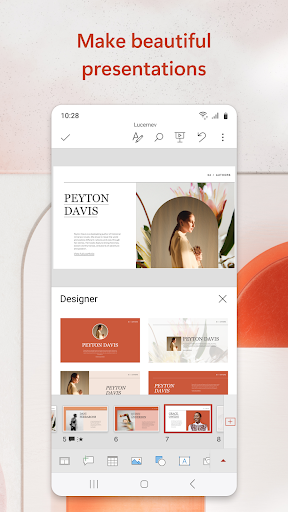
The presentation and slides app that you can carry with you wherever you go – Microsoft PowerPoint. Make a slideshow with music, graphics and charts. Templated PowerPoint slideshows help make your quarterly reports, yearly reports and more shine.
Get the familiar slideshow tool you know and love with the PowerPoint app. Create, edit, and view slideshows and present quickly and easily from anywhere. Present with confidence and refine your delivery, using Presenter Coach.
Present slideshows and access recently used PowerPoint files quickly while on the go. Presentations sync seamlessly across devices, so you won’t have to worry about multiple file versions when you work on PowerPoint mobile.
Give presentations with training from Presenter Coach, an AI tool designed to help with public speaking. Practice presentations on your own using a presentation timer with Presenter Coach. Presenter Practice presentations with real-time suggestions from Coach to help you adjust your pacing, avoid “umms” and speak confidently.
Make a slideshow with powerful and customizable presentations that make you stand out. Present and create slides from anywhere. Presentations made on PowerPoint help make an impact in the way you present and collaborate. With PowerPoint, you can collaborate and edit your ppt or pptx files in real time and customize it on the go.
Present Slideshows with Confidence
• Slideshows are easy to edit & present using PowerPoint mobile
• Present a slideshow free of errors with the help of Presenter Coach
• This presentation maker gives you the option to create presentations from scratch or work on pre-existing slides
• Make a slideshow & present your point clearly & confidently using presentation view on any device
• Practice slideshow presentations for your yearly reports with the Presenter Coach to master public speaking
Make Presentations That Leave a Lasting Impression
• An expertly crafted presentation is always a winner
• Presentation timer lets you deliver your slideshows & present information concisely
• Presentation maker: Take advantage of a slides app with highly customizable tools & present your slideshows with confidence
• Photo Slideshow: Add any photo or take one right from the app
• Slideshow video maker: Insert any video or record a new one right from your phone
Collaborate with Others Easily
• PowerPoint makes it easy for you to collaborate with others
• Make a slideshow & share with your team to get feedback & edits
• View presentation permissions and see who’s working on which slides
• Slides can have integrated comments letting you stay on top of changes & feedback
REQUIREMENTS
1 GB RAM or above
Become a skilled presentation maker & take advantage of the slides app with highly customizable tools and present your slideshows with confidence
Unlock the full Microsoft 365 experience with a qualifying Microsoft 365 subscription for your phone, tablet, PC, and Mac.
Microsoft 365 subscriptions purchased from the app will be charged to your Play Store account and will automatically renew within 24 hours prior to the end of the current subscription period, unless auto-renewal is disabled beforehand. You can manage your subscriptions in your Play Store account settings. A subscription cannot be cancelled during the active subscription period.
This app is provided by either Microsoft or a third-party app publisher and is subject to a separate privacy statement and terms and conditions. Data provided through the use of this store and this app may be accessible to Microsoft or the third-party app publisher, as applicable, and transferred to, stored, and processed in the United States or any other country where Microsoft or the app publisher and their affiliates or service providers maintain facilities.
Please refer to Microsoft’s EULA for Terms of Service for Microsoft 365 on Android. By installing the app, you agree to these terms and conditions: http://aka.ms/eula
Get the familiar slideshow tool you know and love with the PowerPoint app. Create, edit, and view slideshows and present quickly and easily from anywhere. Present with confidence and refine your delivery, using Presenter Coach.
Present slideshows and access recently used PowerPoint files quickly while on the go. Presentations sync seamlessly across devices, so you won’t have to worry about multiple file versions when you work on PowerPoint mobile.
Give presentations with training from Presenter Coach, an AI tool designed to help with public speaking. Practice presentations on your own using a presentation timer with Presenter Coach. Presenter Practice presentations with real-time suggestions from Coach to help you adjust your pacing, avoid “umms” and speak confidently.
Make a slideshow with powerful and customizable presentations that make you stand out. Present and create slides from anywhere. Presentations made on PowerPoint help make an impact in the way you present and collaborate. With PowerPoint, you can collaborate and edit your ppt or pptx files in real time and customize it on the go.
Present Slideshows with Confidence
• Slideshows are easy to edit & present using PowerPoint mobile
• Present a slideshow free of errors with the help of Presenter Coach
• This presentation maker gives you the option to create presentations from scratch or work on pre-existing slides
• Make a slideshow & present your point clearly & confidently using presentation view on any device
• Practice slideshow presentations for your yearly reports with the Presenter Coach to master public speaking
Make Presentations That Leave a Lasting Impression
• An expertly crafted presentation is always a winner
• Presentation timer lets you deliver your slideshows & present information concisely
• Presentation maker: Take advantage of a slides app with highly customizable tools & present your slideshows with confidence
• Photo Slideshow: Add any photo or take one right from the app
• Slideshow video maker: Insert any video or record a new one right from your phone
Collaborate with Others Easily
• PowerPoint makes it easy for you to collaborate with others
• Make a slideshow & share with your team to get feedback & edits
• View presentation permissions and see who’s working on which slides
• Slides can have integrated comments letting you stay on top of changes & feedback
REQUIREMENTS
1 GB RAM or above
Become a skilled presentation maker & take advantage of the slides app with highly customizable tools and present your slideshows with confidence
Unlock the full Microsoft 365 experience with a qualifying Microsoft 365 subscription for your phone, tablet, PC, and Mac.
Microsoft 365 subscriptions purchased from the app will be charged to your Play Store account and will automatically renew within 24 hours prior to the end of the current subscription period, unless auto-renewal is disabled beforehand. You can manage your subscriptions in your Play Store account settings. A subscription cannot be cancelled during the active subscription period.
This app is provided by either Microsoft or a third-party app publisher and is subject to a separate privacy statement and terms and conditions. Data provided through the use of this store and this app may be accessible to Microsoft or the third-party app publisher, as applicable, and transferred to, stored, and processed in the United States or any other country where Microsoft or the app publisher and their affiliates or service providers maintain facilities.
Please refer to Microsoft’s EULA for Terms of Service for Microsoft 365 on Android. By installing the app, you agree to these terms and conditions: http://aka.ms/eula
What's New
Thank you for using PowerPoint.
We regularly release updates to the app, which include great new features, as well as improvements for speed and reliability.
Did you know that with a Microsoft 365 subscription, you can unlock the full power of Office across all of your devices? Find special offers in the app.
We regularly release updates to the app, which include great new features, as well as improvements for speed and reliability.
Did you know that with a Microsoft 365 subscription, you can unlock the full power of Office across all of your devices? Find special offers in the app.
App Information
Version Name
16.0.17531.20088
Version Code
2004005619
File Size
226.3 MB
Min SDK
Android 29+
Target SDK
Android 34
Developer
Microsoft Corporation
Contact
Website
Content Rating
Everyone
Package Name
com.microsoft.office.powerpointPermissions Required
This app may request the following permissions:
Recent Reviews

A Google user
3.0★
Don't get me wrong, this is good, but it is very basic. It lacks a lot of features, but that's expected bc this is an app for phones. Still, keeps freezing on me, then crashing. File Source: originally local, then had to email it back and forth with my partners for my group project, but still saved a local copy. File Type: pptx Repro the issue: not sure what that means, but switching apps and going back, it crashed. Autosave worked, and once I reopened the app, it worked fine.
A Google user
3.0★
In a pinch it can get the job done, but on my device it glitches like crazy forcing me to fully close the app before I can continue working on anything. It still does the job, it just takes quite a bit longer. edit for Microsoft: I've only done local files, I believe they save in .ppt. The app autosaves, half of the time that's fine, the other half of the time it will completely freeze the ability to edit the document. I usually have to fully close and restart the app for it to work again
A Google user
1.0★
How do you just have audio as an insert option. Whats the point of the option if this option is half-baked. The mobile version in of itself is half-baked compared to the desktop version which not only provides all the tools available with a simple click. They also provide the necessary tools to utilize the basic tools to even make a powerpoint presentation to start. The things done in powerpoint mobile could be done in word. Theres almost no difference which makes this app pointless.

Zach Ruhomutally
1.0★
I have to use a mobile, and the first like 5 presentations I made, sure sometimes they just disappeared and the app crashes. And continously now, it just glitches in weird ways and just removes EVERYTHING IVE DONE, and there's no way to retrieve it, it's a terrible app, it is unsuitable for work and is definitely incompatible with mobile devices, don't waste your time here.

Katt Ness
1.0★
Trying to clear formatting of text on a galaxy s22 or a Tab S8+ is way too much of a chore. These devices have been around for at least 3+ years. Why aren't they supported?? Glad I'm finding out now before I continued a subscription for an unusable product. I remember the days (long ago) when Microsoft was on top of their game. This is just pathetic...
yannick martens
1.0★
Does not work. Takes forever to load files, and cannot print, export as PDF or even share. Constantly fails. Not worth the cost of subscription; save your money. The edge explore of slideshow apps; nothing Microsoft makes is reliable anymore
Ad slot: In-Content