
Move app to SD card
com.ljmobile.move.app
by jumobiledo
Screenshots


Ad slot: Top Leaderboard
About this app
Move app in the easiest way。
Feature
*******************
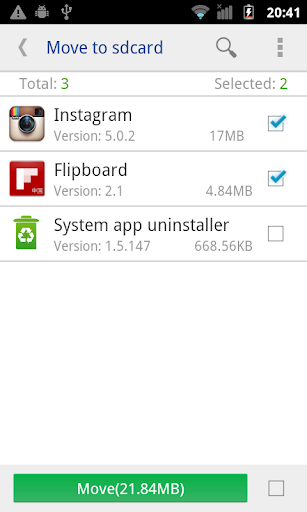
• Move apps to SD card
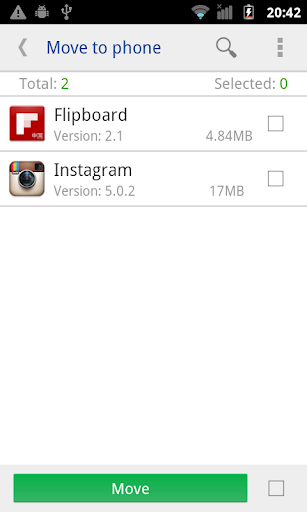
• Move apps to phone internal storage
• Sort app by movable, name, size and time
• User can custom [Install time] [Package name] [Apk path] to show in list
• Show app details: size, install time, package, apk path.
• Open app
• Search in market
• Search in website by apk name, package name, app name
*******************
If we granted root permission, we can move multi-app in one click, and can move almost all apps installed.
If you get "Sdcard share the same disk with os", means that Android os set up ***default*** SD card and system partition in one disk, So we can't move apps from system to default SD card, cause they are in the same disk.
Feature
*******************
• Move apps to SD card
• Move apps to phone internal storage
• Sort app by movable, name, size and time
• User can custom [Install time] [Package name] [Apk path] to show in list
• Show app details: size, install time, package, apk path.
• Open app
• Search in market
• Search in website by apk name, package name, app name
*******************
If we granted root permission, we can move multi-app in one click, and can move almost all apps installed.
If you get "Sdcard share the same disk with os", means that Android os set up ***default*** SD card and system partition in one disk, So we can't move apps from system to default SD card, cause they are in the same disk.
What's New
Fix bugs;
App Information
Version Name
9.9.13581
Version Code
9009008
File Size
5.6 MB
Minimum OS
Android 5.0+
Target SDK
Android 33
Developer
jumobiledo
Contact
Website
Content Rating
Everyone
Package Name
com.ljmobile.move.appPermissions Required
This app may request the following permissions:
Recent Reviews

William Godwin
1.0★
I need an app that I can tell to move my games from the main memory to my SD card and it will do it. this one won't.!!!! MY MEMORY IS FULL BECAUSE OF IT.!! it tells me that it has moved them and they are still in the memory and not on the SD card which is strange because I have the same app on my tablet it does what it says it will do.

Kitty Bee
1.0★
Essentially this app is useless unless you have formatted your card to be part of the internal storage (which means you cannot move things onto it (the sd card) while connected to a PC ) Having a phone that doesnt let you move apps by default, i thought this would be a great thing! Its not Do not download it expecting it to work the way you imagined. Normal phones that dont have this issue can just move their apps from Settings > Apps > Storage > Move (generally speaking)

Endorakai DontBotherAsking
1.0★
Crash Loop So apparently if you have something that prevents ads from loading, it will constantly crash, restart, and repeat until it somehow breaks through with an advert before your adblock can stop it. And it seems to know that it had to do it and locks your ability to skip or even wait for ad to end, basically leaving you stuck with an ad that won't go away like some form of punishment for wanting to have freedom from ads. Worthless.

John Wahrmann
1.0★
After I'd installed the app, it displayed a menu of things it would NOT do. No matter how many times I tried to get the app to do the things on the menu, I'd end up with "no files". It is unfortunate that there is only a listing of how many people who downloaded the app (us suckers) and not how many immediately uninstalled it (I did).

A Google user
5.0★
Only been using this app for 5 minutes and have to say it has surpassed my expectations! App to SD has many functions without root to use. Now I went out and bought a brand new SD card which I'm sure has something to do with how much I'm able to move to it and it's a SanDisk gold SD card with 64GB. This is an app that I would suggest if you're trying to move apps or files to your SD card give it a shot it works for me. Edit root ur device and everything is moveable.
A Google user
1.0★
With the amount of accurate negative reviews (ie it won't allow you to move apps to the SD card) the developers should be doing something about this other than just putting a nonsensical note in the app description. I decided to at least give it a go, even with all the negative reviews. Complete waste of time. Don't waste your's, and just trust the many reviews.
Ad slot: In-Content