

JotterPad - Writer, Screenplay
com.jotterpad.x
by Two App Studio Pte. Ltd.
Screenshots








Ad slot: Top Leaderboard
About this app
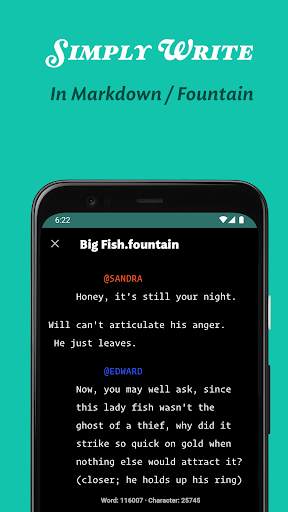
From reed and papyrus, pen to keyboard, and now to our smartphones; the way we write has evolved. JotterPad strives to be an all-encompassing writing tool for writers, screenwriters, screenplay writers, authors, book writers, bloggers and storytellers of all kinds. Jotterpad is a WYSIWYG Markdown and Fountain editor that aids with planning, writing, formatting and publishing your work, ridding you of the hassles and fuss of traditional word processors.
Use Markdown and Fountain syntax to write to your heart’s content, and leave the technical know-how’s of formatting to us. No more fussing over the layout and structure of your writing, and shape your thoughts into words with ease. Have beautifully structured documents at your fingertips.
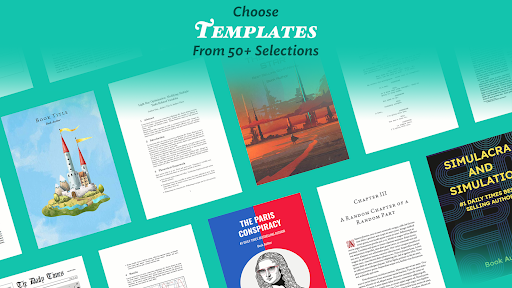
Over 60 Writing Templates For You To Choose From
Choose from a wide variety of templates to guide you with the formatting of your work. Use the templates as a guide for your creativity, and let your ideas & words flow unhindered. Because all that's left for you to do is focus on your content. Once you're done, convert your writing into novels, books, articles, reports and even presentation slides.
Meet Industry-Standard Screenwriting Formats Without Fuss
Have your pick from a range of Fountain screenwriting templates, such as Broadway Musical, Podcasts scripts, Radio Sitcom, BBC Stage Play, Dramatists Guild Modern Musical, and many more to make your next story come alive. Let your creativity take the forefront, and the formatting to your writing tool, JotterPad.
Sync Your Work To The Cloud Seamlessly
JotterPad offers automatic sync and offline-functioning capacities. Sync your files on Google Drive, Dropbox and OneDrive on your Android and Chromebook. Seamlessly convert the abstractions of your thoughts into words wherever you want, whenever you want.
Continue to work even offline. And fret not, as JotterPad syncs your work to the cloud services once you are back online.
Supports Mathematical Language
Adding and formatting mathematical equations will not be cumbersome anymore. Effortlessly add intricate mathematical expressions and formulae with LaTex or TeX equations and have them perfectly rendered in your document.
Simply insert your equations into your document with the click of a button, or use equation-typing syntax of LaTeX.
Share Your Works With Anyone
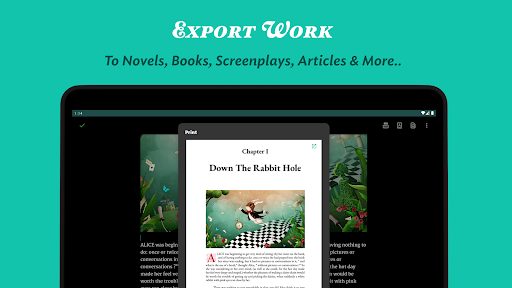
Export your written work into multiple formats; Word, PDF, HTML, rich text, Final Draft (.fdx), Fountain and Markdown without complications.
Publish your work to Tumblr, Ghost, or Wordpress for anyone to enjoy.
Get Your Work Out There
With JotterPad, there is no unnecessary drama. Export your written work into PDF, HTML, rich text, Final Draft, Fountain and Markdown without messing up… the only drama you need is the drama you've written about in your stories.
You can now instantly publish whatever you've written on JotterPad to Tumblr, Wordpress and Ghost in the exact format you've written it in, without having to worry.
Spruce Up your Work with Images
Access millions of high-resolution, editorial images on Unsplash, or your very own images from your gallery and weave them into your writings.
Never Panic Again
The in-built Version Control automatically backs up your work as you write. Put your mind at ease, and write with confidence. Write, review and edit to your heart's content without worrying about losing even a single word from previous draft versions.
JotterPad also offers many features such as:
- Dictionary
- Thesaurus
- Search & Replace
- Rhyming Dictionary
- Light/dark theme
- Night light
- In-app file manager
- Custom fonts
- Upload images
- Cross-platform support
Permissions
READ_EXTERNAL_STORAGE: Access text files.
WRITE_EXTERNAL_STORAGE: Create and save text files.
Use Markdown and Fountain syntax to write to your heart’s content, and leave the technical know-how’s of formatting to us. No more fussing over the layout and structure of your writing, and shape your thoughts into words with ease. Have beautifully structured documents at your fingertips.
Over 60 Writing Templates For You To Choose From
Choose from a wide variety of templates to guide you with the formatting of your work. Use the templates as a guide for your creativity, and let your ideas & words flow unhindered. Because all that's left for you to do is focus on your content. Once you're done, convert your writing into novels, books, articles, reports and even presentation slides.
Meet Industry-Standard Screenwriting Formats Without Fuss
Have your pick from a range of Fountain screenwriting templates, such as Broadway Musical, Podcasts scripts, Radio Sitcom, BBC Stage Play, Dramatists Guild Modern Musical, and many more to make your next story come alive. Let your creativity take the forefront, and the formatting to your writing tool, JotterPad.
Sync Your Work To The Cloud Seamlessly
JotterPad offers automatic sync and offline-functioning capacities. Sync your files on Google Drive, Dropbox and OneDrive on your Android and Chromebook. Seamlessly convert the abstractions of your thoughts into words wherever you want, whenever you want.
Continue to work even offline. And fret not, as JotterPad syncs your work to the cloud services once you are back online.
Supports Mathematical Language
Adding and formatting mathematical equations will not be cumbersome anymore. Effortlessly add intricate mathematical expressions and formulae with LaTex or TeX equations and have them perfectly rendered in your document.
Simply insert your equations into your document with the click of a button, or use equation-typing syntax of LaTeX.
Share Your Works With Anyone
Export your written work into multiple formats; Word, PDF, HTML, rich text, Final Draft (.fdx), Fountain and Markdown without complications.
Publish your work to Tumblr, Ghost, or Wordpress for anyone to enjoy.
Get Your Work Out There
With JotterPad, there is no unnecessary drama. Export your written work into PDF, HTML, rich text, Final Draft, Fountain and Markdown without messing up… the only drama you need is the drama you've written about in your stories.
You can now instantly publish whatever you've written on JotterPad to Tumblr, Wordpress and Ghost in the exact format you've written it in, without having to worry.
Spruce Up your Work with Images
Access millions of high-resolution, editorial images on Unsplash, or your very own images from your gallery and weave them into your writings.
Never Panic Again
The in-built Version Control automatically backs up your work as you write. Put your mind at ease, and write with confidence. Write, review and edit to your heart's content without worrying about losing even a single word from previous draft versions.
JotterPad also offers many features such as:
- Dictionary
- Thesaurus
- Search & Replace
- Rhyming Dictionary
- Light/dark theme
- Night light
- In-app file manager
- Custom fonts
- Upload images
- Cross-platform support
Permissions
READ_EXTERNAL_STORAGE: Access text files.
WRITE_EXTERNAL_STORAGE: Create and save text files.
What's New
Thank you for updating JotterPad.
* Handle edge-to-edge display.
* Google Drive (App Data): Supports Google Drive App Data folder.
Due to the recent Google Drive policy changes, JotterPad will soon no longer be able to sync with Google Drive (Files scope). Use Google Drive (App Data scope) instead. Please read the blog for more details: https://blog.jotterpad.app/casa-3-replacing-google-drive-sync-with-google-drive-app-data/
Happy writing!
* Handle edge-to-edge display.
* Google Drive (App Data): Supports Google Drive App Data folder.
Due to the recent Google Drive policy changes, JotterPad will soon no longer be able to sync with Google Drive (Files scope). Use Google Drive (App Data scope) instead. Please read the blog for more details: https://blog.jotterpad.app/casa-3-replacing-google-drive-sync-with-google-drive-app-data/
Happy writing!
App Information
Version Name
11.7.1-pi
Version Code
112
File Size
11.4 MB
Minimum OS
Android 7.0+
Target SDK
Android 22
Developer
Two App Studio Pte. Ltd.
Contact
Website
Content Rating
Everyone
Package Name
com.jotterpad.xPermissions Required
This app may request the following permissions:
Recent Reviews

Nat
3.0★
This is a decent writing app, if you want something simple, basic, and minimal. It is a little appealing to look at, but could still use some major upgrades and a solid makeover. This was slightly complicated to figure out, especially all the tools and features it has to offer... which, much to my disappointment, was almost non-exsistent. I felt like they lacked a lot of essentials that are useful or important for writing, with not a lot going for it when it comes down to customization options.

Laura P “laudpatty” Ruffino
5.0★
Does what you need it to do, and uploads to your choice of several cloud servers, so you can access your work from anywhere. Word count, choice of background theme and quick formatting. It's ideal. I've tried several different writing programs. I've stuck with Jotterpad for years now. I've used it on computers, tablets, multiple smartphone OS. Great upgrades that don't cost much at all. Stop looking! This is the one.

A Google user
3.0★
I'm only rating 3 stars because paying that much money for the smallest, irrelevant features just isn't worth it. Especially when you guys are already making bank for your banner ads. The free version should include ads, and the paid version removes ads. Pros would be the ability to store work to the cloud, and the ability to change the font (only one note at a time, though) Oh, you guys also don't have an option to "bold" or "underline" my work. 3 Stars, and will more than probably uninstall.

None DnA
1.0★
Very upset. Read a couple of articles which said Jotterpad is great for writing novels. Love the typewriter feature - I bought premium. I should have done more research. So Jotterpad doesn't support .docx and .pdf - fine. But after importing my work which is just shy of 300k words, I found out this app is useless for my purpose of editing. First of all, it takes me 3 seconds just moving the cursor to where I want it. And then it takes another 5 to 10 seconds (so far) just to see what I typed!

Elizabeth Lampe
3.0★
This is a good app to use for the most part. I understand having the paid version. It's just... I had my work saved, and it disappeared. Had to reinstall and do things a bit different to transfer it some place else. I believe I am not the only one who's had to deal with trying to copy the documents and the option disappeared after selecting the select all option first.

Samantha Mailand (Paqpaluk)
4.0★
It's a little hard to navigate, but I've enjoyed using the app. It easily lets you sort your files (when I can find the files page), which is a must for me. I just wish it weren't constantly popping up windows telling me to subscribe. If the menu navigation were to improve, I just might though.
Ad slot: In-Content