

mydlink Lite
com.dlink.mydlink
by D-Link Corporation
Screenshots





Ad slot: Top Leaderboard
About this app
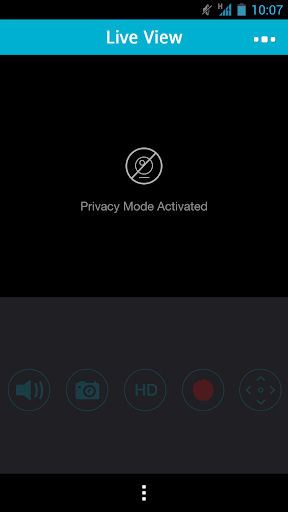
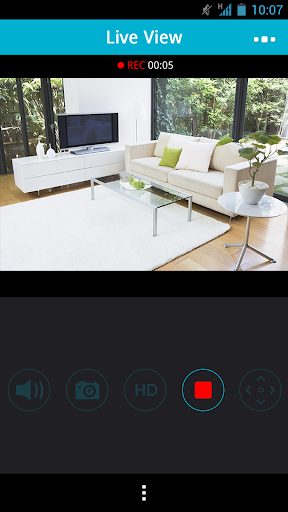
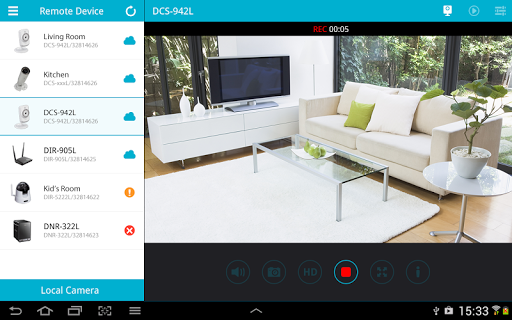
Quickly and easily view your live Cloud Camera feeds and manage your Cloud Routers from anywhere using a Wi-Fi or 3G/4G connection. Whether you're at the office, having an evening out, or away on vacation, the mydlink Lite app gives you access to your Cloud Cameras, Cloud Routers and NVR even when you’re on-the-go.
You can also check your Cloud Router’s current upload/download bandwidth, or manage your wireless network security and status. Parental controls let you see what sites your children have visited when you were away, and you can even block or unblock network access for individual devices.
For more information, go to mydlink.com or dlink.com
Features:
- View live video from your Cloud Camera, including a full-screen view. Tablet users may purchase the mydlink+ app for multiple camera viewing.
- Supports H.264 video streaming for smooth high-quality video (specific models only.)
- Listen to audio from your camera’s microphone (audio-enabled models only)
- Save snapshots of your camera’s video to your phone
- View the online status of your Cloud Cameras and Cloud Routers
- Remotely monitor and configure your Cloud Routers
- Access and view your camera's video feed (without audio) through your NVR.
- Support remote viewing period of five minutes in relay mode. Helpful 60 second left countdown timer.
- Touch and drag to move your view around for non-PT cameras. Pinch to zoom in/out.
- Toggle camera's view modes between Night mode, Day mode, and Automatic mode.
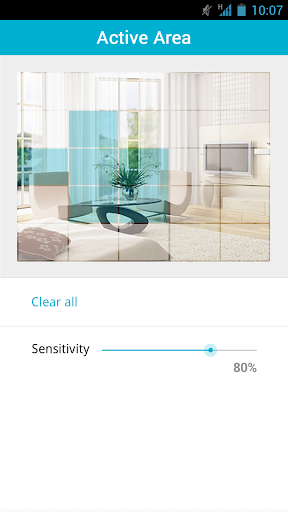
- After initial settings on the mydlink website, you can enable/disable motion/sound detection from the app for supported cameras.
-You can talk back with 2-way audio support (for DCS-942L, DCS-5211L, DCS-5222L, DCS-2132L, DCS-2310L, DCS-7010L, DCS-6010L), and cameras will mute their microphones to avoid feedback during two-way audio communication.
- SD Card Playback
- Camera firmware upgrade feature
- Push notifications: Tap to select which device you want to receive push notifications from.
- Local mode: Allow users to explore and access nearby cameras that are connected to the same LAN network with your phone.
- Online setup: Users can follow the online setup feature to configure new cameras. This app will lead you to configure your camera from A to Z.
- White light light-emitting diode feature of DCS-2136L
Please check https://www.mydlink.com/content/productfamily for supported model list.
Note:
* The mydlink Lite app is dynamically linked to the FFmpeg shared video decoding library, which is compiled to contain LGPL decoders and splitters only. The repository can be cloned from git://github.com/dlinker/mydlink-Lite---Android.git using the git clone command.
*For tablet users, we recommend downloading the mydlink+ app.
* mydlink Lite is not guaranteed to support Android devices using ""dirty"" linux kernel (e.g. LG P990).
You can also check your Cloud Router’s current upload/download bandwidth, or manage your wireless network security and status. Parental controls let you see what sites your children have visited when you were away, and you can even block or unblock network access for individual devices.
For more information, go to mydlink.com or dlink.com
Features:
- View live video from your Cloud Camera, including a full-screen view. Tablet users may purchase the mydlink+ app for multiple camera viewing.
- Supports H.264 video streaming for smooth high-quality video (specific models only.)
- Listen to audio from your camera’s microphone (audio-enabled models only)
- Save snapshots of your camera’s video to your phone
- View the online status of your Cloud Cameras and Cloud Routers
- Remotely monitor and configure your Cloud Routers
- Access and view your camera's video feed (without audio) through your NVR.
- Support remote viewing period of five minutes in relay mode. Helpful 60 second left countdown timer.
- Touch and drag to move your view around for non-PT cameras. Pinch to zoom in/out.
- Toggle camera's view modes between Night mode, Day mode, and Automatic mode.
- After initial settings on the mydlink website, you can enable/disable motion/sound detection from the app for supported cameras.
-You can talk back with 2-way audio support (for DCS-942L, DCS-5211L, DCS-5222L, DCS-2132L, DCS-2310L, DCS-7010L, DCS-6010L), and cameras will mute their microphones to avoid feedback during two-way audio communication.
- SD Card Playback
- Camera firmware upgrade feature
- Push notifications: Tap to select which device you want to receive push notifications from.
- Local mode: Allow users to explore and access nearby cameras that are connected to the same LAN network with your phone.
- Online setup: Users can follow the online setup feature to configure new cameras. This app will lead you to configure your camera from A to Z.
- White light light-emitting diode feature of DCS-2136L
Please check https://www.mydlink.com/content/productfamily for supported model list.
Note:
* The mydlink Lite app is dynamically linked to the FFmpeg shared video decoding library, which is compiled to contain LGPL decoders and splitters only. The repository can be cloned from git://github.com/dlinker/mydlink-Lite---Android.git using the git clone command.
*For tablet users, we recommend downloading the mydlink+ app.
* mydlink Lite is not guaranteed to support Android devices using ""dirty"" linux kernel (e.g. LG P990).
What's New
Miscellaneous bug fixes and enhancements.
App Information
Version Name
3.6.6
Version Code
154
File Size
12.8 MB
Minimum OS
Android 4.4+
Target SDK
Android 19
Developer
D-Link Corporation
Contact
Website
Content Rating
Everyone
Package Name
com.dlink.mydlinkPermissions Required
This app may request the following permissions:
Recent Reviews

A Google user
2.0★
Not connecting or staying connected consistently anymore. When we first got the camera installed and the app downloaded early 2018, it worked great! I could connect every time! Now the app won't connect to the camera most of the time or it freezes and disconnects after a few minutes. We've been holding out for another app update but, I think it might be time to go with a new camera...

Jose Quervo
1.0★
I pulled down my negative feedback explaining how I had a house full of cameras but was still broken into because I couldn't connect to them and check my alerts. Well, nothing has changed. I can't even log in locally while connected to the same network. However, I still get sound and motion alerts from each camera letting me know someone could be breaking in again... But I won't know for sure until I drive 6 hours to see for myself... I love surprises!
A Google user
1.0★
This app needs to be updated badly. Reason for this horrendous score is because the app doesn't work more then half the time. For example when ever trying to change your settings on any of your devices it won't show all the settings options. What it would do is show some of the option sometimes and when going back in to the settings it won't show those same option again. Basically if you want to enable motion detection good luck turning it off when you get back into the settings. Next the app deactivates some of the features of the camera even if you have them checked off as enabled. so let's say you want to use the two way communication or you want to listen on to what's happening through the camera. Good luck using them even if your on the same network. What it does is just show the icon grayed out even if you enable it again within the settings. This could of been a great experience but with these major problems it's not worth the time that you'll be trying to get it to work properly.

Michele Charron
4.0★
Have had my DCS-2132L cameras for several years. When I first set them up, I was using a PC to control them. I had them set to take a before and after snapshot when a motion was detected and attach to and send an e-mail. When I had to change to MyDlink Lite app exclusively on my cell phone, I lost the ability to get the snapshot email, but I still get an e-mail notifying me of the detected movement. I also have app sending me text notification when a movement is detected and it is right on time!
A Google user
1.0★
I will make it my mission to warn as many people as i can about dlink. If you are reading this its probably too late you bought a dlink product already. If you can, send it back. Save yourself hours and hours of frustration trying to set them up, configuring them, they are slow, unresponsive, the advanced sttings are a nightmare. I warned you. Sloooooooooooooooow. Very disappointed. I will look into alternative brands. Huge delays in camera control, fps is almost 0. Bad products. (5000L AND 932)

Travis S.
1.0★
If you're in a hurry to view the camera don't expect this app to let you do so. Takes a long time to load, login to your account, then login into the camera, and often there's ads in-between to buy other products from D-Link. Frustrating experience. Update: I was just logged out for reading a text message that came up. Literally less than 30 seconds away from the app and was booted out of it.
Ad slot: In-Content