

Dexcom Follow (US)
com.dexcom.follow
by Dexcom
Screenshots




Ad slot: Top Leaderboard
About this app
The Dexcom Follow app is part of the Dexcom SHARE® system.
Use this app if your loved one is sharing data from their Dexcom CGM app. The Sharer will need to send an invitation to allow you to connect after you have installed the Follow app.
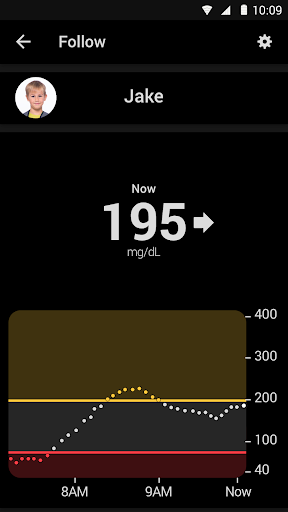
Dexcom Follow is the perfect companion to your loved one’s Dexcom CGM, connecting you to those nearest and dearest to you, even when they’re far away. Through secure wireless connections, Dexcom Follow allows you to view and follow the glucose levels, trends and data of your loved ones.
Whether you have a child who is in college, an elderly parent who lives in another state, or a spouse who is going on a business trip, Dexcom Follow is there to keep you connected and informed.
With Dexcom Follow, you can:
• Monitor your loved one’s glucose activity at school or across the country.
• Receive glucose information from up to 10 different Sharers – children, friends, or other loved ones.
• Respond quickly with the help of customizable glucose alerts and push notifications that can inform you when a Sharer’s glucose levels are outside the norm.
Customer Reviews
This app store should not be used as your first point of contact to resolve technical or customer services issues. In order to protect your privacy and personal information, and promptly resolve any technical or customer services issues you are having with any Dexcom product, please contact 1-888-738-3646.
Dexcom is required to follow up with customers regarding product-related complaints. If
Dexcom determines that your comment/complaint requires follow up, a technical support representative will attempt to contact you to gather more information regarding your comment/complaint.
Use this app if your loved one is sharing data from their Dexcom CGM app. The Sharer will need to send an invitation to allow you to connect after you have installed the Follow app.
Dexcom Follow is the perfect companion to your loved one’s Dexcom CGM, connecting you to those nearest and dearest to you, even when they’re far away. Through secure wireless connections, Dexcom Follow allows you to view and follow the glucose levels, trends and data of your loved ones.
Whether you have a child who is in college, an elderly parent who lives in another state, or a spouse who is going on a business trip, Dexcom Follow is there to keep you connected and informed.
With Dexcom Follow, you can:
• Monitor your loved one’s glucose activity at school or across the country.
• Receive glucose information from up to 10 different Sharers – children, friends, or other loved ones.
• Respond quickly with the help of customizable glucose alerts and push notifications that can inform you when a Sharer’s glucose levels are outside the norm.
Customer Reviews
This app store should not be used as your first point of contact to resolve technical or customer services issues. In order to protect your privacy and personal information, and promptly resolve any technical or customer services issues you are having with any Dexcom product, please contact 1-888-738-3646.
Dexcom is required to follow up with customers regarding product-related complaints. If
Dexcom determines that your comment/complaint requires follow up, a technical support representative will attempt to contact you to gather more information regarding your comment/complaint.
What's New
Performance enhancements and bug fixes.
App Information
Version Name
4.6.0
Version Code
10750
File Size
29.0 MB
Minimum OS
Android 9+
Target SDK
Android 33
Developer
Dexcom
Contact
Website
Content Rating
Everyone
Package Name
com.dexcom.followPermissions Required
This app may request the following permissions:
Recent Reviews

Kent West
2.0★
Was working for weeks. Now it tries to open and just immediately closes. Also, the [delegated] caretaker-follower[s] needs more information than what is shared from the patient's app. And don't uninstall/reinstall to try and fix it, unless you are able to get your Sharer to invite you again to be a follower. This isn't a huge problem if your Sharer is not technologically-challenged, or you live right next door, but if you're across-state and your Sharer can't work a phone app, good luck, Buddy.

Sunni Keister
2.0★
I wish this app had more of the features that the G7 app does. That, or allow 2 phones in G7 (in lieu of a receiver). I can't log insulin doses (or even see them!) in Follow. I can't track carbs. I can't scroll through the data points on the graph in portrait mode, and landscape loses the current BG. The functionality of this app, as the parent of a 9yo who must have the main app for us to stay updated while he's at school, is basic: like those "following" are an afterthought. Do more, please!

Yossi
1.0★
The graph is useless. It does not show time. While the dexcom g7 app (I can't install on my brand new phone because its only compatible with much older models) has a decent graph where you can use your finger to check daily test points, this app does not (!) so you can see a bunch of dots on the scale of 100 to 200 and only guess what the readings were. what? why? did anyone test this? disappointed.

Lorisa Colwell
1.0★
We've been having issues for weeks now. I've uninstalled and reinstalled and we've resent invites to follow again.... it works for a little bit and then I get "No Data" again. It's frustrating when you can't keep an eye on your child's blood sugars. I'm thinking about having him switched to the freestyle libre plus like I'm on. My spouse has never had issues with not being able to see my blood sugar levels.

Lee Ryder
1.0★
It's dangerous Set it to never sleep. All notifications are allowed. All permissions granted. All other apps work with data, but this one won't even show a notification. (But if you open the app, the data is current). Completely useless if the notifications don't work 9/2025: realized it's using 3gb data and growing. the developer clearly does not care

No Thanks
2.0★
it just randomly does not alert anymore for lows. It's almost like it alerts the first low and then doesn't alert after you look at it the first time which is scary. I've checked all settings and all notifications are on both my phone and the app. I don't use DND or anything like that, but I added it anyways. Terrifying as I monitor an 8 year old with it, this needs to be more reliable.
Ad slot: In-Content