

Zapya WebShare - File Sharing
com.dewmobile.kuaiya.web
by Dewmobile USA, Inc.
Screenshots

Ad slot: Top Leaderboard
About this app
Shares files from your phone to any web browser with Zapya WebShare!
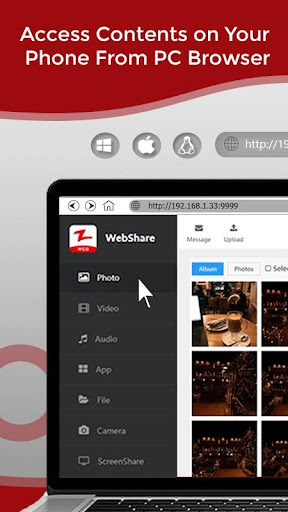
Zapya WebShare allows users to access all of their phone’s contents from any device that can establish a wireless network connection with their phone. Unlike other file sharing applications, Zapya WebShare only needs to be downloaded onto one of the devices in order for you to share files. The other device can access all of the contents of the device that has Zapya WebShare through the web browser. It is the perfect solution for backing up and managing your phone contents on another device!
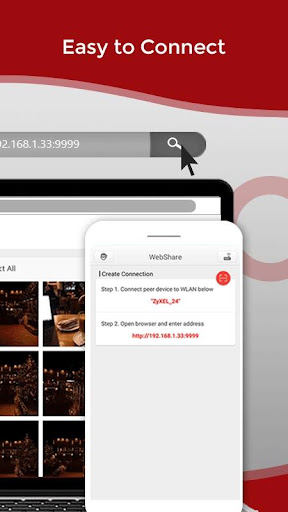
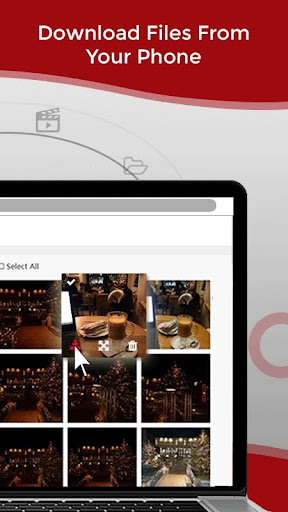
You can wirelessly transfer files from your phone to your laptop in a matter of seconds with Zapya WebShare. Not only can you upload files from your laptop to your phone via the web browser, you can also download files from your phone onto your laptop. All you need is an Internet connection and to have Zapya WebShare downloaded on your phone!
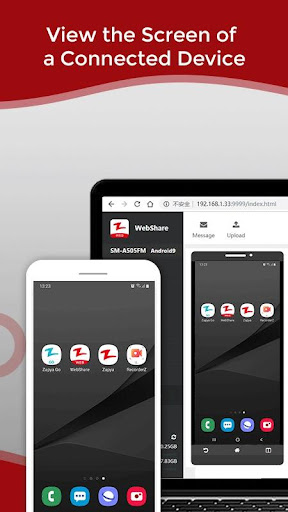
Besides sharing files, you can control the camera of a connected device using the web browser to view and take photos remotely. What the phone camera sees is streamed live to the other device’s web browser as long as the phone is within 20 meters of the other device. You can also view the screen of a connected device on the web browser.
For the application’s complete terms and conditions, please visit: https://www.izapya.com/Agreement
For the latest news and updates, please visit:
http://blog.izapya.com/
Zapya WebShare allows users to access all of their phone’s contents from any device that can establish a wireless network connection with their phone. Unlike other file sharing applications, Zapya WebShare only needs to be downloaded onto one of the devices in order for you to share files. The other device can access all of the contents of the device that has Zapya WebShare through the web browser. It is the perfect solution for backing up and managing your phone contents on another device!
You can wirelessly transfer files from your phone to your laptop in a matter of seconds with Zapya WebShare. Not only can you upload files from your laptop to your phone via the web browser, you can also download files from your phone onto your laptop. All you need is an Internet connection and to have Zapya WebShare downloaded on your phone!
Besides sharing files, you can control the camera of a connected device using the web browser to view and take photos remotely. What the phone camera sees is streamed live to the other device’s web browser as long as the phone is within 20 meters of the other device. You can also view the screen of a connected device on the web browser.
For the application’s complete terms and conditions, please visit: https://www.izapya.com/Agreement
For the latest news and updates, please visit:
http://blog.izapya.com/
What's New
Fix bugs from last release
App Information
Version Name
2.3.5
Version Code
52
File Size
8.3 MB
Minimum OS
Android 6.0+
Target SDK
Android 33
Developer
Dewmobile USA, Inc.
Contact
Website
Content Rating
Everyone
Package Name
com.dewmobile.kuaiya.webPermissions Required
This app may request the following permissions:
Recent Reviews

Majixer Jinxer
3.0★
Sadly a 3 / 5 stars for this is an inferior version of the main Zapya Program for App, it is due to it not supporting different vast file formats like txt and pdf files which help me save memory on my gadgets, and they are the formats that I still use most. And it also needs the internet with wifi data promo to use it for any file transfer compared to its main Zapya app sibling, so it is only a viable website individual / personal file and data transfer program alternative when needed only.

Edris Abidy
4.0★
I have to say this is an awesome app! Does exactly what it should do in a very perfect way. The only thing with this app is that whenever you go to the url that has the interface to interact with your phone on PC, as its main screen it shows all the pictures that you have on your phone. That is not a good idea I think, one may send something to their friend using this app and what if the person doesn't want their friend to see all their photos on the main screen?

special aircraft
3.0★
I've been using this app for almost a year but it doesn't support username and password, other ftp applications do , I know it has an option to give access the other devices to connect or not,,but it's not as secure as the username and password, one of my friends is a hacker and he said I can bypass the authorization this app provides,and he did bypass it , I personally did not allow him to access to the phone when he requested but he gained the access anyway !! so add userpass I'll give 5stars

A Google user
5.0★
Best app for File Sharing and Offline Screen Casting or Streaming audio+video in any platform and any Browser. This app can used by experimental user only, who knows networking very well or user have to know about FTP. Now there is no use of ShareIt and Xender app. They failed in comparison with this all. Very nice developer. I m quiet impress with your work and programming skill. Appreciate it.

kitkatmelon
2.0★
It doesn't work with files over 700mb, basically useless then ~more detail~ So I tried to transfer a video from my phone so I could edit it on my ipad but before that I sent 2 short videos to test it out and it worked but when I tried to send the video to edit it it didn't work. It would get to 90-something% and then it would just stop sending no error message or anything and when I try to send again it would do the same thing.

Son Pham
4.0★
[Update 6/2024: Need WIFI 7 support in the app. It still runs at WIFI 5 speed.] Windows 10 transfer speed shows at average 50 MB/s. I wish the transfer speed can max out per device bandwidth. Majority of phones and laptops max wifi bandwidth is 866 Mbps which is about 100 MB/s. Newer WIFI 6E devices can push over 2 Gbps. Push the transfer speed to the MAX developer. I will pay for that speed if you can make that happens.
Ad slot: In-Content