

Desmos Graphing Calculator
com.desmos.calculator
by Desmos Inc
Screenshots


Ad slot: Top Leaderboard
About this app
At Desmos, we imagine a world of universal math literacy and envision a world where math is accessible and enjoyable for all students. We believe the key is learning by doing.
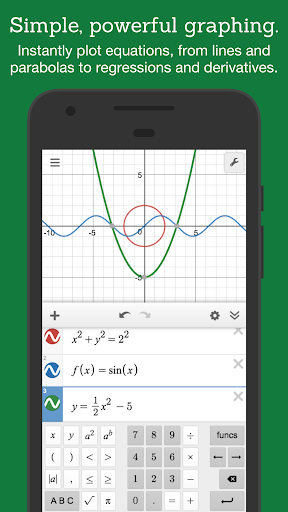
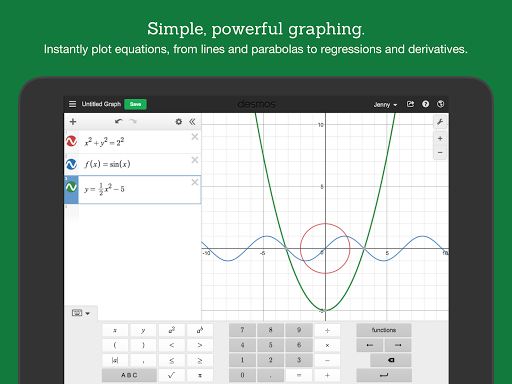
To achieve this vision, we’ve started by building the next generation of the graphing calculator. Using our powerful and blazingly-fast math engine, the calculator can instantly plot any equation, from lines and parabolas up through derivatives and Fourier series. Sliders make it a breeze to demonstrate function transformations. It's intuitive, beautiful math. And best of all: it's completely free.
Features:
Graphing: Plot polar, cartesian, or parametric graphs. There’s no limit to how many expressions you can graph at one time - and you don’t even need to enter expressions in y= form!
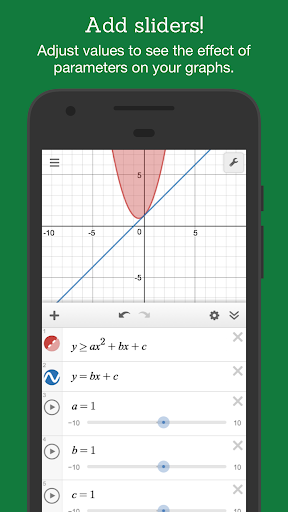
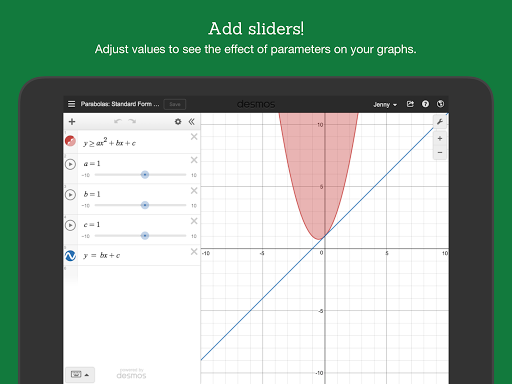
Sliders: Adjust values interactively to build intuition, or animate any parameter to visualize its effect on the graph
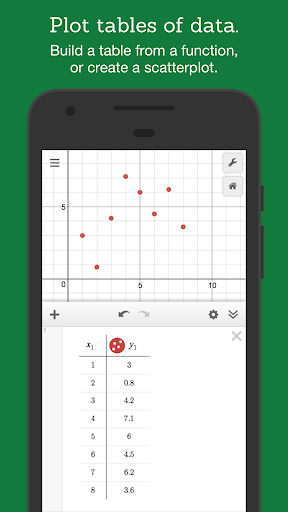
Tables: Input and plot data, or create an input-output table for any function
Statistics: Find best-fit lines, parabolas, and more.
Zooming: Scale the axes independently or at the same time with the pinch of two fingers, or edit the window size manually to get the perfect window.
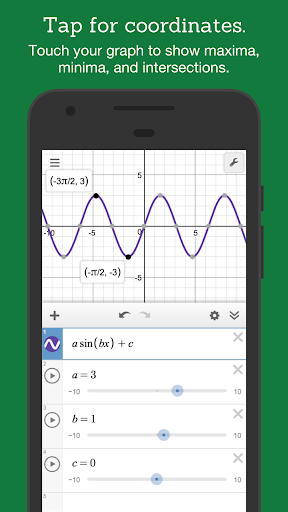
Points of Interest: Touch a curve to show maximums, minimums, and points of intersection. Tap the gray points of interest to see their coordinates. Hold and drag along a curve to see the coordinates change under your finger.
Scientific Calculator: Just type in any equation you want to solve and Desmos will show you the answer. It can handle square roots, logs, absolute value, and more.
Inequalities: Plot cartesian and polar inequalities.
Offline: No internet access required.
Visit www.desmos.com to learn more and to see the free online version of our calculator.
To achieve this vision, we’ve started by building the next generation of the graphing calculator. Using our powerful and blazingly-fast math engine, the calculator can instantly plot any equation, from lines and parabolas up through derivatives and Fourier series. Sliders make it a breeze to demonstrate function transformations. It's intuitive, beautiful math. And best of all: it's completely free.
Features:
Graphing: Plot polar, cartesian, or parametric graphs. There’s no limit to how many expressions you can graph at one time - and you don’t even need to enter expressions in y= form!
Sliders: Adjust values interactively to build intuition, or animate any parameter to visualize its effect on the graph
Tables: Input and plot data, or create an input-output table for any function
Statistics: Find best-fit lines, parabolas, and more.
Zooming: Scale the axes independently or at the same time with the pinch of two fingers, or edit the window size manually to get the perfect window.
Points of Interest: Touch a curve to show maximums, minimums, and points of intersection. Tap the gray points of interest to see their coordinates. Hold and drag along a curve to see the coordinates change under your finger.
Scientific Calculator: Just type in any equation you want to solve and Desmos will show you the answer. It can handle square roots, logs, absolute value, and more.
Inequalities: Plot cartesian and polar inequalities.
Offline: No internet access required.
Visit www.desmos.com to learn more and to see the free online version of our calculator.
What's New
Bug fixes and performance improvements.
App Information
Version Name
7.14.0.0
Version Code
111
File Size
4.4 MB
Minimum OS
Android 8.0+
Target SDK
Android 33
Developer
Desmos Inc
Contact
Website
Content Rating
Everyone
Package Name
com.desmos.calculatorPermissions Required
This app may request the following permissions:
Recent Reviews

Ellie
5.0★
Easily the best graphing calculator on the market, especially considering the cost (or lack thereof) and convenience of it being an app. **I am having an issue in which I can't log in via Google.** This aside, there is not one thing I dislike about this app, and I look forward to seeing what they will add next-- 3D app, anyone? I'd love to see a day in which Desmos wins the metaphorical war against TI.

A Google user
5.0★
This is an advanced calculator that you'd pay alot of money for to do math assignments for classes, except that it's simpler to use, has different graphing methods up for you to simply plug in and give you the answer, allows you different colored and textured lines to distinguish your functions, graphs instantly, allows you to zoom in and out pretty much infinitely.....so in almost every way, it's better than a calculator you could get in a store and pay over $100 for, except this is free.
A Google user
4.0★
Fantastic and incredibly useful. PLEASE change it back so that one can scroll laterally through an equation on a given line!! This makes plugging different numbers into the same formula so much easier! For longer formulas, when the end of the formula is off of the screen, and not being able to swipe to the end, there is a high probability of hitting the clear line (x) button when trying to plug new numbers in to the end of a given formula!!

Noah Weeden
5.0★
Before using the app here's some things to know: 1. You can't use your normal keyboard. They have an in app keyboard to use because it is appearntly extremely difficult to make normal keyboards work. 2. You can't copy and paste. For the same reason as the built in keyboard. 3. You can toggle whether you want to save a copy. I saw another reviewer confused why it always saved as a copy. There's a blue checkbox when you save. I LOVE DESMOS. I LOVE HOW FAST THE GRAPHS RUN ON MY PHONE

Nishay Shah
5.0★
Awesome, both on app and website. Very clean interface with no clutter and no ads. All the calculator functions are neatly foldered. Also, it's convenient to save graphs with Google account. The calculator is quite powerful and is able to carry out select calculations that Wolfram Alpha has trouble doing, like definite integrals. Also grapher is very precise; if you zoom in enough you can get more than 12 decimal points. Overall a great app and has helped me in high school, college and beyond :)
A Google user
5.0★
As a whole, this app/website is amazing for me, I can visualize the general data given on a homework assignment. I think you should add a few things in the calculator though. Such as the ability to convert a data table into an equation via the settings in the input bar. Also having recursive functions would be super helpful. Finally, another idea is to add a way to view steps for converting from one equation system to another. Like y=mx+b to standard form etc.
Ad slot: In-Content