

Mesh Turbine HD Watch Face
com.denite.watchface.meshturbine
by DeNitE Appz
Screenshots



Ad slot: Top Leaderboard
About this app
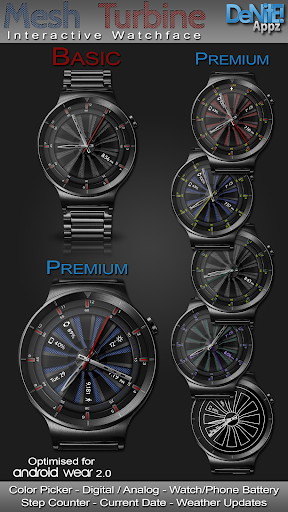
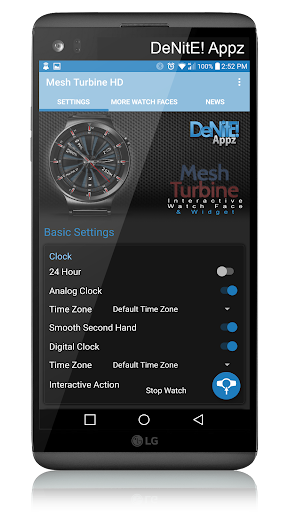
This completely customizable interactive HD Wear OS Watch Face and Clock Widget brings a classic elegance to your wrist and Launcher. Features include custom complications, battery levels, weather conditions, step counter, color picker & date information. A settings app will also be installed on your mobile device to configure the watch face for any look you desire. Select any color and create a completely custom look for yourself! Don't have a Wear OS watch? No Problem! You can use the clock widget on your launcher!
⭐ Compatible with all Wear OS watches including the new Samsung Galaxy Watch 4 Series! ⭐
❗ IMPORTANT ❗ - Not compatible with Samsung Watches that use Tizen or other smartwatches with other operating systems than Wear OS.
★Basic Features★
✔ Launcher Clock Widget (No second hand due to battery consumption)
✔ Customizable digital & or analog clock
✔ Time zone selection
✔ Custom date format picker
✔ Smooth second hand
✔ 24-Hour
✔ Burn-In protection
★Premium Features★
✔ Custom Complications
✔ Screen Modes (Normal, Always Ambient, Always On)
✔ Screen on Time selection
✔ Ambient modes selector
✔ Color picker to select any color you like for the background, clock hands, text, & numbers
✔ Save personal color themes (long press to delete theme)
✔ Clock numbers toggle
✔ Watch battery status
✔ Phone battery status (When connected to an Android Phone)
✔ Current date
✔ Step Counter
✔ Weather conditions (Yahoo Weather & OpenWeatherMap) (When connected to an Android Phone)
★Translations★
✔ English
✔ Chinese
✔ Czech
✔ Dutch
✔ French
✔ German
✔ Italian
✔ Japanese
✔ Korean
✔ Russian
✔ Spanish
✔ Swedish
★How to install★
Watch Face - Once you have installed from the Play store, you may be asked to grant permissions to the app on your phone - be sure to approve all permissions. Once the app has installed on your phone, it may take 5-10 minutes to transfer over to you watch and the Wear OS app. Please be patient. Once installed, simply long press on your watch face to bring up the selection menu, or select this watchface from the Wear OS app. Use the accompanying settings app to configure the settings and options
Widget - Depending on what launcher you are using, you can either long press on your launcher to place a widget, or select this widget from the App Drawer -> Widgets list. Customize and change the widget settings with the accompanying App.
If you have any problems at all, please send me an email before leaving a negative review - I will do my best to fix the issue as soon as possible.
★Trouble Shooting★
http://deniteappz.com/watchface/troubleshooting.html
Stay tuned for more watch faces to come!
⭐ Compatible with all Wear OS watches including the new Samsung Galaxy Watch 4 Series! ⭐
❗ IMPORTANT ❗ - Not compatible with Samsung Watches that use Tizen or other smartwatches with other operating systems than Wear OS.
★Basic Features★
✔ Launcher Clock Widget (No second hand due to battery consumption)
✔ Customizable digital & or analog clock
✔ Time zone selection
✔ Custom date format picker
✔ Smooth second hand
✔ 24-Hour
✔ Burn-In protection
★Premium Features★
✔ Custom Complications
✔ Screen Modes (Normal, Always Ambient, Always On)
✔ Screen on Time selection
✔ Ambient modes selector
✔ Color picker to select any color you like for the background, clock hands, text, & numbers
✔ Save personal color themes (long press to delete theme)
✔ Clock numbers toggle
✔ Watch battery status
✔ Phone battery status (When connected to an Android Phone)
✔ Current date
✔ Step Counter
✔ Weather conditions (Yahoo Weather & OpenWeatherMap) (When connected to an Android Phone)
★Translations★
✔ English
✔ Chinese
✔ Czech
✔ Dutch
✔ French
✔ German
✔ Italian
✔ Japanese
✔ Korean
✔ Russian
✔ Spanish
✔ Swedish
★How to install★
Watch Face - Once you have installed from the Play store, you may be asked to grant permissions to the app on your phone - be sure to approve all permissions. Once the app has installed on your phone, it may take 5-10 minutes to transfer over to you watch and the Wear OS app. Please be patient. Once installed, simply long press on your watch face to bring up the selection menu, or select this watchface from the Wear OS app. Use the accompanying settings app to configure the settings and options
Widget - Depending on what launcher you are using, you can either long press on your launcher to place a widget, or select this widget from the App Drawer -> Widgets list. Customize and change the widget settings with the accompanying App.
If you have any problems at all, please send me an email before leaving a negative review - I will do my best to fix the issue as soon as possible.
★Trouble Shooting★
http://deniteappz.com/watchface/troubleshooting.html
Stay tuned for more watch faces to come!
What's New
★4.31★
✔ New Tab Look!
✔ Added new Navigation Menu (access from top left corner)
✔ Added Deals & Sales in More tab (access in new WatchFace Rewards app)
✔ Added battery saver mode (turns off features with higher battery use)
✔ Bug Fixes...
✔ New Tab Look!
✔ Added new Navigation Menu (access from top left corner)
✔ Added Deals & Sales in More tab (access in new WatchFace Rewards app)
✔ Added battery saver mode (turns off features with higher battery use)
✔ Bug Fixes...
App Information
Version Name
2.1.10
Version Code
7
File Size
13.9 MB
Min SDK
Android 18+
Target SDK
Android 23
Developer
DeNitE Appz
Contact
Website
Content Rating
Everyone
Package Name
com.denite.watchface.meshturbinePermissions Required
This app may request the following permissions:
Recent Reviews

Armando
5.0★
I like this watch face

A Google user
1.0★
Would not work on my smart wear watch could not get it to do anything, waste of time!
A Google user
3.0★
Mediocre. Worst part is the ambient mode... it doesn't look nice there. Removed it as soon ad I saw that
A Google user
5.0★
Watch looks really nice on this watch. It just might become my daily watchface. I just installed it time will tell (pun intended). 1 drawback that i found is that new changes to the watchface dont happen quickly. I made changes to it 5 mins ago stil havent been applied to the watch. Not a reason for me to take a star away. For now.
A Google user
5.0★
👍
A Google user
4.0★
Nice, high quality watch face, would give it 5 stars if with option to spin turbine.
Ad slot: In-Content