

Qute: Terminal emulator
com.ddm.qute
by BlindZone
Screenshots


Ad slot: Top Leaderboard
About this app
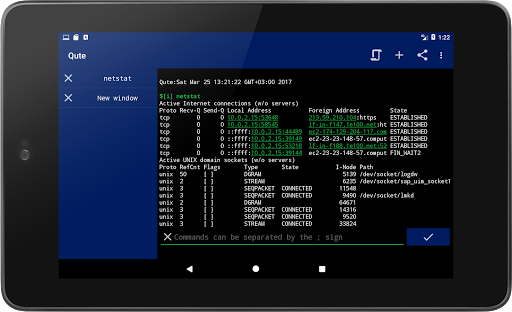
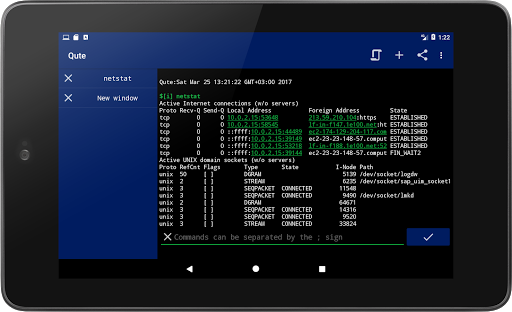
Qute: Terminal emulator - used to emulate a unix terminal and work on the command line on your smartphone. Available for download and installation on smartphones with Android 5.0 and higher. The program is a terminal emulator, it has: automatic prompts, script sets, the ability to save bash scripts.
The Qute application can execute system commands and allows users to run bash scripts and perform various tasks, just like in Linux and Unix operating systems. Qute supports working with root rights, which allows users to perform tasks on behalf of the superuser.
Using the Qute application, you can easily manage your device, execute system commands that are not available in the settings or are closed on Android devices. For example, it can be used to configure network settings, install applications, manage files, and set up a network.
The application gives the user access and full control of the console and terminal. Anyone who has installed the terminal emulator software can work with any selected tools. Qute also supports a large number of standard Linux features such as ls, grep, awk, ssh, cd, ping.
The application was developed taking into account the needs of advanced users and system administrators, it has an intuitive interface. That is why working with the terminal is very simple, convenient and almost everyone will be able to figure out how to use it.
Qute: Terminal Emulator is an application that works quickly and allows you to use the command line on your smartphone.
FEATURES:
• Autorun and creation of shortcuts
• Bash script editor
• Command line file manager
• Run bin files in terminal, when available
• Manage and edit files with nano, vim, or emacs
• Access to servers via ssh
• Bash and ssh shell
• Create your own list of teams
• Automatic completion
• Support for rooted devices
Using the application, you can work with the terminal like on a computer, but do it on your smartphone. You will get more freedom and control over your device the way you want.
WORKING WITH ROOT RIGHTS
Qute supports working with root rights, so there is access to perform tasks on behalf of the superuser.
WORKING WITH BASH SCRIPTS
Qute supports running bash scripts, so it's easy to automate tasks to increase efficiency and productivity.
WORK WITH A LARGE SET OF STANDARD LINUX COMMANDS
Qute supports a large number of standard Linux features such as ls, grep, awk and many more. Users will be able to use the terminal to its full potential to perform daily tasks.
CONVENIENT AND INTUITIVE INTERFACE
Qute was created with the goal of making it accessible and understandable to the majority, so the application has a simple interface, and every button is clear.
Download Qute: Terminal Emulator and enjoy working from the command line on your Android device!
The Qute application can execute system commands and allows users to run bash scripts and perform various tasks, just like in Linux and Unix operating systems. Qute supports working with root rights, which allows users to perform tasks on behalf of the superuser.
Using the Qute application, you can easily manage your device, execute system commands that are not available in the settings or are closed on Android devices. For example, it can be used to configure network settings, install applications, manage files, and set up a network.
The application gives the user access and full control of the console and terminal. Anyone who has installed the terminal emulator software can work with any selected tools. Qute also supports a large number of standard Linux features such as ls, grep, awk, ssh, cd, ping.
The application was developed taking into account the needs of advanced users and system administrators, it has an intuitive interface. That is why working with the terminal is very simple, convenient and almost everyone will be able to figure out how to use it.
Qute: Terminal Emulator is an application that works quickly and allows you to use the command line on your smartphone.
FEATURES:
• Autorun and creation of shortcuts
• Bash script editor
• Command line file manager
• Run bin files in terminal, when available
• Manage and edit files with nano, vim, or emacs
• Access to servers via ssh
• Bash and ssh shell
• Create your own list of teams
• Automatic completion
• Support for rooted devices
Using the application, you can work with the terminal like on a computer, but do it on your smartphone. You will get more freedom and control over your device the way you want.
WORKING WITH ROOT RIGHTS
Qute supports working with root rights, so there is access to perform tasks on behalf of the superuser.
WORKING WITH BASH SCRIPTS
Qute supports running bash scripts, so it's easy to automate tasks to increase efficiency and productivity.
WORK WITH A LARGE SET OF STANDARD LINUX COMMANDS
Qute supports a large number of standard Linux features such as ls, grep, awk and many more. Users will be able to use the terminal to its full potential to perform daily tasks.
CONVENIENT AND INTUITIVE INTERFACE
Qute was created with the goal of making it accessible and understandable to the majority, so the application has a simple interface, and every button is clear.
Download Qute: Terminal Emulator and enjoy working from the command line on your Android device!
What's New
Qute v4.12.2
● Overall stability improvements
We value your feedback. Leave feedbacks and reviews if you like the app!
● Overall stability improvements
We value your feedback. Leave feedbacks and reviews if you like the app!
App Information
Version Name
1.9
Version Code
19
File Size
1.2 MB
Minimum OS
Android 8.0+
Target SDK
Android 23
Developer
BlindZone
Contact
Website
Content Rating
Everyone
Package Name
com.ddm.qutePermissions Required
This app may request the following permissions:
Recent Reviews

Wesley McGinn
4.0★
Updated Review: So apparently you need to enable notifications and "run while app is closed" permissions or nothing works. It's really strange that it works that way. If notifications are disabled, the app will glitch out and you won't be able to do anything. Side note: There isn't much you can do without rooting your phone, which is an entirely separate process which will likely void your warranty. App does what a terminal emulator is supposed to do. Can't complain much.

Derek Guenther
1.0★
App wants storage access, with no explanation of why it should be necessary. App just hangs on start-up, loading ad after ad as rapidly as it can. Don't know if that's because I refuse to give it storage permissions but it's not getting them without an explanation of why, which is not present in either the app description nor in the app itself. Edit: As you can see, the clueless dev has no idea why this is a problem. Storage permissions required to run "ping" or "ip address"? Not happening.

Crisostomo Cornista Mitchell Jr.
5.0★
ha! what an amazing app. never thought an app like this can be so powerful. especially trying to get your cellphone back to factory status. way back when, if you had any kind of issue with your cell, it was either send it in or, pay a mom's & pops shop for restructuring the phone back to normal. AWESOME APP!!! THANK YOU!!!!!!

Abhishek Gupta
5.0★
A useful for me especially for command line simplicity. I have a suggestion that there should be a visual walkthrough detailing the features and access methods to the end user.

Sam
3.0★
Another one of these apps that want all your files access so it can see your photos, then can track you, then hack all your devices. Also it does not work, not very surprising because the first thing it asks is all file access and that's all it needs so they didn't even code the app really. All other reviews are fake I'm guessing. Do not get, I uninstalled, save your money to get a real windows computer so you can use cmd.

Moraenil
1.0★
Now starts on boot up of phone, no setting to stop it, can't close it fully, constantly uses resources running in background when I don't want it running. I don't have the resources for this when I'm not trying to use it to learn. It's also not intuitive at all when trying to learn programming. I kept it around to keep trying when I had the time, but now with the starting on boot up and constantly running, it's hit the last straw & I have to delete it. There's no reason for constant running.
Ad slot: In-Content