

DVD Library
com.dah.librarydvd
by D Hardy
Screenshots



Ad slot: Top Leaderboard
About this app
With the DVD library app, you can keep track of all those DVDs !
** No limit on the number of DVDs you can have!
Scan DVD barcodes or use the find and add function to quickly search by title or series or Actor
Automatic (internet required) lookup of DVD information
Add DVDs offline and then lookup information later when online
Search your library to see if you have a DVD while out and about - perfect for seeing if you already have a certain DVD.
Simple library mode supported, keep track of who you've loaned your DVDs to.
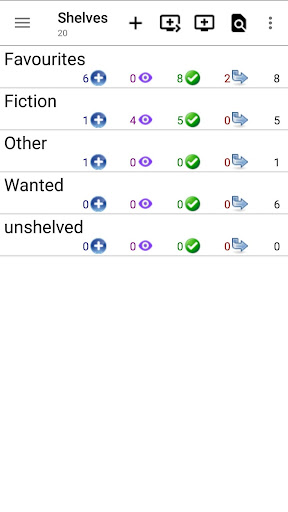
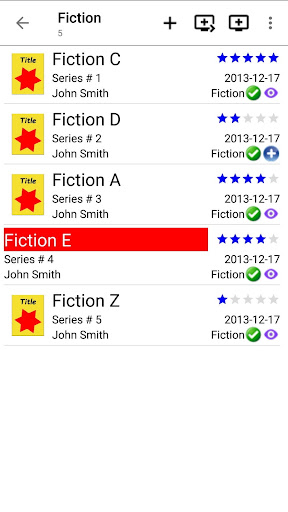
Organise your DVDs into shelves and sub shelves.
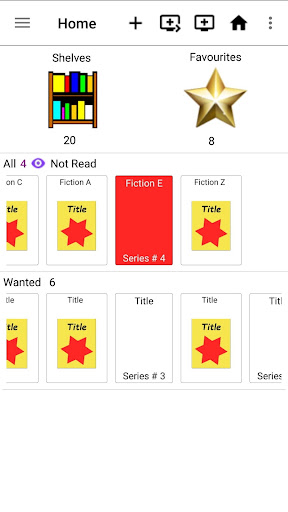
Set quick access lists and pick a favourite shelf to access DVDs easily from the home screen.
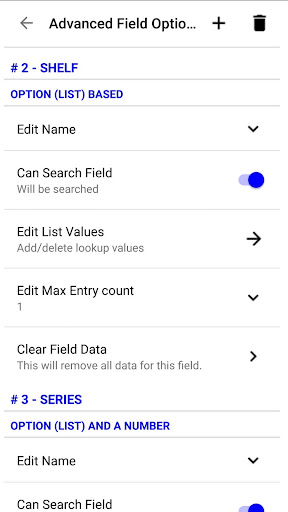
Fully customize the views and fields displayed during lists and editing, and even searching,
change how many of each field you have and add new ones or hide existing ones and even decide which ones are searchable.
Full range of settings for customizing the display, optimize it to suit your needs.
Wide range of export and import formats to help you get your DVDs in/out of the app.
Backup and restore functionality built in (to Internal storage); auto backup frequency or no auto backups, change where backups go
No restrictions on backups, can be copied between devices. Cloud backups coming soon.
Fully integrated sync between devices, either over wifi or bluetooth
Copy your entire catalog or just sync latest changes, with or without images.
Permissions required:
Camera - for scanning barcodes
Storage - for backup storage, exports and imports
Full Internet - for information lookup, data sync over wifi (and ads)
Bluetooth - for data sync over bluetooth
Start at Boot - for intialising auto backup (if turned on)
** Advert Supported, with full GDRP/CCPA support **
Privacy policy can be found at https://dionhardy.com/privacypolicy.php
** No limit on the number of DVDs you can have!
Scan DVD barcodes or use the find and add function to quickly search by title or series or Actor
Automatic (internet required) lookup of DVD information
Add DVDs offline and then lookup information later when online
Search your library to see if you have a DVD while out and about - perfect for seeing if you already have a certain DVD.
Simple library mode supported, keep track of who you've loaned your DVDs to.
Organise your DVDs into shelves and sub shelves.
Set quick access lists and pick a favourite shelf to access DVDs easily from the home screen.
Fully customize the views and fields displayed during lists and editing, and even searching,
change how many of each field you have and add new ones or hide existing ones and even decide which ones are searchable.
Full range of settings for customizing the display, optimize it to suit your needs.
Wide range of export and import formats to help you get your DVDs in/out of the app.
Backup and restore functionality built in (to Internal storage); auto backup frequency or no auto backups, change where backups go
No restrictions on backups, can be copied between devices. Cloud backups coming soon.
Fully integrated sync between devices, either over wifi or bluetooth
Copy your entire catalog or just sync latest changes, with or without images.
Permissions required:
Camera - for scanning barcodes
Storage - for backup storage, exports and imports
Full Internet - for information lookup, data sync over wifi (and ads)
Bluetooth - for data sync over bluetooth
Start at Boot - for intialising auto backup (if turned on)
** Advert Supported, with full GDRP/CCPA support **
Privacy policy can be found at https://dionhardy.com/privacypolicy.php
What's New
New option to force lowercase specified words for title
Updates for android 14: images are no longer included in google backups, notification changes
Updates for android 14: images are no longer included in google backups, notification changes
App Information
Version Name
5.6.1
Version Code
70
File Size
2.9 MB
Minimum OS
Android 5.0+
Developer
D Hardy
Contact
Website
Content Rating
Everyone
Package Name
com.dah.librarydvdPermissions Required
This app may request the following permissions:
Recent Reviews

A Google user
5.0★
This app works AMAZING to help me keep in track of my ever-growing, ever-expanding DVD collection! 😁 And it lets me see which DVD'S (when shopping) I do and do not have, on the go! WITHOUT me having to take my entire collection with me every time! Just 1 minor issue. I can't find where in settings, I can change the display bar to the old one again! Please help me!

Ron Burkey
2.0★
My experience with this app is that it scans in DVD bar codes quickly, conveniently, and fairly accurately once you get the hang of how to do it. But the subsequent process of looking up the DVD's info (title, etc.) is horrendously slow, taking perhaps a minute per DVD to do so. Fortunately, you can keep scanning in new DVDs, because the lookup occurs in the background. But if you've scanned in a few hundreds of DVD bar codes, it make take a full day to look them all up. I use similar apps for scanning books and CDs, and lookup is instantaneous, so it's really hard to understand why this is so very slow. If the DVD lookup were faster, my rating would have been much higher.

Jim Farris
4.0★
Does exactly what it says it does. Almost all of my DVD's were able to be scanned right into the system, there were a couple that weren't found, a few that I couldn't find the art for and one that scanned as something totally different. I do wish that it gave you some indication that it was looking up the info in the background and whether it was successful or not. I wasted a lot of time looking up info that it was already looking up so it spun forever looking up something twice.
A Google user
2.0★
The concept behind this app is good, unfortunately the execution is terrible. Seems cobbled together with no thought given to ease of use. 1. Navigation blows, there does not appear to be any way to return to the main entry window (Shelves) once you drill into the app. 2. Selecting 'filter' causes the filter icon to disappear, so you can no longer 'unfilter'. 3. Adding DVDs is TEDIOUS; while scanning the barcodes is quick, afterwards each DVD must be selected to manually edit shelf, owned, etc.

Libby H
3.0★
I agree with the point another user has made - it takes an INORDINATELY long time for the app to look up a bar code. I tried it twice, and the first eventually gave me completely incorrect data, saying that my Billy Connolly dvd was a Lego movie in German! I will be entering the titles manually in future, but can't be bothered to enter all the other detail. However, it is free, and as a basic list of DVDs to take out shopping, it's fine.

Glenn Marshall
1.0★
poor poor poor, I thought I had found what I needed, an app with a way of having duplicate blurays. son , daughter and myself have some of the same blurays. most apps don't let you add same Blu-ray. this has "shelves" so just named them by person name. all seemed great until I wanted to rename/delete a shelf. random if it works! tried to see if brackets,hypens, apostrophes etc was the problem. no idea as I have now 8 shelves but the total says 15! and the one I wanted to delete is still there
Ad slot: In-Content