

Accupedo Pedometer
com.corusen.accupedo.te
by Corusen LLC
Screenshots



Ad slot: Top Leaderboard
About this app
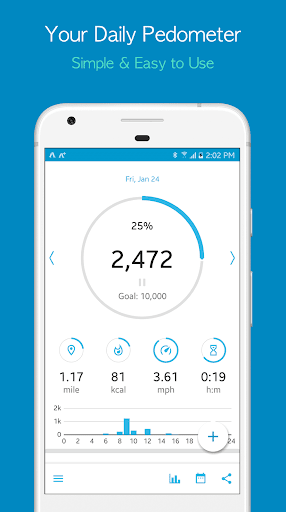
Accupedo is simple and easy to use. It automatically tracks your daily walking.
With easy to read charts and history logs, monitor your steps, calories burned, distance, and time. As your best walking buddy, Accupedo will motivate you to walk more! Set up your daily goal and step towards a healthier you with Accupedo pedometer.
Accupedo counts your steps regardless of where you put your phone like your pocket, waist belt, or bag. Be healthy by setting up your daily goal and accurately monitoring your steps with Accupedo. logs. Explore the different options such as the GPS mode or the efficient power saving mode and choose what’s right for you. Personalize your exercising goals and track your progress through Accupedo!
Features
• The intelligent algorithm starts tracking your steps, then stops and restarts automatically as you walk.
• Activity (walking, running, and biking) tracking with GPS on a map.
• Charts: Easy to read daily, weekly and yearly logs.
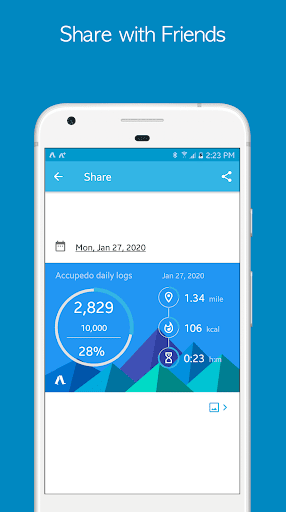
• Daily log history: Tracks steps, distance traveled, calories burned, and walking time.
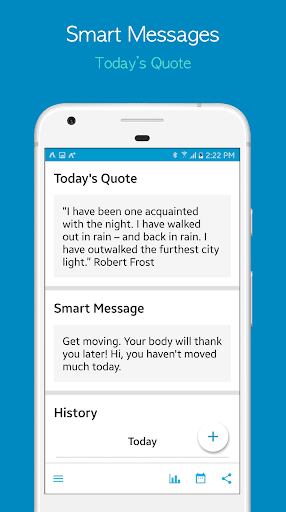
• Smart messages and motivational daily quotes.
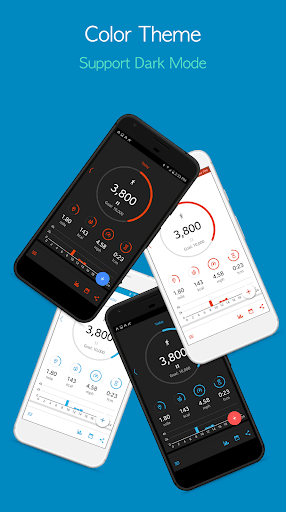
• Color themes and light/dark modes.
• Supports Google Fit health-tracking platform.
• Sync with MyFitnessPal.
• Share your progress on the social media, email, and messengers.
• Power usage mode options for efficient power saving.
• Smart filtering and ejecting out non-walking activities including driving.
• Customized personal settings: sensitivity, metric/customary, step distance, body weight, daily goal, etc.
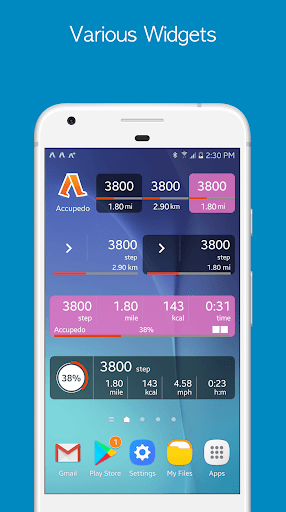
• Customizable widget display modes: steps, distance, minutes, calories, and laps.
• Concise widget display on home screen: 1x1, 2x1, 3x1, 4x1, and 5x1.
• Database backup to the cloud server.
• Email a daily log file.
How it Works
An intelligent 3D motion recognition algorithm is embedded to track only walking patterns by filtering and ejecting out non-walking activities. Accupedo counts your steps regardless of where you put your phone like your pocket, waist belt, or bag. Easily track your progress through the use of this sophisticated algorithm and walk towards a healthier you!
Attention
Your phone may not be compatible with Accupedo. Some phones do not support the G-sensor in sleep (Standby, when screen is OFF) mode by those phone manufacturers. This is not a defect of this app.
Notes
• Step count may not be accurate if you put your phone in loose fit pants due to the random movement your phone makes in the pocket.
• The sensitivity of a phone can be different from others. So, choose a sensitivity level that works best for your phone.
With easy to read charts and history logs, monitor your steps, calories burned, distance, and time. As your best walking buddy, Accupedo will motivate you to walk more! Set up your daily goal and step towards a healthier you with Accupedo pedometer.
Accupedo counts your steps regardless of where you put your phone like your pocket, waist belt, or bag. Be healthy by setting up your daily goal and accurately monitoring your steps with Accupedo. logs. Explore the different options such as the GPS mode or the efficient power saving mode and choose what’s right for you. Personalize your exercising goals and track your progress through Accupedo!
Features
• The intelligent algorithm starts tracking your steps, then stops and restarts automatically as you walk.
• Activity (walking, running, and biking) tracking with GPS on a map.
• Charts: Easy to read daily, weekly and yearly logs.
• Daily log history: Tracks steps, distance traveled, calories burned, and walking time.
• Smart messages and motivational daily quotes.
• Color themes and light/dark modes.
• Supports Google Fit health-tracking platform.
• Sync with MyFitnessPal.
• Share your progress on the social media, email, and messengers.
• Power usage mode options for efficient power saving.
• Smart filtering and ejecting out non-walking activities including driving.
• Customized personal settings: sensitivity, metric/customary, step distance, body weight, daily goal, etc.
• Customizable widget display modes: steps, distance, minutes, calories, and laps.
• Concise widget display on home screen: 1x1, 2x1, 3x1, 4x1, and 5x1.
• Database backup to the cloud server.
• Email a daily log file.
How it Works
An intelligent 3D motion recognition algorithm is embedded to track only walking patterns by filtering and ejecting out non-walking activities. Accupedo counts your steps regardless of where you put your phone like your pocket, waist belt, or bag. Easily track your progress through the use of this sophisticated algorithm and walk towards a healthier you!
Attention
Your phone may not be compatible with Accupedo. Some phones do not support the G-sensor in sleep (Standby, when screen is OFF) mode by those phone manufacturers. This is not a defect of this app.
Notes
• Step count may not be accurate if you put your phone in loose fit pants due to the random movement your phone makes in the pocket.
• The sensitivity of a phone can be different from others. So, choose a sensitivity level that works best for your phone.
What's New
An app is regularly updated with new features and bug fixes.
App Information
Version Name
9.2.8
Version Code
1320
File Size
9.5 MB
Min SDK
Android 24+
Target SDK
Android 34
Developer
Corusen LLC
Contact
Website
Content Rating
Everyone
Package Name
com.corusen.accupedo.tePermissions Required
This app may request the following permissions:
Recent Reviews

William Sears
2.0★
Reasonable step tracker but what is with all the notifications? It nags you to allow notifications and then blasts you incessantly. I turned off the notifications in the app settings but still get blasted every few minutes. Dismiss a notification and it immediately pops up another one. When I complete my daily steps, it notifies me that I've completed them. Then I dismiss that notification only to be notified AGAIN that I've reached my daily goal. One time app integration worked but not anymore.

riley dziedzic
1.0★
I downloaded this to help keep me aware of how much I'm walking everyday and to connect with a calorie app I have, it would continuously stop tracking my steps at random times throughout the day and on day it would track consistently for a few hours it would then delete the few thousand steps I had for that day from my history. not a good app and do not recommend, it is inconsistent and finicky and will not let you track your steps with any sort of accuracy

Louise Spitzer
2.0★
It randomly turns off, so you might be clocking a ton of steps and then look at your phone and the accupedo icon isn't there, you open the app and it says 0 steps. No, accupedo. I've been walking 2 hours. NOT 0 steps. I want a pedometer I don't have to remember to open the app every day and every reboot. Fairly accurate when it does work but is it really annoying when it doesn't. Also, I don't know if it this app or MyFitnessPal, but they both say connected and never connect.

Thomas Ryan
3.0★
Better than nothing, I suppose, but not very accurate. It awards me far more steps than I've actually taken. When I carefully count out 100 steps, the app usually tells me I've walked 105 to 110 steps. Simply handling the phone to make calls or use other apps adds steps. A 20 minute drive over smooth roads with the phone in the car's cupholder added 180 steps.

Alex Plefka
2.0★
12/23 Update: Followed instructions below, still having issue of not always logging steps. App stopping even within 24 hrs of manually opening. Wouldn't recommend if you want to dependably track progress towards a goal. Nice interface, decent graphics. What knocked the rating down is that I started to lose data regularly. Some days the app doesn't count until I open it. Sometimes the data shows on a daily chart but not weekly, throwing off average. Alright app, wouldn't pay.

A Google user
2.0★
The app stops working almost on a daily basis. I even prevented my phone from closing the app, even though it is draining my battery, but it still stops counting steps. The only way to get it working again is to manually pause the app, then resume counting. On top of all of that, the widget doesn't even open the app when I tap it anymore. This is troubling because I have had Accupedo on my phones for almost 10 years, and this is the first problem I have had with it.
Ad slot: In-Content