

DejaOffice CRM with PC Sync
com.companionlink.clusbsync
by CompanionLink Software
Screenshots


Ad slot: Top Leaderboard
About this app
CRM App without Ads or Promotions. Just Productivity!
Sync with Outlook, Act!, GoldMine, or Palm Desktop
DejaOffice works on Android, iPhone and Windows PC
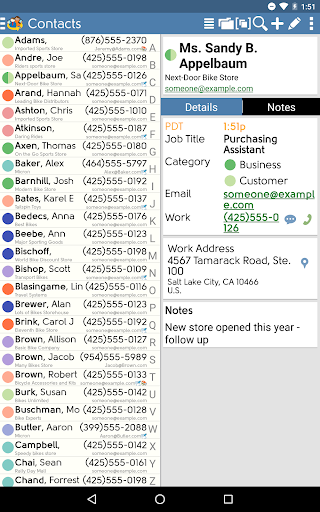
Organize your Contacts, Calendar, Tasks and Notes all in one App, even if your phone is offline. DejaOffice includes the most Powerful Widgets for Contacts and Calendar because data is stored on your device.
This App - DejaOffice Mobile CRM - is Completely Free. Click Download now to try it. DejaOffice development is supported by sales of CompanionLink PC Sync related products.
Download a CompanionLink 14-day Free Trial to set up the PC Sync.
Special Features of DejaOffice
• Built to mirror Outlook Contacts, Calendar, Tasks and Notes
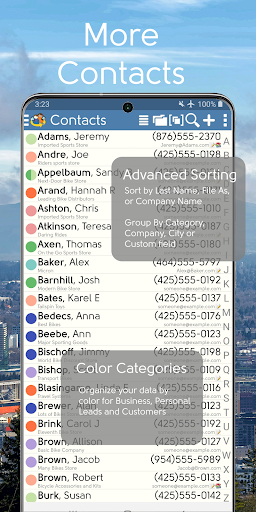
• Advanced contacts sort (first name, last name, company name, categories)
• Category manager with colors
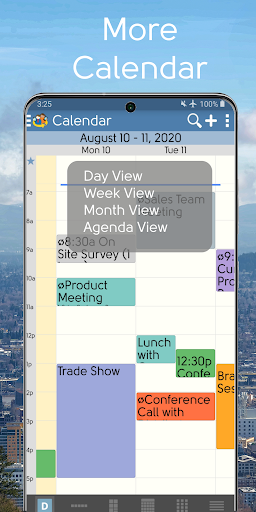
• 6 calendar views (day, week, week grid, month, year, list)
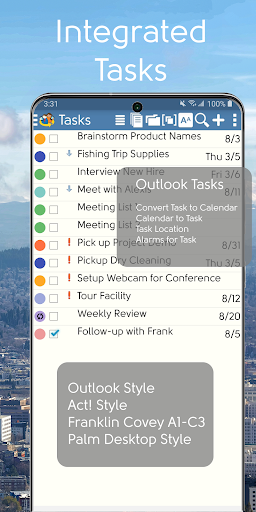
• Multiple task styles (GTD, Franklin Covey, TBYL, Outlook-style, Palm-style)
• Great Widgets: Daily agenda, Month view, Contacts list, Notes list
• Private records (password-protected) like old Palm Treo
• Up to 20 Custom fields
• Global search across all CRM data
• High Security – Private Records, Database Encryption, Automatic Backups
• Sync to Android Contacts, Calendar, Dialer, Maps, SMS messages
CompanionLink PC Sync using USB, Wi-Fi, Bluetooth or DejaCloud to
• Microsoft Outlook - Any version 2007 and higher using CompanionLink for Outlook
• Outlook Customer Manager - Discontinued but easily replaced by DejaOffice PC CRM
• Business Contact Manager
• Act! CRM - Any version 5 and higher including Act! v24
• GoldMine - Any version 4 and higher.
• DejaOffice PC CRM - Use DejaOffice on any Windows PC
• Palm Desktop – Sync the worlds most popular Free PIM with Android
CompanionLink Sync is secure and we will not sell your data. You can sync using:
🔌USB – The most secure direct connection to the phone
📡Wi-fi,- Using a local network in your office
🔊Bluetooth – Using built-in Bluetooth with Laptop or Desktop PC
☁️DejaCloud. – Recommended -Internet based hosted sync
We Recommend DejaCloud as the easiest and most flexible sync system. Your CompanionLink purchase gives you one year of free DejaCloud Service. DejaCloud is free for 500 records or less. If you have 500-5000 records, DejaCloud runs about $2 per month per user ($25 per year)
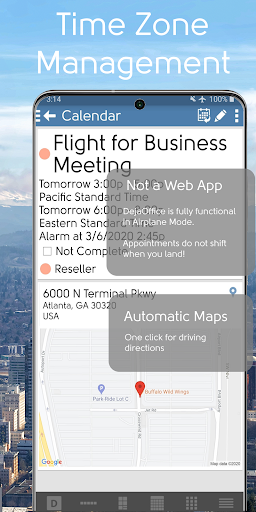
DejaOffice was created in 2009 by CompanionLink Software, the oldest and most experienced Sync Vendor in the handheld arena. We originally envisioned DejaOffice as a landing pad for Outlook data at a time when Android Calendar lacked key features, Android Contacts were sorted by first name. Through steady updates, DejaOffice has become a rounded CRM product incorporating many special features unique to distinct PC platforms. DejaOffice is one of the few Mobile CRM options that use data based locally on your phone, not a web app, so it runs great even when your phone is in Airplane mode. DejaOffice App is free on Android and iPhone, and is available in a Single and Multi-User PC based CRM.
Videos:
Outlook Android Sync using USB: https://youtu.be/EGvh6mVu9iY
Outlook Android Sync using Wi-Fi: https://youtu.be/DNfS_K4qhVg
Outlook Android Sync using Bluetooth: https://youtu.be/ESsInKlYOTA
Outlook Android Sync using DejaCloud: https://youtu.be/rYlBWGgPhq0
Sync with Outlook, Act!, GoldMine, or Palm Desktop
DejaOffice works on Android, iPhone and Windows PC
Organize your Contacts, Calendar, Tasks and Notes all in one App, even if your phone is offline. DejaOffice includes the most Powerful Widgets for Contacts and Calendar because data is stored on your device.
This App - DejaOffice Mobile CRM - is Completely Free. Click Download now to try it. DejaOffice development is supported by sales of CompanionLink PC Sync related products.
Download a CompanionLink 14-day Free Trial to set up the PC Sync.
Special Features of DejaOffice
• Built to mirror Outlook Contacts, Calendar, Tasks and Notes
• Advanced contacts sort (first name, last name, company name, categories)
• Category manager with colors
• 6 calendar views (day, week, week grid, month, year, list)
• Multiple task styles (GTD, Franklin Covey, TBYL, Outlook-style, Palm-style)
• Great Widgets: Daily agenda, Month view, Contacts list, Notes list
• Private records (password-protected) like old Palm Treo
• Up to 20 Custom fields
• Global search across all CRM data
• High Security – Private Records, Database Encryption, Automatic Backups
• Sync to Android Contacts, Calendar, Dialer, Maps, SMS messages
CompanionLink PC Sync using USB, Wi-Fi, Bluetooth or DejaCloud to
• Microsoft Outlook - Any version 2007 and higher using CompanionLink for Outlook
• Outlook Customer Manager - Discontinued but easily replaced by DejaOffice PC CRM
• Business Contact Manager
• Act! CRM - Any version 5 and higher including Act! v24
• GoldMine - Any version 4 and higher.
• DejaOffice PC CRM - Use DejaOffice on any Windows PC
• Palm Desktop – Sync the worlds most popular Free PIM with Android
CompanionLink Sync is secure and we will not sell your data. You can sync using:
🔌USB – The most secure direct connection to the phone
📡Wi-fi,- Using a local network in your office
🔊Bluetooth – Using built-in Bluetooth with Laptop or Desktop PC
☁️DejaCloud. – Recommended -Internet based hosted sync
We Recommend DejaCloud as the easiest and most flexible sync system. Your CompanionLink purchase gives you one year of free DejaCloud Service. DejaCloud is free for 500 records or less. If you have 500-5000 records, DejaCloud runs about $2 per month per user ($25 per year)
DejaOffice was created in 2009 by CompanionLink Software, the oldest and most experienced Sync Vendor in the handheld arena. We originally envisioned DejaOffice as a landing pad for Outlook data at a time when Android Calendar lacked key features, Android Contacts were sorted by first name. Through steady updates, DejaOffice has become a rounded CRM product incorporating many special features unique to distinct PC platforms. DejaOffice is one of the few Mobile CRM options that use data based locally on your phone, not a web app, so it runs great even when your phone is in Airplane mode. DejaOffice App is free on Android and iPhone, and is available in a Single and Multi-User PC based CRM.
Videos:
Outlook Android Sync using USB: https://youtu.be/EGvh6mVu9iY
Outlook Android Sync using Wi-Fi: https://youtu.be/DNfS_K4qhVg
Outlook Android Sync using Bluetooth: https://youtu.be/ESsInKlYOTA
Outlook Android Sync using DejaCloud: https://youtu.be/rYlBWGgPhq0
What's New
•Updated Target API
•Added Attachment sync to USBPacket.
•Bug Fixes and Performance improvements.
For a full list of fixes and changes visit: https://dejaoffice.com/androidapp/
•Added Attachment sync to USBPacket.
•Bug Fixes and Performance improvements.
For a full list of fixes and changes visit: https://dejaoffice.com/androidapp/
App Information
Version Name
4.1.3
Version Code
906
File Size
13.9 MB
Minimum OS
Android 5.0+
Target SDK
Android 19
Developer
CompanionLink Software
Contact
Website
Content Rating
Everyone
Package Name
com.companionlink.clusbsyncPermissions Required
This app may request the following permissions:
Recent Reviews

Cheri Fredrickson
4.0★
I use with Act to android. It is great if and when it works, which is sporadic. I always have to compare the calendar on my computer with the one on my phone to see if it synced correctly. It's about 50/50. Update 2021: Works much better than it used to. Upgraded to 4 stars. Tech support is also much more responsive than they used to be. Whew!

A Google user
5.0★
I've been using DO for 2years or so. It's bloody amazing! I've occasionally had some trouble using wifi synch, but mostly it's trouble-free. (I use wifi because I'm afraid to put my contacts and notes into the cloud. I wish they were more explicit about their encryption procedures. ) I think it's supposed to synch automatically, but that doesn't happen often. I always use a manual synch, and it's an acceptable workaround. Uh-oh, looks like I'm running out of space. Great app!

Keith Conover
5.0★
I refuse to use Outlook for email (I use free Pegasus Mail), but I use Outlook (2010) to store a massive amount of data. I tried many different solutions to syncing this to my phone, and DejaOffice and CompanionLink has turned out to be a solid choice. No issues for years, and what issues I had at the beginning were ironed out with excellent customer support. Syncing gets faster with each update. Highly recommended. Update: also their tech support is some of the best I have ever experienced.
A Google user
5.0★
I have used it for YEARS. I had to shift away from their cloud sync because it wasn't working very well for me but I'm now syncing bluetooth and it is back to performing really well. It syncs my contacts and calendar seamlessly in the background without disturbing me. Im using android (Samsung gs7) and was on outlook 2013 but just upgraded to office pro suite 2016 (which automatically updates to 365). Try it-- you'll like it.
A Google user
5.0★
this app was stellar for the last 3 years. The app worked fine up until the last update on July 3rd, 2019. since then I cannot sync with outlook nor can I add or edit my data. I have changed my rating back to a 5. Technical support contacted me in a timely fashion gave me some options. The final one was uninstall and reinstall. This was the option that worked. my advise is backup often so when you reinstall there are no missing fields.
A Google user
4.0★
A very good app at keeping me organized in all aspects of my life. The only glitch is the "Tasks" aspect of it. Unfortunately, the check part of the reminder doesn't always work. So, I have to go into the app and physically check the item to complete to make sure the reminder comes up the next day. But, everything else is great. Also, I would like to be able to print out the event in the app and not have to send it to another app to print. This would be a big help and time saver.
Ad slot: In-Content