
SpeedView: Legacy Edition
com.codesector.speedview.free
by Code Sector Australia
Screenshots


Ad slot: Top Leaderboard
About this app
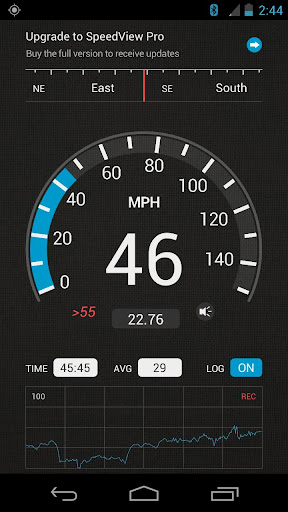
SpeedView is an advanced speedometer application that uses the phone's built-in GPS system to show your current, maximum and average speed, as well as the direction, total distance, and time traveled. Suitable for running, car driving, biking, or hiking.
• High accuracy
GPS-based speedometer that is more accurate than the one in your car.
• Linear compass
Shows your current direction of travel. A compass mode is also available.
• HUD mode
Mirrors the numbers so you can place your phone on your car's dashboard and see the speed reflected in the front glass. You can check out this video to see how it works: http://youtu.be/rzda7CQ-ZAU
• Speed graph
Displays a graph chart covering the last several minutes.
• Speed warning
You can set the speed limits for three different types of roads so that when you go too fast a visual alert or sound will notify you.
• Display units
Supports units such as miles, kilometers, and nautical miles.
• GPX track export
Enables you to save your current track to the SD card or email it to someone. The GPX format is supported by Google Earth and many other programs: http://www.topografix.com/gpx_resources.asp
• Background mode
You can minimize the program and keep it running in the background. It will work as usual and even notify you when you exceed the speed limit.
Please note that the accuracy of GPS measurements is affected by a number of factors including atmospheric conditions, obstructions and the visibility of satellites.
We use Sense360, a third party technology provider, to help us better understand how our users use SpeedView and their devices. SpeedView sends raw sensor data generated by your device to Sense360. This sensor data may include information from GPS receivers, accelerometers, gyroscopes, and other sensors, which may allow Sense360 to determine, for example, your device’s location, acceleration, and orientation. Sense360 may use this data to send us analytic reports regarding how our users are using SpeedView and their devices, or for marketing purposes. To learn more, please visit Sense360’s privacy policy, available at: http://sense360.com/privacy-policy.html.
This version is ad-supported. A paid version without ads and more features is also available.
If you have any questions or comments, feel free to post them on our blog: http://blog.codesector.com/
• High accuracy
GPS-based speedometer that is more accurate than the one in your car.
• Linear compass
Shows your current direction of travel. A compass mode is also available.
• HUD mode
Mirrors the numbers so you can place your phone on your car's dashboard and see the speed reflected in the front glass. You can check out this video to see how it works: http://youtu.be/rzda7CQ-ZAU
• Speed graph
Displays a graph chart covering the last several minutes.
• Speed warning
You can set the speed limits for three different types of roads so that when you go too fast a visual alert or sound will notify you.
• Display units
Supports units such as miles, kilometers, and nautical miles.
• GPX track export
Enables you to save your current track to the SD card or email it to someone. The GPX format is supported by Google Earth and many other programs: http://www.topografix.com/gpx_resources.asp
• Background mode
You can minimize the program and keep it running in the background. It will work as usual and even notify you when you exceed the speed limit.
Please note that the accuracy of GPS measurements is affected by a number of factors including atmospheric conditions, obstructions and the visibility of satellites.
We use Sense360, a third party technology provider, to help us better understand how our users use SpeedView and their devices. SpeedView sends raw sensor data generated by your device to Sense360. This sensor data may include information from GPS receivers, accelerometers, gyroscopes, and other sensors, which may allow Sense360 to determine, for example, your device’s location, acceleration, and orientation. Sense360 may use this data to send us analytic reports regarding how our users are using SpeedView and their devices, or for marketing purposes. To learn more, please visit Sense360’s privacy policy, available at: http://sense360.com/privacy-policy.html.
This version is ad-supported. A paid version without ads and more features is also available.
If you have any questions or comments, feel free to post them on our blog: http://blog.codesector.com/
What's New
Updated app dependencies
App Information
Version Name
4.0.2
Version Code
108
File Size
4.2 MB
Minimum OS
Android 4.4+
Target SDK
Android 30
Developer
Code Sector Australia
Contact
Website
Content Rating
Everyone
Package Name
com.codesector.speedview.freePermissions Required
This app may request the following permissions:
Recent Reviews

A Google user
3.0★
graphics not working properly, the speedometer is not clearly visible, only 1st half is visible. even the speedo needle is off, its not at centre but lying below, I think some issue with the graphics renderig. also, the app shows a speed error of 10kmph which is weird as i measured with other apps and error was only 4kmph. I can't find the option to upload images, would have been easy .
A Google user
2.0★
Used to love this app but since the latest update includes WIFI to allow the sending of all kinds of positional data to a third party company for among other things marketing purposes (read the app description for details) I will be forced to uninstall this app immediately. Also, none of the display formats work on my Xiaomi Mi A2 lite - the font size isn't correct and everything is clipped so can't be read.
A Google user
1.0★
Works well as a speedometer, and the heads-up mode is great. Unfortunately, a recent update causes it to launch itself in the background (unacceptable) and display un-clearable notifications (very unacceptable), and no response from emailing the developer. Uninstalled.
A Google user
1.0★
well this used to be a helpful app but all of the faces of speedometer aren't in sync. the highlighted area that's supposed to follow the speed is in the middle and can't see the actual numbers.. even the needle isn't in the right spot...

Bj Neil
4.0★
FIXED!!! The app would open to a black screen, just like others have said in the reviews so i decided i would delete it and reinstall the updated version currently available on Google Store... and it loaded and worked perfectly... so for me problem solved... maybe it'll work for you too.. Hope so, it's a great app! I gave it 4 stars cos i haven't road tested it yet. Will update rating later
A Google user
1.0★
Worked amazing till it updated. Then you can only see the top quarter of the numbers. And if you open it. It always runs in the background and will drain your battery. You have to manually force stop the app
Ad slot: In-Content