

Multi-Screen Voice Calculator
com.atnsoft.calculator.free
by ATNSOFT
Screenshots









Ad slot: Top Leaderboard
About this app
🎁 The Pro version of the calculator is now free!
https://play.google.com/store/apps/details?id=com.atnsoft.calculator
ATNSOFT Calculator lets you:
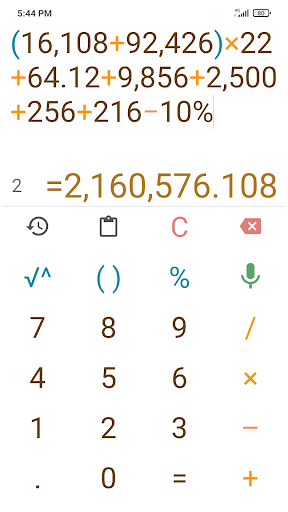
✓ Instantly enter numbers and mathematical expressions using an ergonomic on-screen keyboard and voice input (currently supports English, Arabic, Bengali, Chinese, Croatian, Czech, Dutch, French, German, Greek, Hindi, Hungarian, Indonesian, Italian, Japanese, Korean, Malayalam, Polish, Portuguese, Romanian, Russian, Spanish, Swedish, Tamil, Thai, Turkish and Vietnamese). Just press the mic button and speak the expression (for example, 74 point 5 times 4 plus 37 = 74.5 × 4 + 37 = 335): it will appear on screen and the result will be calculated immediately!
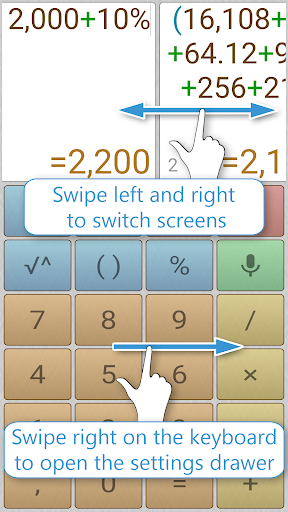
✓ Make two or more calculations simultaneously. To do this, you can switch editing screens with a horizontal swipe along the top edge. You can give names to screens by tapping the screen number.
✓ Quickly copy the result to the clipboard simply by tapping it. There is a special button for pasting from the clipboard (📋).
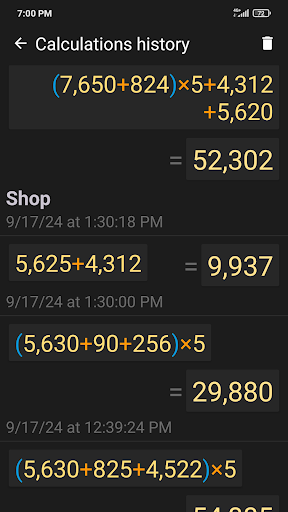
✓ All calculations are recorded in the calculations history, from where you can insert the expression and result into the editor. These records can be instantly deleted with a horizontal swipe. Any record from the history can be tagged with text by tapping the date or time.
✓ Execute mathematical operations with incredibly large numbers and expressions.
✓ Raise to the n-th power or extract the root of the n-th power (for example: 5 cubed = 5^3 = 125; the cube root of 27 = 3√27 = 3).
✓ Percentage calculations (for example: 200 + 10% = 220; 10 % 200 = 20).
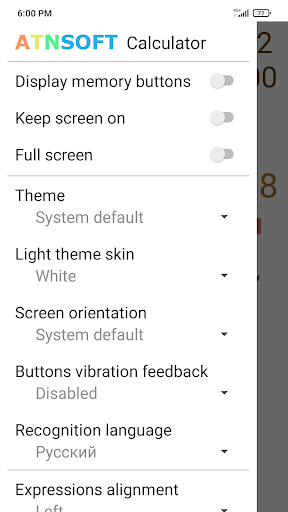
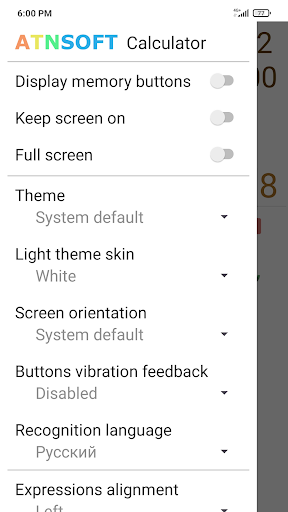
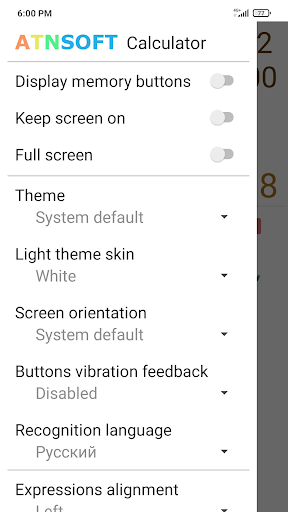
✓ Convenient, user-friendly settings that can be easily opened with a swipe right on the keyboard. The settings include: vibrate on click, full-screen mode, keep screen on, and other options.
✓ The result is always displayed naturally, without incomprehensible E's, dashes, and numbers.
✓ Easily work with many memory cells, and easily switch between them. You can set a name for each cell, letting you intuitively use the memory for a specific field of activity.
✓ Quickly switch themes.
Please feel free to use the contact form to share your ideas:
https://atnsoft.com/support
https://play.google.com/store/apps/details?id=com.atnsoft.calculator
ATNSOFT Calculator lets you:
✓ Instantly enter numbers and mathematical expressions using an ergonomic on-screen keyboard and voice input (currently supports English, Arabic, Bengali, Chinese, Croatian, Czech, Dutch, French, German, Greek, Hindi, Hungarian, Indonesian, Italian, Japanese, Korean, Malayalam, Polish, Portuguese, Romanian, Russian, Spanish, Swedish, Tamil, Thai, Turkish and Vietnamese). Just press the mic button and speak the expression (for example, 74 point 5 times 4 plus 37 = 74.5 × 4 + 37 = 335): it will appear on screen and the result will be calculated immediately!
✓ Make two or more calculations simultaneously. To do this, you can switch editing screens with a horizontal swipe along the top edge. You can give names to screens by tapping the screen number.
✓ Quickly copy the result to the clipboard simply by tapping it. There is a special button for pasting from the clipboard (📋).
✓ All calculations are recorded in the calculations history, from where you can insert the expression and result into the editor. These records can be instantly deleted with a horizontal swipe. Any record from the history can be tagged with text by tapping the date or time.
✓ Execute mathematical operations with incredibly large numbers and expressions.
✓ Raise to the n-th power or extract the root of the n-th power (for example: 5 cubed = 5^3 = 125; the cube root of 27 = 3√27 = 3).
✓ Percentage calculations (for example: 200 + 10% = 220; 10 % 200 = 20).
✓ Convenient, user-friendly settings that can be easily opened with a swipe right on the keyboard. The settings include: vibrate on click, full-screen mode, keep screen on, and other options.
✓ The result is always displayed naturally, without incomprehensible E's, dashes, and numbers.
✓ Easily work with many memory cells, and easily switch between them. You can set a name for each cell, letting you intuitively use the memory for a specific field of activity.
✓ Quickly switch themes.
Please feel free to use the contact form to share your ideas:
https://atnsoft.com/support
What's New
✓ Added quick deletion when holding down the ⌫ button.
✓ Long press on the number buttons inserts the corresponding number of zeros: 2 — 00, 3 — 000, 4 — 0000 and so on up to 9.
✓ The cursor is now more prominent.
✓ When you tap on the result, it is now copied to the clipboard without formatting. This is useful when pasting into other applications.
✓ Improved voice recognition.
✓ Added localization and voice input in Malayalam (മലയാളം).
✓ Long press on the number buttons inserts the corresponding number of zeros: 2 — 00, 3 — 000, 4 — 0000 and so on up to 9.
✓ The cursor is now more prominent.
✓ When you tap on the result, it is now copied to the clipboard without formatting. This is useful when pasting into other applications.
✓ Improved voice recognition.
✓ Added localization and voice input in Malayalam (മലയാളം).
App Information
Version Name
1.2.5
Version Code
27
File Size
1.9 MB
Minimum OS
Android 5.0+
Target SDK
Android 23
Developer
ATNSOFT
Contact
Website
Content Rating
Everyone
Package Name
com.atnsoft.calculator.freePermissions Required
This app may request the following permissions:
Recent Reviews

Michelle Kaz (RagdollWraith)
5.0★
The only voice calculator I can find that lets me continue adding onto my equations, rather than starting over every time I hit the voice record button. a MUST HAVE, since not a single voice calculator just lets you keep talking until you hit the button manually, they all automatically stop calculating the moment you stop to take a breath for more than a single second, including this one... but that's a feature for another time. I'm just glad it doesn't make me start over.

A Google user
5.0★
This is the perfect calculator for everyday calculating needs. I love being able to view previous calculations. When out shopping I can easily calculate my exact total including sales tax. The ads are non intrusive and the interface is simple. I've been using this calculator for over two years and have had no issues. I absolutely love it!

Brandy Peeler
5.0★
Needed something to add all the receipts for filing long form for my business. I was able to speak the numbers and add it all up just saying it which cut the addition time greatly. And I did not have to fix a single digit from misunderstanding my voice. Thank you so much. Exactly what I needed. Now I can go to bed and not be up half the night poking a calculator.

Bonnstermonster
5.0★
Works great! No annoying ads like other apps I've read about. Ad bar on top. Installed quickly with no issues. Starts up quickly. I was able to say many #'s quickly. I messed up a few & that wasn't an issue because my #'s appeared on the screen & I just put the cursor at the bottom & continued. You can see & verify your #'s are correct & edit according. NO Google voice! The Voice recognition worked 100% & my voice is odd. IT'S FAST, EASY PEASY FOR MULTIPLE #'s, & I'M IMPRESSED! GREAT APP GUYS!

Joaquin Solorzano
5.0★
Do you remember that imaginary calculator that you always wished you could have that would listen to your numbers and calculate them flawlessly? Well this is it, I tried adding long budget number lists and it worked perfectly! Only problem was that when I tried to read the adds at the top out of sheer graditude they were in Spanish, but I think that's Google's fault.

Antonio Moniz
5.0★
⭐⭐⭐⭐⭐ Works amazingly well! I've been using it for months. As a truck driver, I love how I can just tap the mic and say things like “300 divided by 3” and get the result instantly—no typing needed. It’s perfect for quick hour or ETA calculations without fumbling with buttons while on the road. Highly recommend for anyone who needs a hands-free calculator!
Ad slot: In-Content