

ASUS AiCloud
com.asustek.aicloud
by ASUSTeK Computer inc.
Screenshots

Ad slot: Top Leaderboard
About this app
****Some features need to work with compatible firmware versions, please make sure that your router's firmware is always to date.
ASUS AiCloud is a revolutionary app that combines all the power of public and private cloud platforms together with home networking into a single space. Enjoy diverse cloud services at home or in your office, with cloud storage expansion available on demand without additional charge!
Key Features:
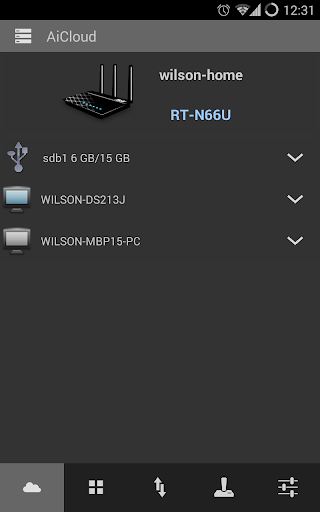
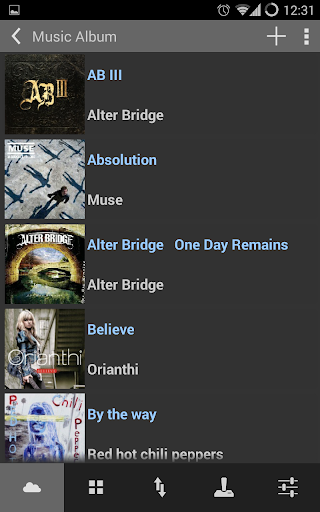
*Cloud Disk - Your always-on data and media library
Connect USB storage to your compatible ASUS router to access content and files and stream media straight to your AiCloud app on mobile devices or from a unique web link via your browser
*Smart Access - All your devices in tune
Whether you’re using Windows, Mac OS, or even Linux PCs(Samba server), ASUS AiCloud lets you access, stream, and share content from your home network or online storage through a personalized web link. Smart Access can also wake up a sleeping PC.
*Smart Sync - Always up to date
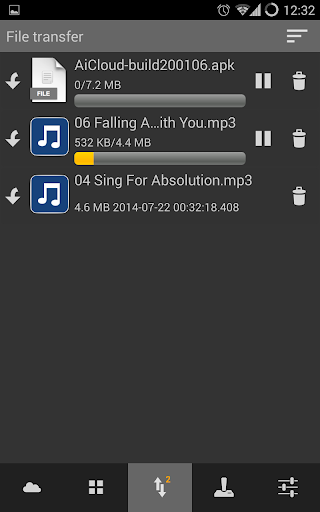
Keeps all media, data, and other content you want to share from online storage services like web storage, your home network, and even other AiCloud-enabled networks up to date in real time to easily share and access the same file version wherever you are.
ASUS AiCloud is a revolutionary app that combines all the power of public and private cloud platforms together with home networking into a single space. Enjoy diverse cloud services at home or in your office, with cloud storage expansion available on demand without additional charge!
Key Features:
*Cloud Disk - Your always-on data and media library
Connect USB storage to your compatible ASUS router to access content and files and stream media straight to your AiCloud app on mobile devices or from a unique web link via your browser
*Smart Access - All your devices in tune
Whether you’re using Windows, Mac OS, or even Linux PCs(Samba server), ASUS AiCloud lets you access, stream, and share content from your home network or online storage through a personalized web link. Smart Access can also wake up a sleeping PC.
*Smart Sync - Always up to date
Keeps all media, data, and other content you want to share from online storage services like web storage, your home network, and even other AiCloud-enabled networks up to date in real time to easily share and access the same file version wherever you are.
What's New
-Big fixes and stability improvements
App Information
Version Name
2.1.0.0.59
Version Code
105
File Size
13.0 MB
Minimum OS
Android 7.0+
Target SDK
Android 21
Developer
ASUSTeK Computer inc.
Contact
Website
Content Rating
Everyone
Package Name
com.asustek.aicloudPermissions Required
This app may request the following permissions:
Recent Reviews

Dawkins Dog
3.0★
When it works it works well, but sadly that's not all the time. I've two folders on my network drive, both with thousands of files in. While one displays all the files and subfolders without problem, the other shows just a small number of files and only one subfolder. I've tried reinstalling the app, clearing the cache etc, all without success. It's a shame as the Asus router it's linking to has been excellent.

Roman Kovbasjuk
2.0★
This app sort of works. Its allows access to your LAN resources like routers and NAS, even while away from home. But unfortunately the access to local files via remote connection is unbearably slow. On the same network, the access is quick, but then you can use UPnP or Samba anyway, so you don't really need this app. And the connection is quick for anything else, both on a phone and on a router, just the file access from AiCloud is slow. P.S. It used to be OK back in 2016-2018.

Dan Burke
3.0★
The app was decent, but had some problems with playing audio - with shutdowns sometimes happening in the background. With the latest update on 10/23/23, I can no longer play audio. The app no longer asks for permission for "music and audio", so I'm guessing that's why. I uninstalled and manually installed the old version.

Jerry Hatfield
3.0★
Little to no documentation how to successfully set it up. There should be a step-by-step instructional video by the manufacturer. After watching several YouTube videos finally figured out how to get this app to work and connect to my router. When I try to upload a PDF the app instantly crashes! Also I would like to see a thumbnail view of pictures that I upload! Thumbnails never consistently show up. If they do I would like to be able to make them larger to see the detail of the picture.

John Turner
1.0★
Was the "programmer" just starting out in IT? I would imagine a school child could do better. I haven't the time to list all the flaws but one in particular casts doubt on the capabilities of whoever built this trash. If you copy a file from your USB storage to your local storage, it actually puts the string "asuscopy" AFTER the file extension...which means your device will not recognise the file type without you having to edit the filename. Do they even test this trash before releasing it?

Robert Andrew Almedina
2.0★
Reading files from my connected USB is great but when I try to upload file from my phone it always crashes. Please fix it. I am using s25U, Redmagic9 Pro, Blackshark5. All with the same vrashing issue when uploading file through AI Cloud I can easily upload files before. Can't remember when it started crashing when trying to upload. it's been a while.
Ad slot: In-Content