
Draw Sketch & Trace
com.ardraw.sketch
by Fancy Font For U
Screenshots

Ad slot: Top Leaderboard
About this app
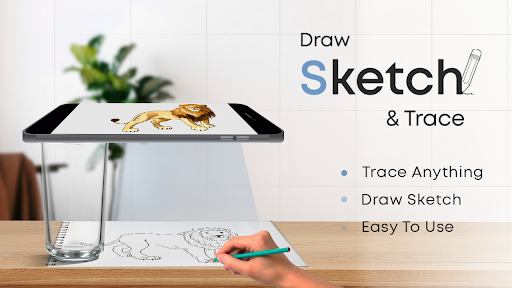
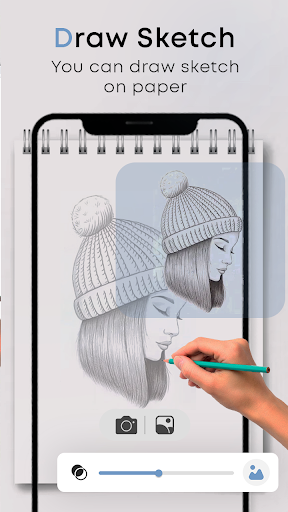
With the help of the Draw Sketch & Trace App, you can start learning sketches or drawings by taking a photo or image and tracing over it. Draw Sketch & Trace app provide various collection of objects to easily learn to trace with a simple click. A Draw Sketch & Trace app is a tool that allows you to start sketching the object with mount your device on a glass or a tripod. Adjust the image, brightness, contrast, rotation, and lock with yourself and start tracing line by line.
Introducing Sketch AR and AR Drawing - Your ultimate artistic companion. Unleash your creative talent with the AR Sketching and AR Drawing App, where imagination meets technology.
Turn your desire to be a sketch artist by using this Draw Sketch & Trace App. Our App has a special design to easily start learning sketching, drawing, and tracing with your smart device. The app Includes a variety of features such as the ability to adjust photos on screen with your choice, Select and apply photos from the gallery and camera, change the color of the trace, and adjust brightness with your needs of the drawing. One of the best tools to easily start learning sketching and tracing your way.
How to begin a sketch:
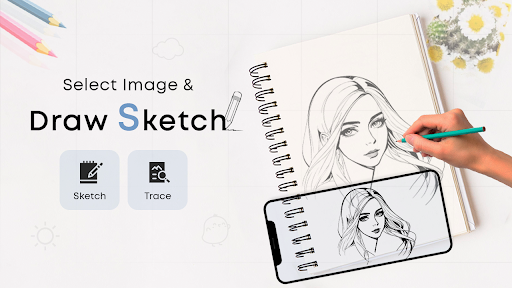
* Tap on the sketch button and find the object collection
* You have the choice to select an object from the collection or also from the gallery or camera
* Insert one of your choice objects and stretch with your choice
* Set your choice brightness according to your choice
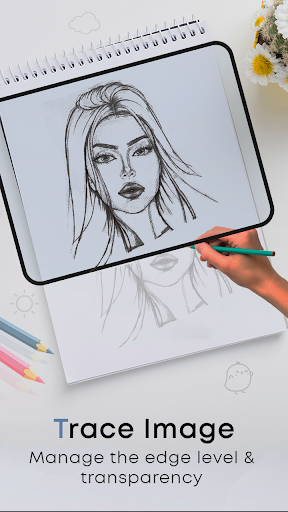
* Select the bitmap tool to easily convert your object into a transparent screen only by removing the white background
* Have the choice to rotate the image and on a flashlight in a dark area
* Lock the device screen and start sketching the images line by line
* Easily transfer the object into the paper by just tracing the lines
How to get proficient in tracing:
* Tap on the trace button and select an object from the different collection
* Additionally, you can import images from a camera or gallery
* Stretch the item to fit your needs
* Pick one of your choice background colors from the different colors
* Rotate and lock the image to trace any object clearly
* Have the choice to set the brightness of the object and also set the brightness of the device
* A straightforward technique for learning to trace any image and object
FEATURES:
- Draw Sketch and Trace to improve your drawing skills
- Start to learning sketch art by using this app
- Variety of objects to easily trace with line by line
- Allow to trace and sketch any instant capture images from the camera and also import from the photo gallery
- Different tools like locking the screen, rotating the image, adjusting brightness, Flashlight
- Find a bitmap to easily remove the white background from the image when you work on sketching
- Best app allow you to learn the art by using this app
- Attractive User Interface design
Introducing Sketch AR and AR Drawing - Your ultimate artistic companion. Unleash your creative talent with the AR Sketching and AR Drawing App, where imagination meets technology.
Turn your desire to be a sketch artist by using this Draw Sketch & Trace App. Our App has a special design to easily start learning sketching, drawing, and tracing with your smart device. The app Includes a variety of features such as the ability to adjust photos on screen with your choice, Select and apply photos from the gallery and camera, change the color of the trace, and adjust brightness with your needs of the drawing. One of the best tools to easily start learning sketching and tracing your way.
How to begin a sketch:
* Tap on the sketch button and find the object collection
* You have the choice to select an object from the collection or also from the gallery or camera
* Insert one of your choice objects and stretch with your choice
* Set your choice brightness according to your choice
* Select the bitmap tool to easily convert your object into a transparent screen only by removing the white background
* Have the choice to rotate the image and on a flashlight in a dark area
* Lock the device screen and start sketching the images line by line
* Easily transfer the object into the paper by just tracing the lines
How to get proficient in tracing:
* Tap on the trace button and select an object from the different collection
* Additionally, you can import images from a camera or gallery
* Stretch the item to fit your needs
* Pick one of your choice background colors from the different colors
* Rotate and lock the image to trace any object clearly
* Have the choice to set the brightness of the object and also set the brightness of the device
* A straightforward technique for learning to trace any image and object
FEATURES:
- Draw Sketch and Trace to improve your drawing skills
- Start to learning sketch art by using this app
- Variety of objects to easily trace with line by line
- Allow to trace and sketch any instant capture images from the camera and also import from the photo gallery
- Different tools like locking the screen, rotating the image, adjusting brightness, Flashlight
- Find a bitmap to easily remove the white background from the image when you work on sketching
- Best app allow you to learn the art by using this app
- Attractive User Interface design
App Information
Version Name
24.0
Version Code
24
File Size
34.9 MB
Minimum OS
Android 5.0+
Target SDK
Android 33
Developer
Fancy Font For U
Contact
Website
Content Rating
Everyone
Package Name
com.ardraw.sketchPermissions Required
This app may request the following permissions:
Recent Reviews

Mimo AZ
5.0★
I love this it helps my creativity in drawing anything, but there's 1 thing that I don't like, it's the premium content thing that pops up, it's appears when I'm doing my drawings and if I press watch add I'll watch the add ant not have that premium content thing show up but then like 5 3 minutes later it shows up and I don't want to press premium. At least let it show up once every day?, other than that I'm obsessed I drew so many drawings because of this app! I love the new drawings you added.

JINX
1.0★
I would give this 0 starts if i could but this app sucks like most of them. So the app gives you 4 to 5 minutes to draw what you want and when that time is up you either have to watch an add or pay for premium also when i first got the app i was trying to get past the tutorial and then out of nowhere the premium subscription popped up and almost made buy it without me wanting to.

ahmad almaghrabi
1.0★
I strongly recommend caution when considering this app. It requests permissions for audio recording and access to audio, even though its supposed function is limited to the camera. This raised concerns about privacy and how it utilizes these permissions. Additionally, I encountered functionality issues as the app didn't perform as expected. Please be cautious when downloading and using it.

rolan mudang
3.0★
when i try to trace the drawing .it moves a lot. at first I though that I was moving the phone .but when I try puting my phone in the mobile stand and draw again it moved again it made me angry and difficult to draw .but some time it didn't move so in some way this app is good also

Manish Shukla
1.0★
I hate this app a lot because every time open the picture to draw it says that watch ad or get premium and after 30 seconds it ask this and if I don't touch anything it closes the picture and doesn't have enough pictures to draw and make small images we can draw them 😤 😒 😑 by our self I request that who wants free do not download this application very bad application I have ever seen. Please do not download this application.

Shayne
1.0★
Every 5 second an ad pops up....thats why i am deleting this app...and also i dont recommend this app...its gonna waste all your time...u just keep on whatching ads like you downloaded an app made for only ads...i tried to ignore them but they just keep on coming and getting worse...now i fed up with this app...please fix...i will come and check if it has got any better cause i wanted a drawing app so badly and now iv lost hope in drawing 😔😔😔😔😔
Ad slot: In-Content