
Color Touch Effects
com.appspot.swisscodemonkeys.paintfx
by AppTornado
Screenshots



Ad slot: Top Leaderboard
About this app
Color Touch Effects allows to recolor images and apply cool photo effects to them.
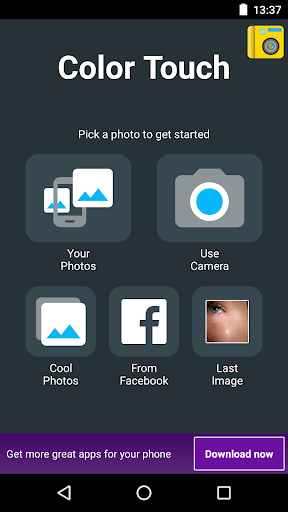
You can select an image, turn it to gray (or sepia, ..) and paint the color back with your fingers.
- Easy to paint, move, zoom with your fingers
- Splash a different coloring on your pictures with vivid colors
- Two finger zoom and paint
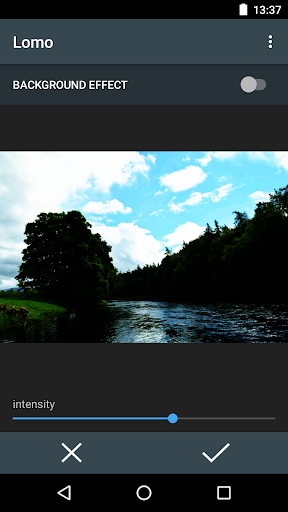
- Many effects such as black & white, sepia coloring or blur.
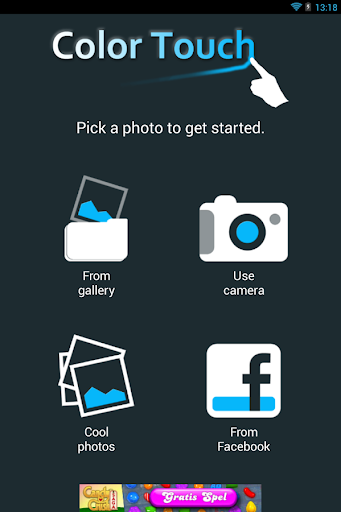
- Import photos easily from your photo gallery, photo album, camera or from Facebook into this picture editor
- several cool image effects in the fx gallery
- configure brush and opacity
- add a caption / title to your image after drawing
- Post your art to facebook, share via email, or send via MMS, or share it with whatsapp
So much fun to edit your photos and pictures. Download this free picture editor now. Works great together with our free camera effects (fx) app.
Icon based on a photo by Seafrost/flickr.
This image app is earning money using the AppBrain app monetization system: http://www.appbrain.com/info/monetize
You can select an image, turn it to gray (or sepia, ..) and paint the color back with your fingers.
- Easy to paint, move, zoom with your fingers
- Splash a different coloring on your pictures with vivid colors
- Two finger zoom and paint
- Many effects such as black & white, sepia coloring or blur.
- Import photos easily from your photo gallery, photo album, camera or from Facebook into this picture editor
- several cool image effects in the fx gallery
- configure brush and opacity
- add a caption / title to your image after drawing
- Post your art to facebook, share via email, or send via MMS, or share it with whatsapp
So much fun to edit your photos and pictures. Download this free picture editor now. Works great together with our free camera effects (fx) app.
Icon based on a photo by Seafrost/flickr.
This image app is earning money using the AppBrain app monetization system: http://www.appbrain.com/info/monetize
What's New
Various fixes
App Information
Version Name
4.9
Version Code
37
File Size
4.8 MB
Minimum OS
Android 5.0+
Target SDK
Android 34
Developer
AppTornado
Contact
Website
http://www.swiss-codemonkeys.com/app/paintfx/android-color-touch-effects-brush-up-your-pictures.html
Content Rating
Everyone
Package Name
com.appspot.swisscodemonkeys.paintfxPermissions Required
This app may request the following permissions:
Recent Reviews

Heather Vandegrift
1.0★
No instructions for how to choose colors, no help menu, and the "about" link just goes to an ad for one of the other apps. If you aren't going to provide instructions, at least make it intuitive. I'm trying to change the color on a pic to decide what to paint something. Guess I'll have to find another app

A Google user
1.0★
Gave the requiste 1 star to write this: the ap is useless. Under the PAINT selection there's no color choice option, only a brush size select which does ZIP when you touch the picture. All this ap does is apply whole-photo filters under the EFFECT selection and even these are bland, limited, lusterless and readily available in ANY editor ap. You CANNOT select a portion of the pic and change or add color as implied. DELETED about 7 seconds after installation. Waste of time.
A Google user
1.0★
app is garbage because no matter how good your edit is, once you save it the image, the quality gets reduced dramatically to the point it looks like it was taken with a phone from 10 years ago. Not sure why there isn't an option to determine what quality you want to save your edits.
A Google user
1.0★
Saves the edits in a 0.2mp version only. Useless. Edit: I'll elaborate as requested by the seemingly automated developer response to the statement above: When I press 'save', it saves and image, but only a 100kb one instead of the over 2.5MB original picture. That's it. Simple. So is giving a low rating for ruining the potential of a great app with this deal breaker.
A Google user
1.0★
What a crappy interface!! Any other intelligent life would expect to be able to change the color you're painting with under the 'paint' tab. Not such a thing with this developer! Also, no canvas rotation while you're at it, paint with white, as you can't figure out how to change said colour! Uninstalling this pile of dump in 3, 2, 1...

Anonymous Penguin
2.0★
It simply turns your whole picture into gray, then bringing back the original color of some parts of the picture (in your liking) by brushing it. You CAN'T change the original color of your picture into other colors. That's all. Looking forward to your edited version .
Ad slot: In-Content