
Battery 100% Alarm
com.appeteria.battery100alarm
by Appeteria
Screenshots


Ad slot: Top Leaderboard
About this app
"Remove the charger when the battery is fully charged. Energy saved by you can fill Light in someones life".
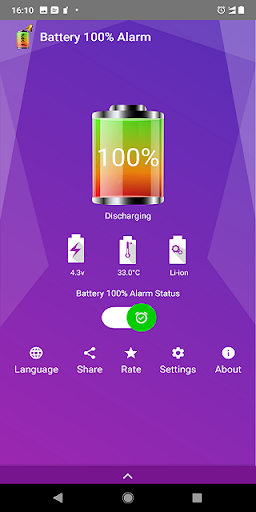
By keeping the Energy Conservation in mind we have developed 'Battery 100% Alarm' app which will notify you by alarming on 100% charging of battery.
This will help you to save energy and protect your phone battery
It will also keep you updated on battery charging status through notification and home screen widget.
Please write an email if you have any problems, questions or feature requests.
Due to vast amount of android devices users might have different experience on different devices, but we are working hard to make it stable. if you have problem on your device write us to [email protected]
MIUI Users need to Enable this app in Settings->Persmissions-> Autostart to auto start when charger is connected.
By keeping the Energy Conservation in mind we have developed 'Battery 100% Alarm' app which will notify you by alarming on 100% charging of battery.
This will help you to save energy and protect your phone battery
It will also keep you updated on battery charging status through notification and home screen widget.
Please write an email if you have any problems, questions or feature requests.
Due to vast amount of android devices users might have different experience on different devices, but we are working hard to make it stable. if you have problem on your device write us to [email protected]
MIUI Users need to Enable this app in Settings->Persmissions-> Autostart to auto start when charger is connected.
What's New
Issue Fixed for support for earlier Android versions
Minor bug fix and enhancement
Minor bug fix and enhancement
App Information
Version Name
4.5.3
Version Code
49
File Size
5.9 MB
Minimum OS
Android 5.0+
Target SDK
Android 33
Developer
Appeteria
Contact
Website
Content Rating
Everyone
Package Name
com.appeteria.battery100alarmPermissions Required
This app may request the following permissions:
Recent Reviews

A Google user
2.0★
This app is great. It accurately let's me know when my battery reaches a certain percentage. But the PROBLEM with the app is that for some reason, it doesn't always alert me after I start charging my phone. It probably faces an issue in remaining active in the background. I hope you guys will notify me if it's a bug that needs to be fixed or is it something wrong in the settings. Thank you. Update: I think this app has stopped working... The alarm hasn't rang for more than a month now. It could be Android Oreo blocking the app. Anyway, until it's fixed. Uninstalling....
A Google user
2.0★
Well it works as advertised. Unfortunately since last update (was suprised to see an update) it requires a full time notification. If you choose to hide notifcations it may or may not work... not cool. I hate unnecessary notifications on my screens. Unfortunately I have to let it go... to bad. P.S. it was pretty good for awhile, I've used it on numerous phones over a few years. Thanks for that at least 👍.

Sharneilbena
5.0★
This app is so good. You'll need this app since you want to prevent your battery phone from get overcharged especially when it's night time where most people charge their phone before sleep and leave it charged overnight. In most cases, your phone probably needs only an hour or two to hit 100%. Leaving it plugged in longer is pointless. Which can reduce capacity of the battery phone
A Google user
5.0★
I have tried several battery alarms and found issues with most of them. They have been unreliable and not alarming a 100% of the time, No easy way to remind user to turn on or excessively draining the battery. Battery 100% alarm Resolves all those issues I have a perfect track record of alarm sounding, Battery does not seem to drain excessively And there is a Widget feature That allows you to put a Readily seen Icon on the home screen to remind you to turn on . All in all an excellent app.

Jeremy Varghese
1.0★
This is purely an app to show you ads, the battery alarm is an afterthought which does not work most of the time. I have already switched off battery optimizations for the app. Despite claiming to be completely automatic, I have to kill the app and open it again after plugging the phone to charge EVERY SINGLE TIME for the alarm to work. Of course, it is designed that way to show you ads every day, if not twice a day.
A Google user
2.0★
After the update, it only alarm once then the screen also turns off after the alarm, i like the last version because it has the function that alarms and turns screen on infinitely until you press the a button to turn it off. I also like the last version because you have the option to turn off the things displayed on the status bar and on the drop down menu. If i turn this off using my phone's notification settings, the whole application will not work. Luckily, on this version you can turn off the notification badges to prevent a circle on always displaying in the application icon on the app drawer. In the previous version, this is not a problem. On the last version, only 1 ads is displayed at a random time, on this version, 2 ads are always displayed every time you close the application or everytime you disable the alarm.
Ad slot: In-Content