

APCOA FLOW | Mobile Parking
com.apcoaflow.consumer
by APCOA FLOW
Screenshots


Ad slot: Top Leaderboard
About this app
>>Park easily with the free APCOA FLOW park app. No ticket. No cash. No stress. <<
Our service is country-specific - currently, it’s available for:
> Germany – find out more on www.flow.apcoa.de
> Italy - find out more on www.flow.apcoa.it
> Sweden - find out more on www.flow.apcoa.se
> Austria - find out more on www.flow.apcoa.at
> Poland - find out more on www.flow.apcoa.pl
Simply choose the country where you want to park with APCOA FLOW, register, and start your first ticketless parking session with us.
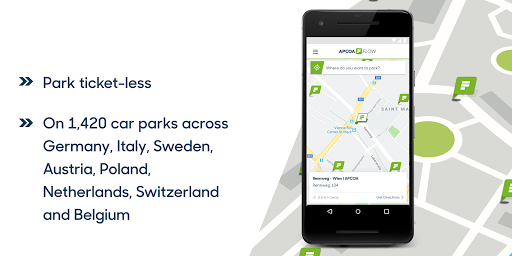
Search for car parks at your desired destination or check which ones are close-by - you recognize APCOA FLOW car parks by the green flag on the map screen. How you can use APCOA FLOW to park at a specific location is shown within the car park details.
The following APCOA FLOW parking options are available:
> Park using the app for payment at car parks with pay machines and without barrier control
> Park with license plate recognition – barriers open automatically at the entry and exit
> Park using a RFID card – barriers open automatically at the entry and exit
You can manage all your payment options conveniently within in the app and don’t have to queue up in front of the pay machine anymore. You park ticket- and cashless and you know exactly what you pay.
Our service is country-specific - currently, it’s available for:
> Germany – find out more on www.flow.apcoa.de
> Italy - find out more on www.flow.apcoa.it
> Sweden - find out more on www.flow.apcoa.se
> Austria - find out more on www.flow.apcoa.at
> Poland - find out more on www.flow.apcoa.pl
Simply choose the country where you want to park with APCOA FLOW, register, and start your first ticketless parking session with us.
Search for car parks at your desired destination or check which ones are close-by - you recognize APCOA FLOW car parks by the green flag on the map screen. How you can use APCOA FLOW to park at a specific location is shown within the car park details.
The following APCOA FLOW parking options are available:
> Park using the app for payment at car parks with pay machines and without barrier control
> Park with license plate recognition – barriers open automatically at the entry and exit
> Park using a RFID card – barriers open automatically at the entry and exit
You can manage all your payment options conveniently within in the app and don’t have to queue up in front of the pay machine anymore. You park ticket- and cashless and you know exactly what you pay.
What's New
Overall bug fixing
Optimization of performance
Optimization of performance
App Information
Version Name
6.63.1
Version Code
445
File Size
68.0 MB
Minimum OS
Android 8.0+
Target SDK
Android 34
Developer
APCOA FLOW
Contact
Website
Content Rating
Everyone
Package Name
com.apcoaflow.consumerPermissions Required
This app may request the following permissions:
Recent Reviews

Zbigniew Stankowicz
4.0★
App is helpful in some places where getting a physical ticket is always a pain. Initial authorization process (to confirm card payment) took me a few attempts before it finally worked. My biggest disappointment is that I cannot change the language of the app. It's always following system setting (which most people will have set to English). It doesn't support Android's App Language setting and it doesn't have an option in the app itself to change it :(

Jakub Białkowski
1.0★
It is unacceptable that when you have a few cars registered with the app you can apply 3h free of charge parking ticket only once per day per account and not by the car itself. For example when by accident you pick the wrong plates from the list and start the free session, you can not stop it and start a free one for the correct car. Also you can not split the free 3h time during the day, you have to use it in one constant session, or else you have to pay additional parking fee. Rubbish!!!

Dan Micu
1.0★
The app doesn't allow you to just start counting the time easily with one button which is easy to find. Instead, you need to click around to only have the possibility to choose the amount of time you want to be parked but that is not a feature that I'm looking for. I prefer another app which is way easier to manipulate

Roman Shaposhnikov
1.0★
It's so bad that it easily takes top 1 in the worst parking app. Login with gmail -> oh, new account -> nope, you already registered. ok I will login with my non gmail email -> reset password, nope still wrong. Pay from site -> of course we can't search for all the parking, make a guess first what the parking place name was. Swish, google/apple pay? Never heard about! But don't worry, you saw our premium app, of course, your card details are safe with us... Payment error

Zsombor G
1.0★
One would assume that at least adding a payment method is working and well tested, but this is not with this app: even after entering my card number 5 times, approve it in my bank app, still reports that "Failed to load payment page" . I assume the developers failed to save the started (and finished) payment

Manuel Grolitsch
1.0★
"We currently don't support cross country parking" Just because I logged in with my google account which I used in another country. Even manually adding the new car and deactivating the old car did not help. Wasted half an hour just to buy a parking ticket for my rental car during my road trip in Sweden. Nothing worked. If there is a thing I have to do, that I didn't find, then it's clearly bad UX! Either way, using my gf phone, registering a new account for her and make her pay did the trick!
Ad slot: In-Content