

Schlage Home
com.allegion.leopard
by Schlage Lock Company, LLC
Screenshots




Ad slot: Top Leaderboard
About this app
For over a century, Schlage has been trusted by millions of homes to help protect what matters most – peace of mind. The Schlage Home app lets you control and monitor your home from anywhere when your Schlage locks are paired to a home WiFi network. Through a secure encrypted connection, easily lock and unlock your doors with the touch of a button in the Home View, conveniently manage multiple Homes with the Map and Gallery View, schedule unique access codes for trusted users, view lock history, and pair your Schlage locks with leading smart home systems. This app works with Schlage Encode Plus™ Smart WiFi Deadbolt, Schlage Encode® Smart WiFi Deadbolt and Lever, and Schlage Sense® Smart Deadbolt.
SCHLAGE ENCODE SMART WIFI DEADBOLT & LEVER
AND SCHLAGE ENCODE PLUS SMART WIFI DEADBOLT
These locks feature built-in WiFi so you don’t need to purchase additional hubs or accessories for remote access of your lock. When a lock is paired to your smartphone and connected to your home’s WiFi network, conveniently use the Schlage Home app to:
- Lock/unlock, check your lock’s status from anywhere
- Manage up to 100 unique access codes per lock
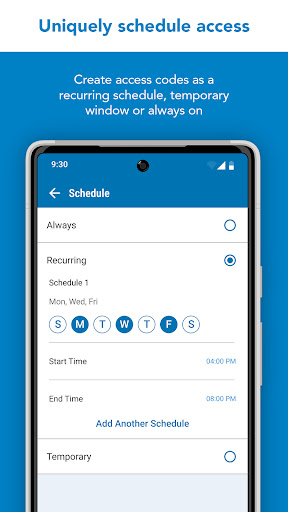
- Schedule access codes as always-on, recurring at specific times / days, or temporary with a specific start and end date / time
- Share virtual keys for full administrative access or guest lock/unlock only access
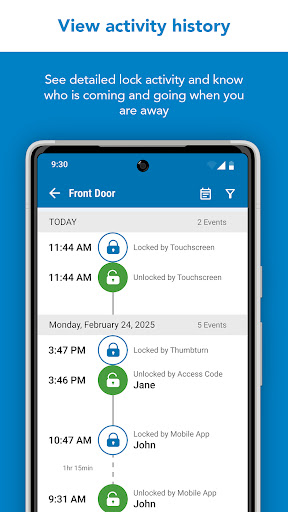
- View history log for your lock
- Customize push notifications to be alerted if specific access codes are used and when your door is locked/unlocked
- Select time delay for auto-locking
- Receive low battery advanced warnings
- Set built-in alarm warnings
- Pair with leading smart home speakers and ecosystems
SCHLAGE SENSE SMART DEADBOLT
The Schlage Sense deadbolt features Bluetooth technology allowing you to easily use your smartphone with the Schlage Home app to:
Within Bluetooth range:
- Lock/unlock and check your lock’s status
- Manage up to 30 unique access codes per lock
- Schedule access codes as always-on or recurring at specific times / days
- Share virtual keys for full administrative access or guest lock/unlock only access
- Use the history log to see activity at your lock
- Select time delay for auto-locking
- Set built-in alarm warnings based on the type of disturbance detected
You must pair with a Schlage Sense WiFi Adapter and your home WiFi network to:
- Control and monitor your lock remotely
- Pair with leading smart home speakers and ecosystems
- Receive push notifications when specific access codes are used or when your door is locked/unlocked
- Make your Schlage Sense Smart Deadbolt accessible when you are away from home with Apple HomeKit. Remotely control and automate your lock with the Apple Home app when used with a HomePod, Apple TV or iPad set up as a home hub.
The Schlage Connect® Smart Deadbolt is not supported by the Schlage Home app. Visit Schlage’s website for more information on compatible home hubs and apps for the Schlage Connect Smart Deadbolt.
Works best in Google and Samsung flagship phones.
SCHLAGE ENCODE SMART WIFI DEADBOLT & LEVER
AND SCHLAGE ENCODE PLUS SMART WIFI DEADBOLT
These locks feature built-in WiFi so you don’t need to purchase additional hubs or accessories for remote access of your lock. When a lock is paired to your smartphone and connected to your home’s WiFi network, conveniently use the Schlage Home app to:
- Lock/unlock, check your lock’s status from anywhere
- Manage up to 100 unique access codes per lock
- Schedule access codes as always-on, recurring at specific times / days, or temporary with a specific start and end date / time
- Share virtual keys for full administrative access or guest lock/unlock only access
- View history log for your lock
- Customize push notifications to be alerted if specific access codes are used and when your door is locked/unlocked
- Select time delay for auto-locking
- Receive low battery advanced warnings
- Set built-in alarm warnings
- Pair with leading smart home speakers and ecosystems
SCHLAGE SENSE SMART DEADBOLT
The Schlage Sense deadbolt features Bluetooth technology allowing you to easily use your smartphone with the Schlage Home app to:
Within Bluetooth range:
- Lock/unlock and check your lock’s status
- Manage up to 30 unique access codes per lock
- Schedule access codes as always-on or recurring at specific times / days
- Share virtual keys for full administrative access or guest lock/unlock only access
- Use the history log to see activity at your lock
- Select time delay for auto-locking
- Set built-in alarm warnings based on the type of disturbance detected
You must pair with a Schlage Sense WiFi Adapter and your home WiFi network to:
- Control and monitor your lock remotely
- Pair with leading smart home speakers and ecosystems
- Receive push notifications when specific access codes are used or when your door is locked/unlocked
- Make your Schlage Sense Smart Deadbolt accessible when you are away from home with Apple HomeKit. Remotely control and automate your lock with the Apple Home app when used with a HomePod, Apple TV or iPad set up as a home hub.
The Schlage Connect® Smart Deadbolt is not supported by the Schlage Home app. Visit Schlage’s website for more information on compatible home hubs and apps for the Schlage Connect Smart Deadbolt.
Works best in Google and Samsung flagship phones.
What's New
General Bug fixes
App Information
Version Name
4.4.0
Version Code
1123701551
File Size
69.4 MB
Minimum OS
Android 11+
Target SDK
Android 33
Developer
Schlage Lock Company, LLC
Contact
Website
Content Rating
Everyone
Package Name
com.allegion.leopardPermissions Required
This app may request the following permissions:
Recent Reviews

n chili
1.0★
App worked fine. No issues with setup. Occasional connection issues, but it at the extreme limit of my wifi range, so that's expected. I basically reinstall it each time I need to add/change an access code. Just incredibly annoying that it forces you to use a lock screen on your phone or the app won't work. Believe it or not, I'm capable of deciding for myself how secure (or not) I want my phone to be

Ria Nicholas
5.0★
I use this lock on a vacation rental property. So far, it's been very easy to use - both at my end and for my guests. I'm many miles away and can schedule and specifically time temporary codes. I can also see when the batteries need to be changed. If necessary, I can access who unlocked the door to see if the housekeeper has been there to clean it. Highly recommend!

Heather S
2.0★
I've had the lock for a little over 2 months & there are times when the keypad will not respond. I have changed the batteries. I'm not sure if the contacts on the battery pack. Also the app shows that the wifi is not connected when nothing else in my house has an issue with the wifi. I have tried to manually reset it and nothing. Eventually it will reset itself. The reason I purchased it was for the app features to lock/unlock the door and w/owifi you can't. Disappointing for the amount of $$$

William Robison
1.0★
This app has become very annoying and less useful. It doesn't read the current state of the lock. If I unlock the door and it auto locks (per the settings). it doesn't show as locked. then it takes way too long standing at the door for the app to read the state. most of the time you have to "lock" using the app for it to read as locked. The layout is improved though. I have lowered my rating of this app from three stars to one star. Come on Schlange you can do better.

ben brown
1.0★
This app used to work well. But recently it started to exhibit a big problem. When I lock/unlock the door using the app, the physical lock responds within 2 seconds. But the app takes up to 30 minutes to update lock status. This means that you can't know the true state of the lock for some time. I tried resetting the lock by pulling the batteries, confirming my mesh router has a super strong signal and more, but no change. Maybe the latest app update messed things up? SCHLAGE-PLEASE FIX.

S F
2.0★
5 years later, still no push for any error status other than low battery. Randomly auto logs you out of the app. Still no push alerts for any error status(failed to lock) in the door 2 years later. You figure that would be an integral notification. Needs a push alert for error status, when the door doesn't lock or has an unknown status on the app. Otherwise works as intended and expected.
Ad slot: In-Content