
Time Planner: Schedule & Tasks
com.albul.timeplanner
by Oleksandr Albul
Screenshots





Ad slot: Top Leaderboard
About this app
Do you also keep planning 100 things a day to see you accomplish maximum 10 in the end?
Does your time fly very fast as well?
Have you ever thought, where it has disappeared?
Quit wondering where, see it with your own eyes!
If you are tired of keeping lots of time management apps like calendars, to-do lists, habit trackers, timers, alarms, note pads, try Time Planner that has all those tools included. Save time and boost your productivity in different areas of life!
Why this App?
• Fast and optimized time management tool
• Absolutely no ads (seriously!)
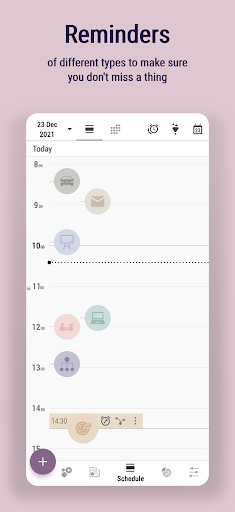
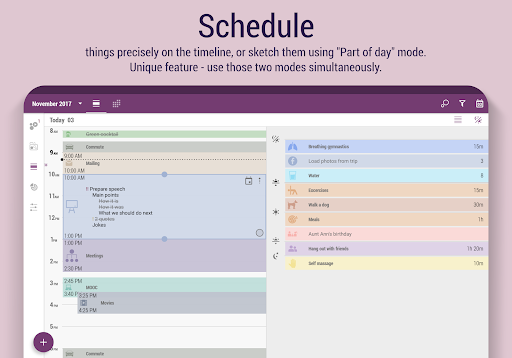
• Convenient schedule with timeline and part of the day modes
• Easy time tracking with bubbles
• Handy customizing with loads of icons and colors
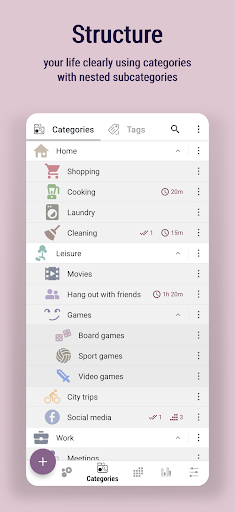
• Hierarchical structure of categories and subcategories
• Reminders of different types
• Task priority marks
• Notes with rich formatting
• Alarm + captcha to fight procrastination
• Moon calendar
• Import events from Google calendar
• Backup
Additionally for Pro version:
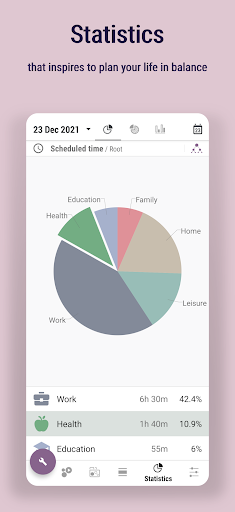
▸ Unlimited and detailed statistics of your expectations and the reality
▸ Multiple nesting levels of subtasks
▸ Various filters
▸ Timer, stopwatch and countdown
▸ Widget for quick access
▸ Enriched settings, including more sounds
Also our users proved this app goes well with:
🌞 Early wake ups
🚰 Water drinking monitoring
🚭 Controlling bad habits like smoking
📥 Quitting constant email / feed checking
⚖️ Finding balance between work and family
🎾 Making more time for hobbies
🏠 FlyLady housekeeping system
🥕 Finding self motivation to get things done
🎯 Being focused and concentrated on what you're doing
Follow us:
https://www.facebook.com/OlekdiaTimePlanner
https://www.youtube.com/c/olekdia
https://olekdia.groups.io/g/timeplanner/topics
Does your time fly very fast as well?
Have you ever thought, where it has disappeared?
Quit wondering where, see it with your own eyes!
If you are tired of keeping lots of time management apps like calendars, to-do lists, habit trackers, timers, alarms, note pads, try Time Planner that has all those tools included. Save time and boost your productivity in different areas of life!
Why this App?
• Fast and optimized time management tool
• Absolutely no ads (seriously!)
• Convenient schedule with timeline and part of the day modes
• Easy time tracking with bubbles
• Handy customizing with loads of icons and colors
• Hierarchical structure of categories and subcategories
• Reminders of different types
• Task priority marks
• Notes with rich formatting
• Alarm + captcha to fight procrastination
• Moon calendar
• Import events from Google calendar
• Backup
Additionally for Pro version:
▸ Unlimited and detailed statistics of your expectations and the reality
▸ Multiple nesting levels of subtasks
▸ Various filters
▸ Timer, stopwatch and countdown
▸ Widget for quick access
▸ Enriched settings, including more sounds
Also our users proved this app goes well with:
🌞 Early wake ups
🚰 Water drinking monitoring
🚭 Controlling bad habits like smoking
📥 Quitting constant email / feed checking
⚖️ Finding balance between work and family
🎾 Making more time for hobbies
🏠 FlyLady housekeeping system
🥕 Finding self motivation to get things done
🎯 Being focused and concentrated on what you're doing
Follow us:
https://www.facebook.com/OlekdiaTimePlanner
https://www.youtube.com/c/olekdia
https://olekdia.groups.io/g/timeplanner/topics
What's New
* Logged activities are in Schedule tab (see Filters)
* Logged activities can be moved and resized in Schedule tab
* Filters in Logging tab are revised and search by text added
* New default value for scheduled activity - "event type"
* Logged activities can be moved and resized in Schedule tab
* Filters in Logging tab are revised and search by text added
* New default value for scheduled activity - "event type"
App Information
Version Name
3.22.0_6 (Massive Star)
Version Code
322006
File Size
11.5 MB
Minimum OS
Android 5.0+
Target SDK
Android 33
Developer
Oleksandr Albul
Contact
Website
Content Rating
Everyone
Package Name
com.albul.timeplannerPermissions Required
This app may request the following permissions:
Recent Reviews

Sarah Beyer
5.0★
What I was looking for in an app! I use it for our weekday schedule to ensure I allot time for housework, playing with the kids, being with my partner and personal time. I open the app when I am having trouble being motivated or feel guilty about how I am managing my time. I follow what I already outline. It has a timer for each activity, so I can set it and get to work! One improvement could be to make each activity more blocky so they don't overlap if in the same time slot.

A Google user
4.0★
I actually really like this app, I feel like there's potential. However, it is confusing, having many components. I wish there's a how-to video. I wish they had an option for 'rituals' (also the name isn't appealing) of making changes, like changing time for a certain one without having all the other change like Google calendar, you change one event's day and time but the rest is same. Also I found that I can't extend time to from present day to next day (10pm to 1am next day).

David Bolt
3.0★
This app is okay. I scheduled several tasks to reoccur every day but when I marked them as completed they would never refresh and go back to incomplete each morning. Instead, I had to go and rest my own stuff everyday. I also think theres just too much going on, managing asks and keeping track of stuff required really sitting down and focusing for a few minutes and ultimately, while it was helpful to remember stuff, took up a lot of time.

Ravyn Mikhail
5.0★
I absolutely love this app, and use it for scheduling everything! The only things I'd ask - if you set the alarm strength to alarm, you have the ability to choose custom sounds. However, this isn't available in the notification alarm strength. I'd really like it to be!! I would also really like to be able to set an end date for my intents. Lastly, if there could be a widget for displaying the "Schedule" section (kind of like Google calendar does) I would be so happy! But guys, this app is best!!

Ellie Sine
3.0★
Pretty customization. App is very functional too, but...BUT, the alarms/notifications! I set an alarm, then it would just not turn off. Even if I turned the main volume down on my phone. I only got it to stop by turning off my phone. I searched reviews and found that I needed to turn on the app pop-ups. I did that and now no alarms won't sound at all. PLEASE include a section about hearing alarms in the tutorial. I am open to hearing suggestions, but will probably just find something else.

Dianne Hunter
4.0★
This app does SO much! I've been using getting aquatinted with all it's features for about 4 days now. Only reason I didn't give a five star rating is ease of use isn't there. I feel/know I'm not using everything it has to offer, but will have it all mastered at some point! 🙂 Love being able to create categories and sub-categories. Great organizer, list maker, event tracker, and calendar visual for everything I am trying to remember and accomplish, especially healthy body and mind habits.
Ad slot: In-Content