
Alarm Clock Xtreme & Timer
com.alarmclock.xtreme.free
by AVG Labs
Screenshots


Ad slot: Top Leaderboard
About this app
Wake up gently to your favorite music and avoid accidentally disabling your alarm with Alarm Clock Xtreme Free! Our smart alarm clock includes features that prevent excessive snoozing and get you out of bed.
Join over 50,000,000 people who have already installed this app!
Download the redesigned Alarm Clock Xtreme Free (with timer and stopwatch) NOW
Alarm Clock Xtreme is more than your basic alarm clock. It’s highly customizable, allowing you to wake up in whatever way works for you.
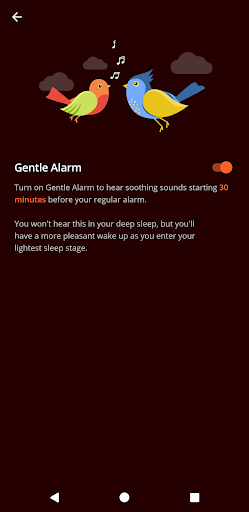
♪ Set your morning alarm to slowly increase in volume and wake you up gently
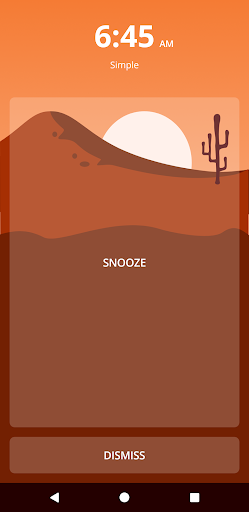
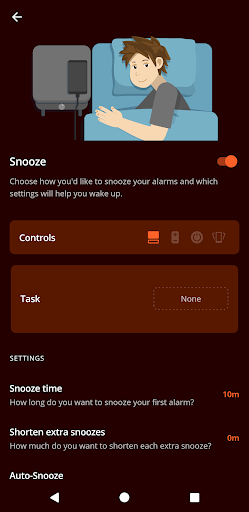
♪ Use the extra-large snooze button to prevent you from accidentally pressing ‘dismiss’
♪ Jump-start your brain by solving math problems to snooze/dismiss the alarm
♪ Decrease snooze interval time and set a maximum number of snoozes. Perfect if you are a sound sleeper.
♪ Easily deactivate your alarm if you wake up before it goes off.
♪ Use Quick Alarm to speedily set a non-recurring alarm.
FEATURES
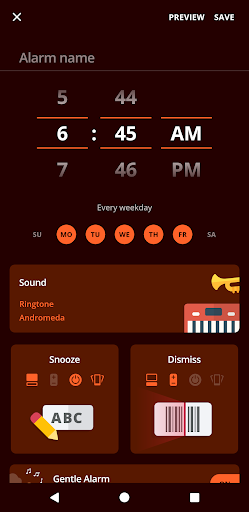
Alarm — Personalize your alarm to never oversleep again! Our alarm clock offers the following dismiss options: screen button, volume buttons, power button, or shaking your phone.
Quick Alarm — Set a non-recurring alarm in just a few taps.
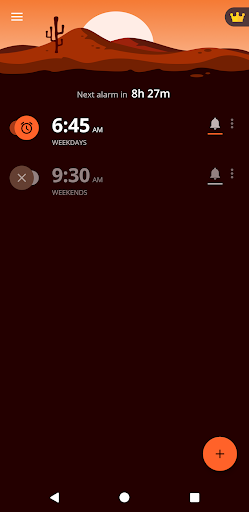
Upcoming alarm notification — Easily deactivate your alarm if you wake up before it goes off.
Timer — Enter required time and start timer. You can set as many timers as you want for activities like exercise, cooking, and more!
Stopwatch — Use our simple and reliable stopwatch to keep track of split/lap time and total time down to 1/100 of a second.
My day — Display the most important information you need when you wake up, such as the day’s weather forecast and upcoming events synced from your calendar.
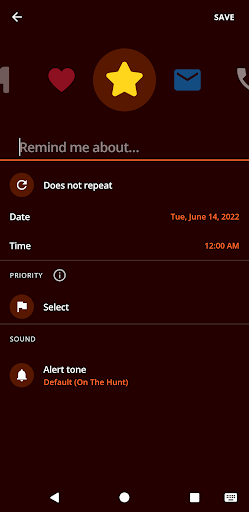
Reminders – Never forget an important task or event again thanks to our newest feature!
ALARM RINGTONE OPTIONS
Ringtone — Default ringtones from your device.
Music on device — Any music downloaded onto your device can be used as your alarm clock ringtone.
Online Radio — Choose from many popular online radio stations, or add your own if your favorite isn’t already on the list.
None — Don’t want any sound? Wake up using only vibrations.
HOW TO AVOID ACCIDENTALLY DISABLING YOUR ALARM
Choose one of the puzzles available in Alarm Clock Xtreme!
Puzzle appears only after you hit the dismiss button.
PUZZLE
Math — Solve math problems. You get to choose the difficulty level: Easiest, Easy, Medium, Hard, Hardest. If solving one problem isn’t enough, increase the number of problems from 1 up to 5.
Password — To turn off the alarm, you must retype the password that appears on the screen.
QR/Barcode — Scan any QR code to add it into your code library. Print the QR code and place it far from your bed. When your alarm goes off, you’ll have to scan the QR code to dismiss the alarm.
App Launch — Choose an app on your device that will launch after you turn off your alarm.
None — If you trust yourself to not hit dismiss or snooze when your alarm goes off, then no puzzle is needed.
With these puzzles you will never oversleep again.
Reminders (NEW!)
- Customize each reminder with name, icon, or ring tone
- Set repeat intervals: annually, monthly, weekly, daily, hourly, or several times a day
- Choose a priority for each reminder: decide how urgent each reminder is, and how you want to be reminded
** Important Note: your phone must be on for the alarm to work **
Download Alarm Clock Xtreme Free (with timer and stopwatch) NOW!
Alarm Clock Xtreme Free features:
✔ Music alarm – choose your favorite music
✔ Gentle alarm with increasing volume
✔ Wake-up check
✔ Quick alarms
✔ Upcoming alarm notifications
✔ Random song alarm
✔ Solve math problem to snooze/disable
✔ Extra-large snooze button
✔ Nap alarm with countdown timer
✔ Decreasing snooze interval after every snooze
✔ Set a maximum number of snoozes
✔ Auto-snooze
✔ Auto-dismiss
✔ Built-in Stopwatch
✔ Built-in Timer
✔ Reminders
Join over 50,000,000 people who have already installed this app!
Download the redesigned Alarm Clock Xtreme Free (with timer and stopwatch) NOW
Alarm Clock Xtreme is more than your basic alarm clock. It’s highly customizable, allowing you to wake up in whatever way works for you.
♪ Set your morning alarm to slowly increase in volume and wake you up gently
♪ Use the extra-large snooze button to prevent you from accidentally pressing ‘dismiss’
♪ Jump-start your brain by solving math problems to snooze/dismiss the alarm
♪ Decrease snooze interval time and set a maximum number of snoozes. Perfect if you are a sound sleeper.
♪ Easily deactivate your alarm if you wake up before it goes off.
♪ Use Quick Alarm to speedily set a non-recurring alarm.
FEATURES
Alarm — Personalize your alarm to never oversleep again! Our alarm clock offers the following dismiss options: screen button, volume buttons, power button, or shaking your phone.
Quick Alarm — Set a non-recurring alarm in just a few taps.
Upcoming alarm notification — Easily deactivate your alarm if you wake up before it goes off.
Timer — Enter required time and start timer. You can set as many timers as you want for activities like exercise, cooking, and more!
Stopwatch — Use our simple and reliable stopwatch to keep track of split/lap time and total time down to 1/100 of a second.
My day — Display the most important information you need when you wake up, such as the day’s weather forecast and upcoming events synced from your calendar.
Reminders – Never forget an important task or event again thanks to our newest feature!
ALARM RINGTONE OPTIONS
Ringtone — Default ringtones from your device.
Music on device — Any music downloaded onto your device can be used as your alarm clock ringtone.
Online Radio — Choose from many popular online radio stations, or add your own if your favorite isn’t already on the list.
None — Don’t want any sound? Wake up using only vibrations.
HOW TO AVOID ACCIDENTALLY DISABLING YOUR ALARM
Choose one of the puzzles available in Alarm Clock Xtreme!
Puzzle appears only after you hit the dismiss button.
PUZZLE
Math — Solve math problems. You get to choose the difficulty level: Easiest, Easy, Medium, Hard, Hardest. If solving one problem isn’t enough, increase the number of problems from 1 up to 5.
Password — To turn off the alarm, you must retype the password that appears on the screen.
QR/Barcode — Scan any QR code to add it into your code library. Print the QR code and place it far from your bed. When your alarm goes off, you’ll have to scan the QR code to dismiss the alarm.
App Launch — Choose an app on your device that will launch after you turn off your alarm.
None — If you trust yourself to not hit dismiss or snooze when your alarm goes off, then no puzzle is needed.
With these puzzles you will never oversleep again.
Reminders (NEW!)
- Customize each reminder with name, icon, or ring tone
- Set repeat intervals: annually, monthly, weekly, daily, hourly, or several times a day
- Choose a priority for each reminder: decide how urgent each reminder is, and how you want to be reminded
** Important Note: your phone must be on for the alarm to work **
Download Alarm Clock Xtreme Free (with timer and stopwatch) NOW!
Alarm Clock Xtreme Free features:
✔ Music alarm – choose your favorite music
✔ Gentle alarm with increasing volume
✔ Wake-up check
✔ Quick alarms
✔ Upcoming alarm notifications
✔ Random song alarm
✔ Solve math problem to snooze/disable
✔ Extra-large snooze button
✔ Nap alarm with countdown timer
✔ Decreasing snooze interval after every snooze
✔ Set a maximum number of snoozes
✔ Auto-snooze
✔ Auto-dismiss
✔ Built-in Stopwatch
✔ Built-in Timer
✔ Reminders
What's New
We are always working to maintain this app in tip top shape and improve its functionalities. To learn details about the most important recent changes, please open the app and navigate to "What's new" screen. It can be directly accessed from the main menu. Thank you for using our app!
App Information
Version Name
24.04.0
Version Code
70004141
File Size
20.1 MB
Minimum OS
Android 9+
Target SDK
Android 34
Developer
AVG Labs
Contact
Website
Content Rating
Everyone
Package Name
com.alarmclock.xtreme.freePermissions Required
This app may request the following permissions:
Recent Reviews

Patti Johnson
3.0★
Usually great, sometimes glitches. Most mornings this works perfectly, but once or twice a week it won't accept any characters being typed as an answer to a math problem. I've cleared the cache and even uninstalled and reinstalled the app, but it still happens. The app was perfect until somewhat recently (maybe 6 months ago? I don't remember when it started glitching). I'll continue using, and hoping it fixes itself for now.

Stephanie Wilson
3.0★
used to really love this app but, ever since I switched my phone, it doesn't work the same. the alarm no longer takes over the screen (whether my device is locked or not), so I always have to go open the app to turn it off or snooze it. I've tried adjusting the settings but nothing helps. at this time I've chosen to uninstall and try to find another alarm app

Jennie “zellsbells” Zell
5.0★
Apparently I've been using this alarm for 10 years now! I wish it had a watch OS version, devs please consider it. would love to have a vibration only alarm -- original review - 11/18/15 I am always sleeping through my alarms. The customizable settings keep me from snoozing too many times and forces me to wake up. I love that I can change up the routine every once in a while so I don't get used to it and start oversleeping again like I do with most alarms

Marcelina Smith
3.0★
Every so often this app goes on the fritz. Most recently, I can't get the alarms to stop!! Had an alarm set for 7:30am, I woke up to it & dismissed it. It went off every so often for the next 2 hours until I had finally had it and shut my phone off entirely. I was dismissing it, solving the math equations etc and there's a limit of 4 10 minutes snoozes so I just REALLY don't understand 2 hours! Wish I bought a different 3rd party alarm app because it's literally always something with this one

Angela Bitz
4.0★
I didn't like some of the recent changes to my built -in clock and checked this one out. I love the customizability for alarm settings, especially for snoozing! The only thing I regularly wish is that, like my built-in alarm, I could choose a future day for an alarm. As in, set an alarm for November 13, or for the third Wednesday if each month. Maybe in the future sometime??

Tasha J
2.0★
Update: Now app won't even open! Ever since I got a new phone in 2021, my phone now overrides the volume setting on every single alarm I have...to "stun"...full volume EVERY single time it goes off- even if I override phone volume each time. I can't figure out how to fix it. Also if the alarm is going off in the background because I'm doing something else on the phone at the time, the auto snooze feature won't work...which then messes with the next time it's scheduled to go off. Frustrated.
Ad slot: In-Content