
Spectrolizer - Music Player +
com.aicore.spectrolizer
by AICore Software
Screenshots









Ad slot: Top Leaderboard
About this app
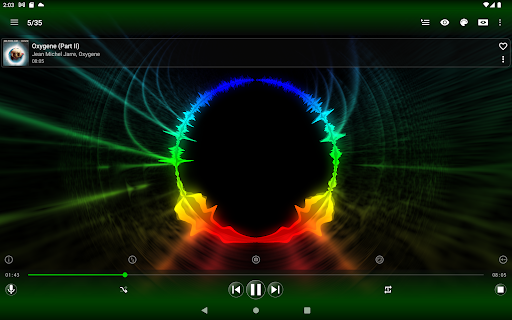
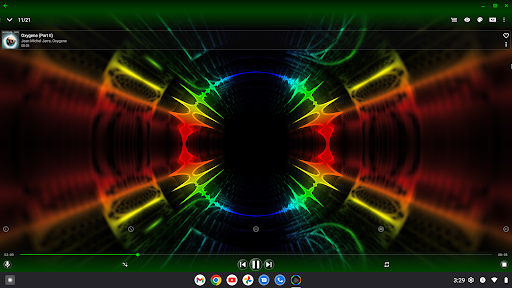
Spectrolizer is unique, hybrid audio player with stereo, spectrographic, interactive 3D music visualizer, based on advanced psychoacoustic spectrum analysis technology, developed by AICore Software.
What you will get in Spectrolizer:
MUSIC VISUALIZER with:
✓ Multiple Layout and Color presets.
✓ Layout and Color presets editor.
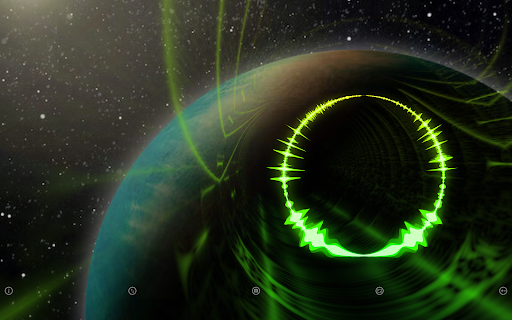
✓ Multiple View Modes (Normal, Kaleidoscope, Sensors & VR, Pyramidal Reflector, Simple Reflector, dB Analyzer).
✓ Multiple Presentation Modes (Light Show, Ink Show, Custom Show with your own images on background).
✓ Multiple Interaction Modes which allows you to perform various actions inside a 3D scene of visualizer: rotation, movement, scaling.
✓ Ability to display the Visualization on external HDMI Display.
MUSIC PLAYER with:
✓ Ability to play your tracks from Media Library or directly from storage or external USB storage folders.
✓ Ability to play Internet Media Streams.
✓ Media Library Browser with lots of features like sorting and grouping media tracks by Title, Album, Artist, Year, Duration, Date added, Folder, File Name or File Size.
✓ Ability to import M3U and PLS Playlists.
✓ Sound Effects: Bass Boost, Equalizer, Reverb and more.
✓ Multiple queues.
✓ Gapless playback.
✓ Sleep Timer.
✓ Music playback Widget.
INTERNET RADIO PLAYER with:
✓ Radio browser with thousands of radio stations from around the world, making it easy to find what you want by country, language or tag.
✓ Ability to filter and search for radio stations, as well as the ability to pin a list of preferred results for quick future reference.
AUDIO SPECTRUM ANALYZER
Spectrolizer can visualize not only playing music, but also the audio recorded from the microphone of your device. You can easily turn the Spectrolizer into a powerful Audio Spectrum Analyzer, for this purpose it has:
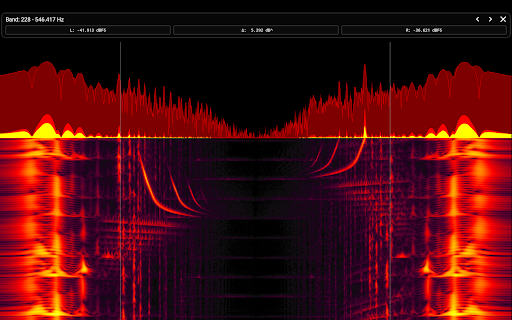
✓ Special View Mode "dB Analyzer", which works with dB levels instead of psychoacoustic levels.
✓ Special flat Layout presets with no effects - more suitable for convenient spectrogram observation.
✓ Special high sensitive Color presets - more suitable for convenient spectrogram observation.
✓ Special Interaction Mode with Band Analyzer, which will show you dB level values of the selected band.
✓ Others convenient features. For example: Spectral Magnification (to make quiet signals more visible).
Enjoy using the Spectrolizer:
✓ As Color / Light Organ for home disco parties.
✓ With external HDMI Display, Ambilight TV or Projector.
✓ With VR Headset.
✓ With Pyramidal Reflector (Holographic Pyramid).
We use only main sound tones and most significant harmonics (overtones) displayed via pure high quality spectrograms and spectrum graphs generated at real-time.
In Spectrolizer, no pixel is drawn for no reason - just for beauty. All that you see is real data produced by a spectrum analyzer, and there is a lot of this data: Our spectrum analyzer has incredible characteristics and can produce real-time analysis for 600 bands (RTA 1/60) in stereo - total 1200 bands, and with result rate up to 500 results per second for each band. Eventually it can produce up to 600 000 results (new pixels in textures) per second (depends on CPU of device).
This makes the Spectrolizer the most effective music visualizer with the highest degree of correlation between a sound and produced visual content.
Only with Spectrolizer you will see how the singer's voice vibrates, you will see each beat of drumroll, you will not miss any of the shortest acoustic chirp (sweep signal), you will understand that the difference in the sound of various instruments can not only be heard, but also seen.
What you will get in Spectrolizer:
MUSIC VISUALIZER with:
✓ Multiple Layout and Color presets.
✓ Layout and Color presets editor.
✓ Multiple View Modes (Normal, Kaleidoscope, Sensors & VR, Pyramidal Reflector, Simple Reflector, dB Analyzer).
✓ Multiple Presentation Modes (Light Show, Ink Show, Custom Show with your own images on background).
✓ Multiple Interaction Modes which allows you to perform various actions inside a 3D scene of visualizer: rotation, movement, scaling.
✓ Ability to display the Visualization on external HDMI Display.
MUSIC PLAYER with:
✓ Ability to play your tracks from Media Library or directly from storage or external USB storage folders.
✓ Ability to play Internet Media Streams.
✓ Media Library Browser with lots of features like sorting and grouping media tracks by Title, Album, Artist, Year, Duration, Date added, Folder, File Name or File Size.
✓ Ability to import M3U and PLS Playlists.
✓ Sound Effects: Bass Boost, Equalizer, Reverb and more.
✓ Multiple queues.
✓ Gapless playback.
✓ Sleep Timer.
✓ Music playback Widget.
INTERNET RADIO PLAYER with:
✓ Radio browser with thousands of radio stations from around the world, making it easy to find what you want by country, language or tag.
✓ Ability to filter and search for radio stations, as well as the ability to pin a list of preferred results for quick future reference.
AUDIO SPECTRUM ANALYZER
Spectrolizer can visualize not only playing music, but also the audio recorded from the microphone of your device. You can easily turn the Spectrolizer into a powerful Audio Spectrum Analyzer, for this purpose it has:
✓ Special View Mode "dB Analyzer", which works with dB levels instead of psychoacoustic levels.
✓ Special flat Layout presets with no effects - more suitable for convenient spectrogram observation.
✓ Special high sensitive Color presets - more suitable for convenient spectrogram observation.
✓ Special Interaction Mode with Band Analyzer, which will show you dB level values of the selected band.
✓ Others convenient features. For example: Spectral Magnification (to make quiet signals more visible).
Enjoy using the Spectrolizer:
✓ As Color / Light Organ for home disco parties.
✓ With external HDMI Display, Ambilight TV or Projector.
✓ With VR Headset.
✓ With Pyramidal Reflector (Holographic Pyramid).
We use only main sound tones and most significant harmonics (overtones) displayed via pure high quality spectrograms and spectrum graphs generated at real-time.
In Spectrolizer, no pixel is drawn for no reason - just for beauty. All that you see is real data produced by a spectrum analyzer, and there is a lot of this data: Our spectrum analyzer has incredible characteristics and can produce real-time analysis for 600 bands (RTA 1/60) in stereo - total 1200 bands, and with result rate up to 500 results per second for each band. Eventually it can produce up to 600 000 results (new pixels in textures) per second (depends on CPU of device).
This makes the Spectrolizer the most effective music visualizer with the highest degree of correlation between a sound and produced visual content.
Only with Spectrolizer you will see how the singer's voice vibrates, you will see each beat of drumroll, you will not miss any of the shortest acoustic chirp (sweep signal), you will understand that the difference in the sound of various instruments can not only be heard, but also seen.
What's New
✓ Major changes to the Camera Animator aimed at keeping the scene in the field of view to make movements more accurate and comfortable for the observer.
✓ Added a camera return timeout, which will allow for a longer period in manual camera positioning state, as well as the ability to reset this state with a long press on the screen.
✓ A large number of other changes in the visualization mode configurators: updated terms, translations, and added clarifications.
✓ Added a camera return timeout, which will allow for a longer period in manual camera positioning state, as well as the ability to reset this state with a long press on the screen.
✓ A large number of other changes in the visualization mode configurators: updated terms, translations, and added clarifications.
App Information
Version Name
1.41.157
Version Code
157
File Size
16.1 MB
Min SDK
Android 21+
Target SDK
Android 34
Developer
AICore Software
Contact
Website
Content Rating
Teen
Package Name
com.aicore.spectrolizerPermissions Required
This app may request the following permissions:
Recent Reviews

Ryan Colvin
5.0★
There's just no other music visualizer like it!... Not only do you have a lot of choices to visualize your music, but the fact that it's also a frequency analyzer makes it that much better!... The spectrum analyzer helps me out tremendously when I'm mixing my songs because I can compare it to professionally mastered tracks and get a good idea where my levels for each instrument should be... My only suggestion is to make an even higher resolution if possible! Thanks a lot!...

Kyle
5.0★
Absolutely fantastic, thousands of different options for display, thousands of radio stations, acces to downloads, custom displays, small ads, plays sound even when you're not on the app. IF you want to listen to music from your favorite app like Spotify, unfortunately that's not an option, so I recommend this for people who like the radio or have downloads. Overall, for the features it had, 10/10

A Google user
5.0★
Wow! The sound is a garbled, distorted, muted mess through headphones. Not sure what's going on with that. Everything looks great, but all music is unusable. UPDATE: No, it wasn't background processes. When I tried the app through the phone's speaker, it sounded fine, which led me to investigate further. On the latest Samsung phones, if using the UHQ Upscaler, you need to select "Bit AND bandwidth upscaling." If only "Bit" is selected, you'll kill your ears.

Kenneth Khou (Ken)
5.0★
One of the if not THE best music player and visualizer apps on any phone device currently. The ability to randomizer both visualizer, music and settings is wonderful and intuitive. The ads aren't invasive either which is far better than other apps. I wish there was a way to scroll through music quicker than having to scroll down every single song. Like having the ability to click on the letter in the alphabet to skip ahead for instance. Great app! Room for small improvements.
A Google user
4.0★
Visualizer works great. Best out of all the apps ive tried so far! Great work! But I only have one problem: How do i download the visualizer? (If that's even a possibility). If there is a way, how? Hopefully without the black/white background. But it'd be okay with it i guess. Thankyou. Edit: As in download, I mean like how you'd download a song. Download the song I used with the visualizer. Ultimately, downloading a video of the visualizer with the music behind it. Like how'd you see in a yt vid

teo bis
5.0★
Great app, I've used it for 3+ yrs.If it's possible I would like to recommend a small update: I use a lot the playlist feature and I often get duplicate tracks in them because for the life of me I can't remember if I've added that specific track or not. I thought a possible solution for this: when I select for a track "Add to playlist..." and choose from "Selected playlist", before i can hit "OK" I get a notification or some prompt that tells me that I already have that track in that playlist.
Ad slot: In-Content