

Adobe Scan AI PDF Scanner, OCR
com.adobe.scan.android
by Adobe
Screenshots




Ad slot: Top Leaderboard
About this app
New: Generative summary is now in Adobe Scan. One tap pulls the key points from any scan, so you can find what matters and summarize your docs in a tap with AI.
Adobe Scan is free to download and turns your mobile device into a powerful PDF and document scanner that helps you create, save, and organize your paper documents as digital files.
5 WAYS TO USE ADOBE SCAN
1) Make a PDF with your phone: Convert paper documents or printed images into PDFs or JPEGs with the mobile PDF and photo scanner.
2) Ask AI Assistant to pull the key points from any scan, get follow-up answers or draft emails, reports, and next steps from your scan.
3) Scan faster with High-speed scan: This document scanner lets you bulk scan documents and turn stacks into PDFs in seconds.
4) Turn images to text: Use image to text to make words in your scans searchable and editable with OCR.
5) Scan anything: Receipts, IDs, notes, recipes, photos, business cards, whiteboards – scan documents into PDF or JPEG files you can work with on your phone, tablet, or computer.
CAPTURE WITH PRECISION
• Get perfect scans of book and magazine pages with Straighten in Book Mode.
• Advanced image to text technology detects borders, sharpens content, and makes your scans editable and searchable.
ENHANCE YOUR SCANS
• Edit in text lets you scan words, and handwritten text, to make it editable.
• The Modify tool helps you crop, rotate, resize, and adjust colors in your scans.
• Reorder pages and preview before saving.
• Adjust the brightness and contrast of your scans in just a few taps.
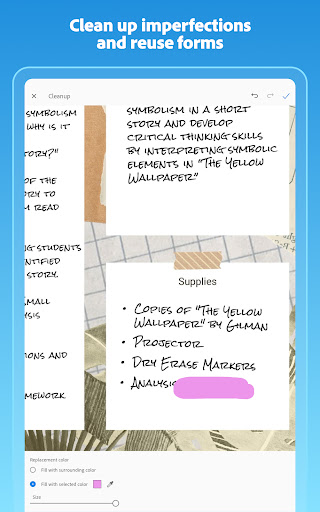
• Cleanup lets you remove and edit imperfections, erase stains, marks, creases, even handwriting.
ORGANIZE YOUR DOCUMENTS
• Scan paperwork and create custom folders for work documents, personal files, school forms, or ID scans.
• Contact details are pulled straight from business cards with image to text, so you can save them to your phone contacts in seconds.
• Scans are automatically saved to Adobe Document Cloud for instant access and sharing.
SMART LIBRARY
• This powerful doc scanner finds documents and receipts in your photo library and turns them into PDF.
• Touch up scans or photos directly from your camera roll.
REUSE & SHARE
• Make high-quality PDFs that unlock text from images – from scanned contracts to study notes – so you can copy, edit, and reuse.
• Export your scans to Word, Excel, or PowerPoint for new formats, then share.
DO MORE WITH ACROBAT READER
• Open your PDF scan in Acrobat Reader to comment, highlight, fill forms, and sign documents.
• Access and share securely across Scan, Reader, and Acrobat on web and mobile.
IN-APP PURCHASE
• Subscribe for even more scanning power. Subscriptions work across Scan and Reader mobile apps and Acrobat on the web.
• Combine scans into one file so you can take multiple scans and consolidate into one document.
• Increase OCR capacity from 25 to 100 pages so that you can find text in multiple images.
Download this free mobile scanner to convert important photos and documents into PDF and JPEG files to help you stay organized. Adobe Scan is the PDF converter trusted by millions worldwide
Terms & Conditions:
Your use of this application is governed by the Adobe General Terms of Use http://www.adobe.com/go/terms_en and the Adobe Privacy Policy http://www.adobe.com/go/privacy_policy_en
Do Not Sell or Share My Personal Information: www.adobe.com/go/ca-rights
Adobe Scan is free to download and turns your mobile device into a powerful PDF and document scanner that helps you create, save, and organize your paper documents as digital files.
5 WAYS TO USE ADOBE SCAN
1) Make a PDF with your phone: Convert paper documents or printed images into PDFs or JPEGs with the mobile PDF and photo scanner.
2) Ask AI Assistant to pull the key points from any scan, get follow-up answers or draft emails, reports, and next steps from your scan.
3) Scan faster with High-speed scan: This document scanner lets you bulk scan documents and turn stacks into PDFs in seconds.
4) Turn images to text: Use image to text to make words in your scans searchable and editable with OCR.
5) Scan anything: Receipts, IDs, notes, recipes, photos, business cards, whiteboards – scan documents into PDF or JPEG files you can work with on your phone, tablet, or computer.
CAPTURE WITH PRECISION
• Get perfect scans of book and magazine pages with Straighten in Book Mode.
• Advanced image to text technology detects borders, sharpens content, and makes your scans editable and searchable.
ENHANCE YOUR SCANS
• Edit in text lets you scan words, and handwritten text, to make it editable.
• The Modify tool helps you crop, rotate, resize, and adjust colors in your scans.
• Reorder pages and preview before saving.
• Adjust the brightness and contrast of your scans in just a few taps.
• Cleanup lets you remove and edit imperfections, erase stains, marks, creases, even handwriting.
ORGANIZE YOUR DOCUMENTS
• Scan paperwork and create custom folders for work documents, personal files, school forms, or ID scans.
• Contact details are pulled straight from business cards with image to text, so you can save them to your phone contacts in seconds.
• Scans are automatically saved to Adobe Document Cloud for instant access and sharing.
SMART LIBRARY
• This powerful doc scanner finds documents and receipts in your photo library and turns them into PDF.
• Touch up scans or photos directly from your camera roll.
REUSE & SHARE
• Make high-quality PDFs that unlock text from images – from scanned contracts to study notes – so you can copy, edit, and reuse.
• Export your scans to Word, Excel, or PowerPoint for new formats, then share.
DO MORE WITH ACROBAT READER
• Open your PDF scan in Acrobat Reader to comment, highlight, fill forms, and sign documents.
• Access and share securely across Scan, Reader, and Acrobat on web and mobile.
IN-APP PURCHASE
• Subscribe for even more scanning power. Subscriptions work across Scan and Reader mobile apps and Acrobat on the web.
• Combine scans into one file so you can take multiple scans and consolidate into one document.
• Increase OCR capacity from 25 to 100 pages so that you can find text in multiple images.
Download this free mobile scanner to convert important photos and documents into PDF and JPEG files to help you stay organized. Adobe Scan is the PDF converter trusted by millions worldwide
Terms & Conditions:
Your use of this application is governed by the Adobe General Terms of Use http://www.adobe.com/go/terms_en and the Adobe Privacy Policy http://www.adobe.com/go/privacy_policy_en
Do Not Sell or Share My Personal Information: www.adobe.com/go/ca-rights
What's New
IMPROVED:
• Performance and stability.
• Performance and stability.
App Information
Version Name
24.04.08-google-dynamic
Version Code
241338525
File Size
79.3 MB
Min SDK
Android 28+
Target SDK
Android 34
Developer
Adobe
Contact
Website
Content Rating
Everyone
Package Name
com.adobe.scan.androidPermissions Required
This app may request the following permissions:
Recent Reviews

Jim Monaco
2.0★
Garbage page detection. App should be really good, but trying to scan multiple pages in a document wastes more time than it would save. The app searches for pages to scan but it will take basically anything: your hand, the floor, a blurry picture of a coffee mug... it snaps anything and moves to the next page. It ruins any document you're trying to scan by taking a bunch of useless pictures. If you can get it to actually take a picture of a page then it's great.

A Google user
5.0★
My phone isn't a fancy brand, but does have plenty of RAM, and the camera is of good quality. That said, I did have to tweak a few settings to get my handwritten (in pencil) notes to show clearly. It didn't take long, however, and now I am really happy with the features that allow me to capture, organize, and store all my notes, and to access them from all of my devices. I prefer to save to my Google Drive account instead of Adobe Cloud and there is no problem with that. 5⭐!

ThyWarden
3.0★
I gave it 3 stars only because Scanning works well, but all the features are not free, and I wish I could pay a one time payment. $9.99 a month? Come on. It's sad cause I realIy like this app. it locks a bunch of important features. Too expensive. If it was maybe a one time fee of $10-$20 bucks then maybe, but not monthly, That's ridiculous. I'll look else where, I suggest others do the same.
A Google user
1.0★
It said you can select what you scan. YOU CAN"T. It can't even correctly select the document! In fact ,this app can't do much of anything - there are hardly any controls. It was COMPLETELY misrepresented. The ONLY control is turn off automatic capture, and that doesn't stop it from selecting HALF of SOME documents before it waits for you to press capture! I am telling you. USELESS. AND, you can't even save it to your phone! You're supposed to FIGURE OUT how to SIGN INTO ADOBE to get your files - I DO NOT THINK SO!!!!!!!!!!!!!!!!!!!!!!!!!!!!!!!!

Jason Wood
1.0★
These monthly subscription fees are apt to drive most people to bankruptcy... I get it, you've developed a brilliant piece of mobile software and you want to be fairly compensated for it's use. However, keep in mind that the average consumer will have 20-40 other pieces of software or streaming services all clamoring for monthly subscription fees at similar price points. We can't afford it. If it were a one-time $10-25, maybe. But $9.99/monthly?? Not going to happen.
A Google user
4.0★
Most of the time it works greatly. Some magical code makes sense document look like a scan through a scanner device. Then sometimes it is dark and unreadable. I use the phone camera for a standard photo. The with the app make a scan from a photo in my gallery. Overall, any improvement may come from increasing the speed of the scan, somehow. I use it for work and find it makes a difference in getting the story out.
Ad slot: In-Content