

Big Font (change font size)
com.a0soft.gphone.bfont
by AZSoft Technology Inc.
Screenshots


Ad slot: Top Leaderboard
About this app
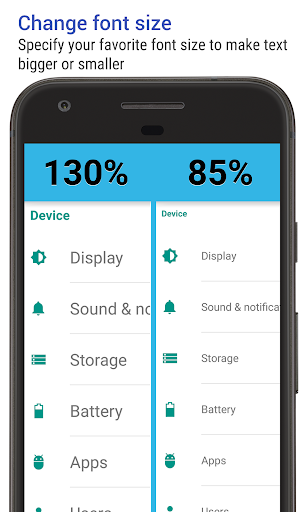
Does the default system font look too small or too large? Do you want to globally change the text size?
This app allows you to scale system font size from 25% (smaller) to 500% (bigger).
FEATURES
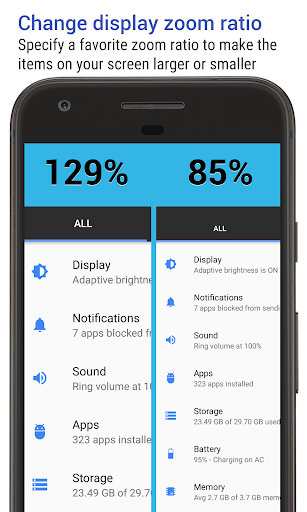
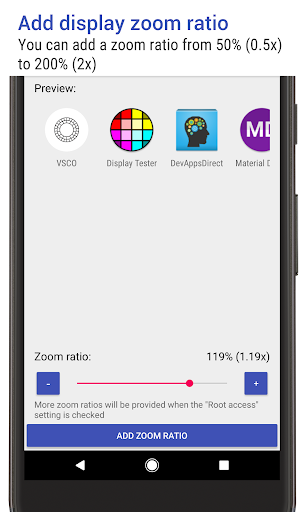
★ change display zoom ratio on Android 7.0 or greater devices
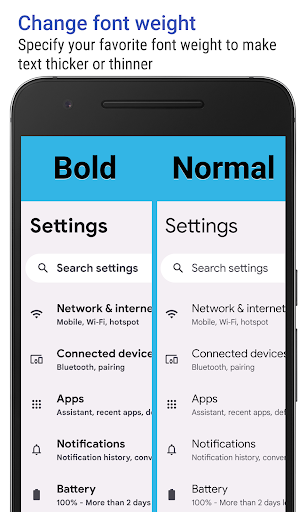
★ change system text to bold or thin on Android 12.0 or greater devices
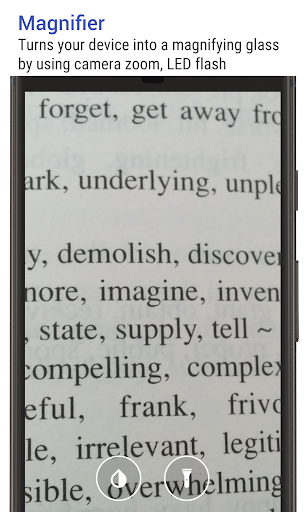
★ turns your device into a magnifying glass by using camera zoom, auto-focus, and LED flash
★ preview the scaled text before applying
★ show a notification icon describing the current font size. An option is also provided to hide it
★ switch system font size by tapping the notification
★ customized the font size scale value
PERMISSIONS
• CAMERA: used for the magnifier function
• WRITE_SETTINGS: change the font size, prevent the screen rotation during the automatic function
PRO VERSION
You can upgrade to the PRO version by purchasing a PRO license from Google Play. PRO version adds the following additional features:
★ no ads
★ unlimited font scaling values
★ unlimited zoom ratio values
★ unlimited font weight values
★ 251% or above font size
We have been selected as a Google I/O 2011 Developer Sandbox partner, for its innovative design and advanced technology.
If you are interested in helping us to translate this app into your native language, please let me know. Thanks.
Credits:
Arabic - Ibrahim almamo
Danish - Christian Stangegaard Kappelgaard
Dutch - Niko Strijbol
French - Alex...
German - Michel Müller
Italian - Michele Mondelli
Japanese - Yuanpo Chang
Polish - Dawid Zieliński
Portuguese brazilian - Wagner Santos
Russian - Идрис a.k.a. Мансур (IDris a.k.a. MANsur), Ghost-Unit
Spanish - Tomás de la Puente López
Tagalog - Angelo Laus
Turkish - Kutay KuFTi
Vietnamese - Nguyễn Trung Hậus
This app allows you to scale system font size from 25% (smaller) to 500% (bigger).
FEATURES
★ change display zoom ratio on Android 7.0 or greater devices
★ change system text to bold or thin on Android 12.0 or greater devices
★ turns your device into a magnifying glass by using camera zoom, auto-focus, and LED flash
★ preview the scaled text before applying
★ show a notification icon describing the current font size. An option is also provided to hide it
★ switch system font size by tapping the notification
★ customized the font size scale value
PERMISSIONS
• CAMERA: used for the magnifier function
• WRITE_SETTINGS: change the font size, prevent the screen rotation during the automatic function
PRO VERSION
You can upgrade to the PRO version by purchasing a PRO license from Google Play. PRO version adds the following additional features:
★ no ads
★ unlimited font scaling values
★ unlimited zoom ratio values
★ unlimited font weight values
★ 251% or above font size
We have been selected as a Google I/O 2011 Developer Sandbox partner, for its innovative design and advanced technology.
If you are interested in helping us to translate this app into your native language, please let me know. Thanks.
Credits:
Arabic - Ibrahim almamo
Danish - Christian Stangegaard Kappelgaard
Dutch - Niko Strijbol
French - Alex...
German - Michel Müller
Italian - Michele Mondelli
Japanese - Yuanpo Chang
Polish - Dawid Zieliński
Portuguese brazilian - Wagner Santos
Russian - Идрис a.k.a. Мансур (IDris a.k.a. MANsur), Ghost-Unit
Spanish - Tomás de la Puente López
Tagalog - Angelo Laus
Turkish - Kutay KuFTi
Vietnamese - Nguyễn Trung Hậus
What's New
v3.97
★ new "Color contrast" setting, Android 14+ only
★ send me an email if you'd like to help with the translation
★ bugs fixed and optimizations
v3.96
★ new setting to show or hide the bottom title text of the "Update system font" widget
v3.95/v3.94
★ new material 3 theme
★ support Android 16 devices
★ new "Color contrast" setting, Android 14+ only
★ send me an email if you'd like to help with the translation
★ bugs fixed and optimizations
v3.96
★ new setting to show or hide the bottom title text of the "Update system font" widget
v3.95/v3.94
★ new material 3 theme
★ support Android 16 devices
App Information
Version Name
2.59
Version Code
100002599
File Size
3.0 MB
Minimum OS
Android 6.0+
Target SDK
Android 22
Developer
AZSoft Technology Inc.
Contact
Website
Content Rating
Everyone
Package Name
com.a0soft.gphone.bfontPermissions Required
This app may request the following permissions:
Recent Reviews

Robert Rucker
3.0★
I have a lifetime plan to one of your other apps and I happened to run across this through that app. I'm not seeing what font it increases. I haven't seen a font size increase anywhere. Not on my home screen, not in my text messages, not in any of my apps. maybe I'm doing something incorrectly? it has a notification in the notification bar and I have it set to 180%.

A Google user
4.0★
Big Font is a big hit with me! I often switch between using my phone up close and at a distance, and Big Font's included widget (in-app purchase required, which I was more than happy to buy) makes switching text sizes on-the-fly easier than on iPhone! I absolutely would buy again! (Now if only the widget looked a little nicer and the app's interface had some careful, Material Design thought given to it, it would earn that fifth star. . . .)

Greg Searle
5.0★
Does what it says very well. Allows you to change system font size beyond what is available through the Settings app. ADVANCED: If you have ADB, you can also use this app to change the system zoom ratio (requires WRITE_SECURE_SETTINGS permission). My new Samsung would only zoom down to 88%. I wanted to set it 75%, and this app did it. This setting is system-level, so it's permanent and survives restart. You don't need to keep the app notification active. ADS: interstitial pop-up ads. Buy it!

Prem Narain
3.0★
This app has helped me a great deal in the past. Earlier I was able to increase the font size to 250% but now I am only being able to increase it till 200%. Every time i try to increase the size to 250% the app prompts a message on tje screen saying -"This device disallows you to change the system font size to 250%(2.5x)." I have not changed any settings on my phone. Kindly address this flaw. Thank you.

Sig Sorensen
5.0★
After a brief test of several of these, i really liked this app. Had to manually go in and change permissions to allow it to change system settings. However, really like the one time $3.50 purchase option. And it does what i want which is a widget that allows you to switch back and forth between 100% and a font size of your choice. This is helpful for me because I have a harder time at night.

Vincent Agbolosu
5.0★
great app. I've used it for sometime and I recommend it anyone who needs to enlarge their font. thanks developer.
Ad slot: In-Content