
AppMgr III (App 2 SD)
com.a0soft.gphone.app2sd
by AZSoft Technology Inc.
Screenshots


Ad slot: Top Leaderboard
About this app
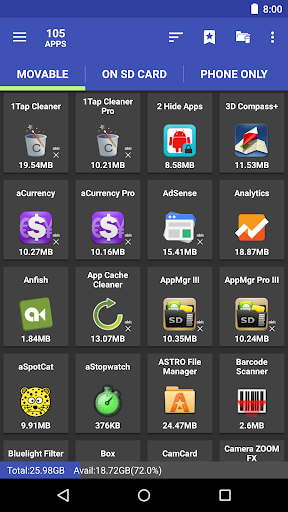
AppMgr (also known as App 2 SD) is a new design app that provides the following components:
★ Archive apps: archive apps to save storage on your Android device. Android 15+ only
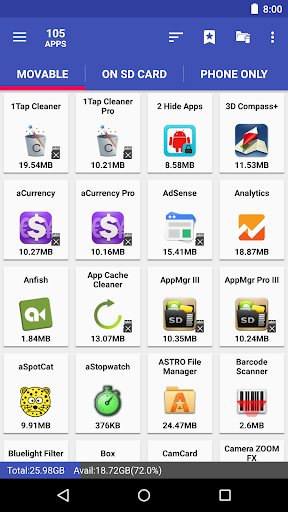
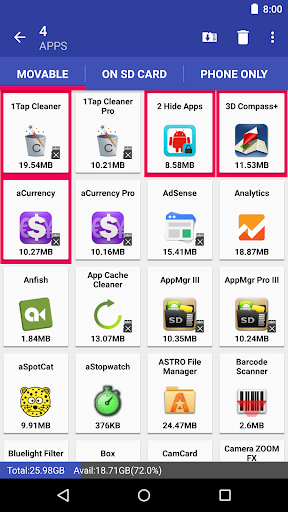
★ Move apps: moves apps to either internal or external storage to get more available app storage
★ Hide apps: hides system (built-in) apps from the app drawer
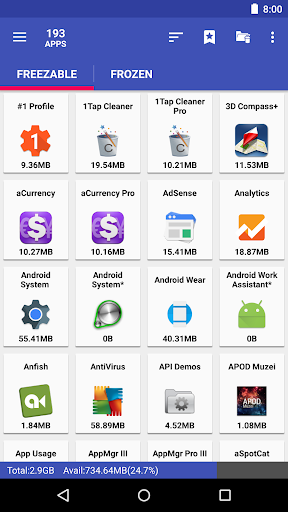
★ Freeze apps: freeze apps so they won't use any CPU or memory resources
★ App manager: manages apps for batch uninstalling, moving apps, or sharing apps with friends
Support app 2 sd for Android 6+, read http://bit.ly/2CtZHb2 if you don't see the Change button. Some devices may not be supported, visit AppMgr > Settings > About > FAQ for details.
Features:
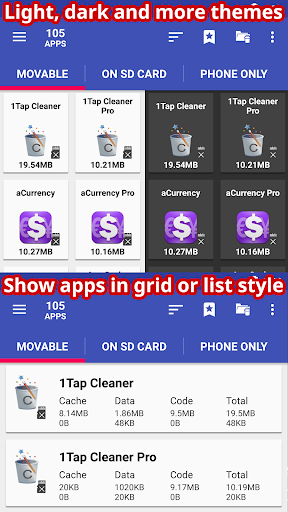
★ up-to-date UI style, themes
★ batch archive or restore apps (Android 15+ only)
★ uninstall apps
★ move apps to external storage
★ notify when movable apps installed
★ hide apps from the app drawer
★ freeze apps to a stop state
★ 1-tap to clear all cache
★ clear apps cache or data
★ batch view apps on Google Play
★ export the app list
★ install apps from the exported app list
★ No ads (PRO)
★ quick uninstall or move an app by drag-n-drop
★ sort apps by name, size, or installation time
★ share customized app list with friends
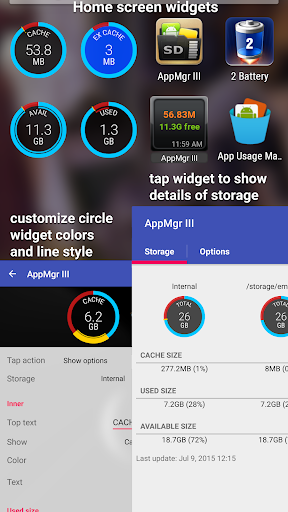
★ support home screen widgets
Functions for rooted device
★ Root uninstaller, Root freeze, Root cache cleaner
★ Root app mover(PRO-only)
Move apps
Are you running out of application storage? Do you hate having to check each and every app if it supports moving to the SD card? Do you want an app that automatically does this for you and can notify you when an app can be moved? This component streamlines the movement of apps to your device's external or internal storage through your device's Settings. With this, you'll have more control over your ever expanding collection of apps. This is crucial to anyone who has memory management issues.
Hide apps
Don't you care about all the apps your carrier adds to Android? Well, now you can get rid of them! This component lets you hide system (built-in) apps from the app drawer.
Freeze apps
You can freeze apps so they won't use any CPU or memory resources and consume zero battery. It's good for you to freeze apps that you would like to keep in the device, but don't want them to run or be uninstalled.
Permissions
• WRITE/READ_EXTERNAL_STORAGE: use to export/import the apps list
• GET_PACKAGE_SIZE, PACKAGE_USAGE_STATS: get the size information of apps
• BIND_ACCESSIBILITY_SERVICE: this app uses Accessibility services to automate the function (e.g. clear cache, move apps), optional. It helps those who have difficulty tapping and complete the task easier
• WRITE_SETTINGS: prevent the screen rotation during the automatic function
• SYSTEM_ALERT_WINDOW: draw a wait screen above other apps during the automatic function
We have been selected as a Google I/O 2011 Developer Sandbox partner, for its innovative design and advanced technology.
★ Archive apps: archive apps to save storage on your Android device. Android 15+ only
★ Move apps: moves apps to either internal or external storage to get more available app storage
★ Hide apps: hides system (built-in) apps from the app drawer
★ Freeze apps: freeze apps so they won't use any CPU or memory resources
★ App manager: manages apps for batch uninstalling, moving apps, or sharing apps with friends
Support app 2 sd for Android 6+, read http://bit.ly/2CtZHb2 if you don't see the Change button. Some devices may not be supported, visit AppMgr > Settings > About > FAQ for details.
Features:
★ up-to-date UI style, themes
★ batch archive or restore apps (Android 15+ only)
★ uninstall apps
★ move apps to external storage
★ notify when movable apps installed
★ hide apps from the app drawer
★ freeze apps to a stop state
★ 1-tap to clear all cache
★ clear apps cache or data
★ batch view apps on Google Play
★ export the app list
★ install apps from the exported app list
★ No ads (PRO)
★ quick uninstall or move an app by drag-n-drop
★ sort apps by name, size, or installation time
★ share customized app list with friends
★ support home screen widgets
Functions for rooted device
★ Root uninstaller, Root freeze, Root cache cleaner
★ Root app mover(PRO-only)
Move apps
Are you running out of application storage? Do you hate having to check each and every app if it supports moving to the SD card? Do you want an app that automatically does this for you and can notify you when an app can be moved? This component streamlines the movement of apps to your device's external or internal storage through your device's Settings. With this, you'll have more control over your ever expanding collection of apps. This is crucial to anyone who has memory management issues.
Hide apps
Don't you care about all the apps your carrier adds to Android? Well, now you can get rid of them! This component lets you hide system (built-in) apps from the app drawer.
Freeze apps
You can freeze apps so they won't use any CPU or memory resources and consume zero battery. It's good for you to freeze apps that you would like to keep in the device, but don't want them to run or be uninstalled.
Permissions
• WRITE/READ_EXTERNAL_STORAGE: use to export/import the apps list
• GET_PACKAGE_SIZE, PACKAGE_USAGE_STATS: get the size information of apps
• BIND_ACCESSIBILITY_SERVICE: this app uses Accessibility services to automate the function (e.g. clear cache, move apps), optional. It helps those who have difficulty tapping and complete the task easier
• WRITE_SETTINGS: prevent the screen rotation during the automatic function
• SYSTEM_ALERT_WINDOW: draw a wait screen above other apps during the automatic function
We have been selected as a Google I/O 2011 Developer Sandbox partner, for its innovative design and advanced technology.
What's New
v6.04
★ add Health Connect, Ad Privacy, Cell Broadcast Service apps to the default clear cache ignored list
★ fixed: failed to clear the cache on some Android 15 devices
★ see FAQ #20 if the clear cache function fails to start or complete
★ send me an email if you'd like to help with the translation
★ bugs fixed and optimizations
v6.03
★ new "Color contrast" setting, Android 14+ only
★ fixed: failed to clear the cache on some Android 15, and Lenovo with Android 16 devices
★ add Health Connect, Ad Privacy, Cell Broadcast Service apps to the default clear cache ignored list
★ fixed: failed to clear the cache on some Android 15 devices
★ see FAQ #20 if the clear cache function fails to start or complete
★ send me an email if you'd like to help with the translation
★ bugs fixed and optimizations
v6.03
★ new "Color contrast" setting, Android 14+ only
★ fixed: failed to clear the cache on some Android 15, and Lenovo with Android 16 devices
App Information
Version Name
5.74
Version Code
230005749
File Size
6.1 MB
Minimum OS
Android 6.0+
Target SDK
Android 34
Developer
AZSoft Technology Inc.
Contact
Website
Content Rating
Everyone
Package Name
com.a0soft.gphone.app2sdPermissions Required
This app may request the following permissions:
Recent Reviews

Mick Raimann
5.0★
I've been using this app since it 1st came out. I bought the full version 6 or 7 years ago. IMHO...It's well worth it!!! It let's you actually see how much room is left to deal within SD card for installing! Hard to beat this one. It also allows you to clean cache and Freeze apps! It's a 'must have' for all my phones and tablets! Great going Sam!!! 6-20-25....still great!

Chip Bradford
2.0★
used to use this program with other devices with great success. so much so that when my pro license couldn't be found, I opted to purchase it again, thinking that would enable feature that I was used to before. I recently bought a less advanced device with less space and was disappointed that although the app says a program is movable, it fails to move the program to the SD card even after following all the troubleshooting steps meticulously .

Andrey Shevtsov
1.0★
in general, it was a good idea, a bad idea, I paid, hoping I'll get some changes, but it isn't powerful at all. everything it does, I can do it myself w/o it for free. it doesn't disable any apps. to hide any of your items, you need a rooted phone only. It temporarily stops the apps, and you can open them w/o any problems after that. none of the apps that I was going to use it for this app was not able even to stop. UNINSTALLED.

A Google user
2.0★
While the app has been improved to be automated, which is a great way for this to work, the result lately has made the app mostly useless. What happens is that the apps are moved as they are supposed to be, then within 1 day, most of them "update" from the play store and they go back onto the internal memory. If I move them again, the same thing happens. If the app won't stay moved, this is not a useable function. I can't spend half an hour every day moving the apps over and over.

Raymond Bain
5.0★
App seems to have been improved heavily over the years. Now you can automate the process. I was able to load a lot more apps than I thought I could onto my SD, which freed up like 12GB lol. Overall, really happy with my experience. The automation takes control of your phone for a bit, so if you're transferring a lot, I would do it when you're not expecting any calls.

Rebecca Tremethick
5.0★
I really like this app. I use it primarily to move apps to the SD card and to clear cache on apps. It saves me *hours* of tedious & time consuming work. You also can look at the storage details of each app. It'll give the storage amount for cache, data, and how much space each app uses. It's so helpful. I wish it could be prettier but sometimes that takes up more memory. Since I have a Samsung that throttles memory to save battery, I'm good with it.
Ad slot: In-Content